 In macOS, Apple includes a feature that can optimize the storage on your Mac by reducing the amount of space that data takes up on your Mac's internal drive. It does this by offloading certain files, data, and documents to iCloud and iCloud Drive when space on your Mac is running low.
If you have a lot of iCloud storage space and a high-speed internet connection, Optimize Mac Storage is a convenient way to recoup space on your Mac's system drive. If you're running low on iCloud storage or your internet connection is poor, however, then having it enabled can invite performance slowdowns and lead to a poor user experience.
Fortunately, Optimize Mac Storage is an entirely optional feature, and you can enable or disable it to fit your personal needs. The steps below show you how it's done.
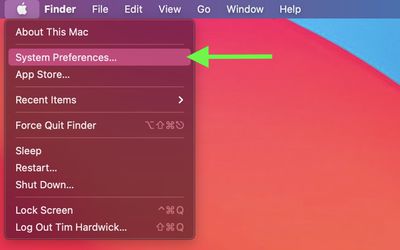
- Apple symbol () in the far-left corner of the menu bar at the top of the screen, then click System Preferences....

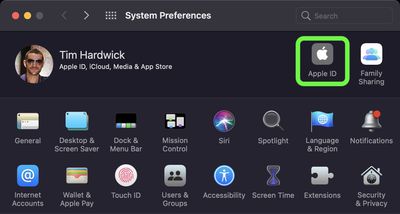
- Click the Apple ID preference pane.
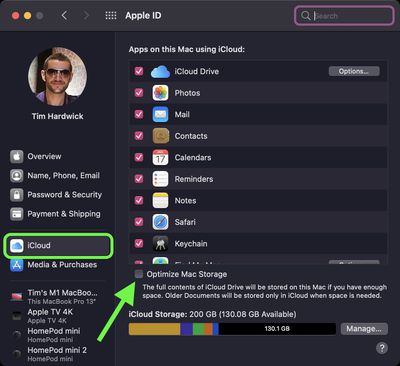
- Select iCloud in the sidebar, then click the checkbox next to Optimize Mac Storage at the bottom of the window to enable/disable it.
Note that disabling Optimize Mac Storage may force your Mac to download data from iCloud, which could take a while. Similarly, enabling the feature will require your Mac to upload data to the cloud to free up storage on your Mac, which may take some time, depending on the amount of data and your internet speed.