Skip to Content

Delete Voice Memo Recordings on iPhone and iPad

by

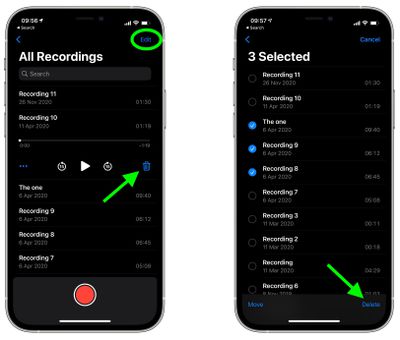
Deleting individual recordings in Apple's native Voice Memos app for iPhone and iPad is really easy. Launch the app, and in the list of recordings, just swipe leftwards across the one you want to delete, then tap the red trash icon.
voice memos
If you want to delete multiple recordings in one go, tap the Edit button in the top-right corner of the screen, then select the recordings that you want to remove. Once you're done selecting recordings, tap the trash button in the bottom-right corner of the screen.

Change How Long Deleted Recordings Are Kept

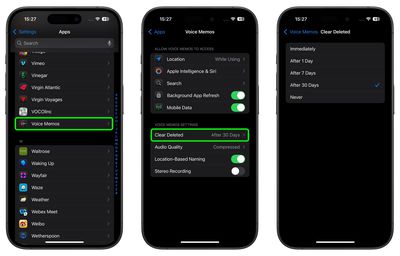
Deleted recordings are moved to the Recently Deleted folder, where they’re kept for 30 days by default. To change how long deleted recordings are kept, follow these steps:

  1. Launch the Settings app.
  2. Scroll down and tap Apps, then tap Voice Memos.
  3. Under "Voice Memo Settings," tap Clear Deleted.
  4. Select one of the following options: Immediately, After 1 Day, After 7 Days, After 30 Days, or Never.
    settings

Note that in the "Voice Memo Settings" section, you can also adjust the audio quality of recordings. If you're eager to save on storage and don't mind sacrificing a bit of quality, make sure Compressed is selected, rather than Lossless.


Popular Stories

Apple Event Logo

Apple Released Seven New Products Today

Wednesday March 11, 2026 7:05 am PDT by
Starting today, the seven new Apple products that were announced last week are available at Apple Stores and beginning to arrive to customers. The colorful MacBook Neo and all of the other new products are on display at most Apple Store locations around the world starting today. Apple Stores have inventory of the new products for both walk-in customers and Apple Store pickup, but...
ios 26 4 yellow

Everything New in iOS 26.4 Beta 4

Monday March 9, 2026 3:50 pm PDT by
Apple is continuing to test the iOS 26.4 beta, and the latest update is now available for developers and public beta testers. As testing goes on, there are fewer new features in each beta, but today’s release adds new emoji characters and a few other changes. New Emoji Apple added new emoji characters, including trombone, treasure chest, distorted face, hairy creature, fight cloud, orca,...
Apple 50 Years of Thinking Different

Apple Announces 50th Anniversary Plans

Thursday March 12, 2026 6:10 am PDT by
Apple today announced that it will celebrate the company's 50th anniversary over the coming weeks, but it has yet to reveal any specific plans. Apple was founded on April 1, 1976, so the company will turn 50 on April 1, 2026. "While Apple is known for looking forward, this milestone offers a special moment to reflect on the journey that has brought the company here, to celebrate the...