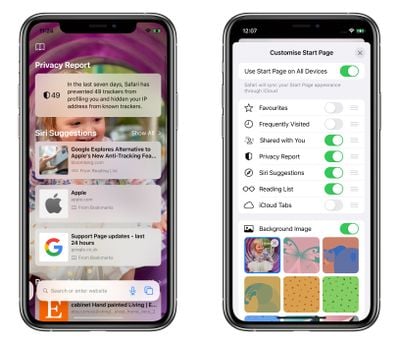
First seen in macOS Big Sur, Safari's redesigned Start Page in iOS 15 is a one-stop shop for all of your Bookmarks, Favorites, Frequently Visited sites, Siri Suggestions, iCloud Tabs, Reading List, and Privacy Report.
ios 15 safari start page
The Start Page also features several customizable options, such as the ability to choose your own Start Page wallpaper. You can even optionally sync your Start Page appearance on all your devices via ‌iCloud‌. The following steps show how you can start making the Safari Start Page your own.

  1. Launch Safari on your iPhone or iPad.
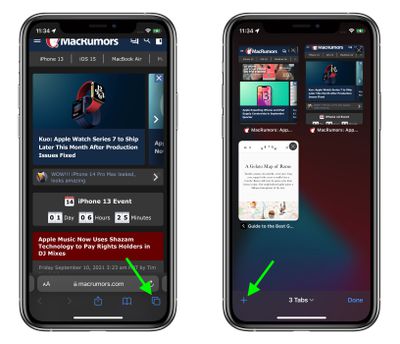
  2. Tap the open tabs icon in the bottom right corner of the Safari interface.
  3. In the Tabs view, tap the + icon in the bottom left corner to open a new tab.
    safari

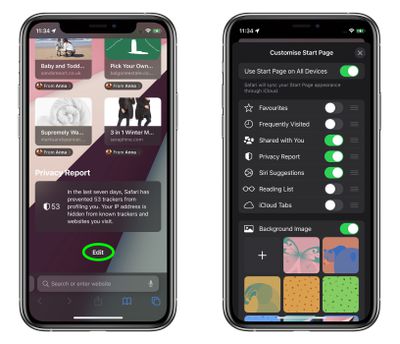
  4. Scroll down to the bottom of the Start Page and tap the Edit button.
  5. To sync your Start Page settings with other devices linked to the same Apple ID, turn on the switch next to Use Start Page on All Devices.
  6. Use the switches to control what you want to appear on your Start Page. Options include: Favorites, Frequently Visited, Shared with You, Privacy Report, Siri Suggestions, Reading List, and iCloud Tabs.
  7. You can also turn on the Background image option and choose one of the existing iOS wallpapers, or select your own from your photos by tapping the big + button.
  8. Tap the X at the top-right of the menu card when you're done.
    safari

In iOS 15, Tab Groups is another new feature in Safari that can improve your browsing experience. To learn more about Tab Groups, be sure to check out our dedicated how-to.

Tag: Safari
Related Forum: iOS 15
Popular Stories

Apple Announces Special Event in New York Feature 1

Apple Reportedly Plans to Unveil at Least Five New Products Next Week

Sunday February 22, 2026 9:48 am PST by
In his Power On newsletter today, Bloomberg's Mark Gurman said Apple will have a three-day stretch of product announcements from Monday, March 2 through Wednesday, March 4. In total, he expects Apple to introduce "at least five products." Subscribe to the MacRumors YouTube channel for more videos. A week ago, Apple invited selected journalists and content creators to an "Apple Experience" in...
tim cook data privacy day

Tim Cook Warned by CIA That China Could Move on Taiwan by 2027

Tuesday February 24, 2026 4:03 am PST by
Apple CEO Tim Cook was among a handful of top tech executives who attended a classified CIA briefing warning that China could attack Taiwan by 2027, according to a sweeping investigative report by The New York Times ($). The previously unreported briefing was apparently held in a secure room in Silicon Valley in July 2023. The meeting is said to have been arranged at the request of the...
iOS 26

iOS 26.3.1 Update for iPhones Coming Soon as 'Apple Experience' Nears

Sunday February 22, 2026 5:29 pm PST by
Apple's software engineers are testing iOS 26.3.1, according to the MacRumors visitor logs, which have been a reliable indicator of upcoming iOS versions. iOS 26.3.1 should be a minor update that fixes bugs and/or security vulnerabilities, and it will likely be released within the next two weeks. Last month, Apple released iOS 26.2.1 with bug fixes and support for the second-generation...