For iOS 13, Apple overhauled the interface of its Reminders app and added some new features that make it a lot more competitive with rival third-party apps offering similar reminder functions.

As with the previous version of Reminders, you can make as many reminders as you think you'll need in the new Reminders app, and you can add them to dedicated reminder lists for specific projects.
reminders
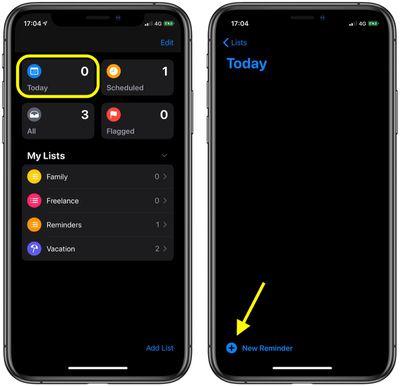
Your lists appear in the main Reminders screen under My Lists. But you don't need to have created a list to add a reminder, thanks to the app's new Today, Scheduled, All, and Flagged views.

Tap the Today view, for instance, and you can tap the "+" icon next to New Reminder in the bottom-left corner of the screen.

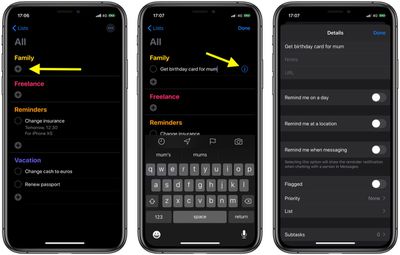
Similar plus buttons appear in the other views and you can likewise tap these to add reminders. When naming your reminder, a new quick access toolbar appears above the virtual keyboard that lets you add times, locations, and more to your reminders.
how to add a reminder ios 2
A small info ("i") button will also appear next to your reminder. You can tap the info button to add notes to your reminder, opt to be reminded on a particular day and/or at a particular location, give it a priority level, and more. Tap Done in the top-right corner of the Details screen to finish.


Popular Stories

m5 macbook pro deal

Why You Shouldn't Buy the Next MacBook Pro

Tuesday February 10, 2026 4:27 pm PST by
Apple is planning to launch new MacBook Pro models as soon as early March, but if you can, this is one generation you should skip because there's something much better in the works. We're waiting on 14-inch and 16-inch MacBook Pro models with M5 Pro and M5 Max chips, with few changes other than the processor upgrade. There won't be any tweaks to the design or the display, but later this...
iOS 26

Apple Releases iOS 26.3 and iPadOS 26.3

Wednesday February 11, 2026 10:07 am PST by
Apple today released iOS 26.3 and iPadOS 26.3, the latest updates to the iOS 26 and iPadOS 26 operating systems that came out in September. The new software comes almost two months after Apple released iOS 26.2 and iPadOS 26.2. The new software can be downloaded on eligible iPhones and iPads over-the-air by going to Settings > General > Software Update. According to Apple's release notes, ...
M3 iPad Air

Apple's Next Two Products Are Coming Soon

Thursday February 12, 2026 11:17 am PST by
Apple plans to release an iPhone 17e and an iPad Air with an M4 chip "in the coming weeks," according to the latest word from Bloomberg's Mark Gurman. "Apple retail employees say that inventory of the iPhone 16e has basically dried out and the iPad Air is seeing shortages as well," said Gurman. "I've been expecting new versions of both (iPhone 17e and M4 iPad Air) in the coming weeks."...
macbook air prime day 2025

M5 MacBook Air: Release Date, Features, and Performance Predictions

Wednesday February 11, 2026 3:36 am PST by
The MacBook Air is Apple's most popular laptop – a thin, fanless machine that wields quiet power thanks to the efficiency of Apple silicon. While the M4 model isn't exactly old, attention is already turning to its successor. Apple doesn't telegraph new product launches ahead of time, but we can draw a surprisingly clear picture of what to expect by looking at Apple's silicon roadmap,...
Apple Sales Coach App

Apple Launching New 'Sales Coach' App

Friday February 13, 2026 2:01 pm PST by
Apple plans to launch a rebranded "Sales Coach" app on the iPhone and iPad later this month, according to a source familiar with the matter. "Sales Coach" will arrive as an update to Apple's existing "SEED" app, and it will continue to provide sales tips and training resources to Apple Store and Apple Authorized Reseller employees around the world. For example, there are articles and videos...