

How to Change 'Sent From My iPhone' Email Signature - MacRumors
Skip to Content

How to Change 'Sent From My iPhone' Email Signature

by

Fed up of seeing "Sent from my iPhone" at the end of your emails? Customizing your email signature can add a personal touch to your messages and project a professional image. Here's how to change it on iPhone and iPad.
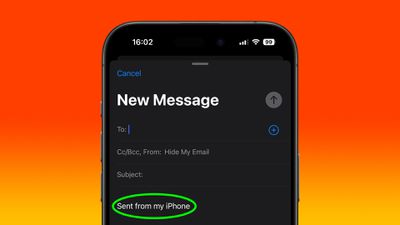
sent from my iphone signature
If you're an iPhone user, you've probably noticed the default "Sent from my iPhone" signature that accompanies emails sent in the Mail app. While this signature serves as a subtle advertisement for Apple's popular device, you may not feel it reflects your personality, or you might worry that it lacks professionalism.

Whether you're looking to add your contact information, a company logo, or a unique sign-off, changing your email signature on an iPhone is a simple process that can make a big difference in how your emails are perceived. The following steps show you how it's done.

  1. On iPhone or iPad, launch the Settings app.
  2. Choose Mail.
  3. Scroll down to the "Composing" section, then tap Signature.
  4. To use the same signature across all your email accounts, choose All Accounts. To enter a unique signature for each account, choose Per Account.
  5. Use the input field(s) to enter your custom signature(s).
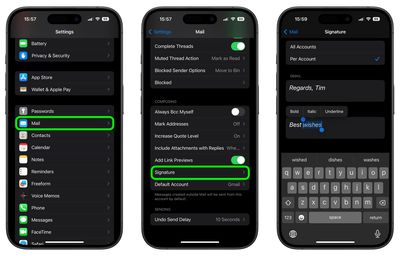
settings

Note that if you press and hold on the text you enter, you can access the Format option from the popup menu to apply bold, italic, and underlined formatting. Otherwise, that's all there is to it. The next time you send an email, your new personalized signature will be automatically applied.


Popular Stories

macOS 27 on MacBook Pro

macOS 27 Will Mark the End of an Era

Saturday April 18, 2026 6:45 am PDT by
During its Platforms State of the Union segment at WWDC 2025, Apple revealed that macOS 26 Tahoe is the final major macOS version for Intel-based Macs. The upcoming macOS 27 release will be compatible with Apple silicon Macs only, meaning that you will need a Mac with an M-series chip or a MacBook Neo with an A18 Pro chip in order to install the software update. macOS 27 should be available...
macworld iphone 18 pro colors

iPhone 18 Pro's Four Rumored Colors Revealed, Including 'Dark Cherry'

Friday April 17, 2026 3:50 am PDT by
A source said to be familiar with Apple's supply chain today revealed the color options Apple is planning for the iPhone 18 Pro, iPhone 18 Pro Max, and the upcoming foldable iPhone. Image via Macworld. The information comes from Macworld, which says the signature new color for this year's Pro models will be Dark Cherry, a deep wine-like red. While other sources had previously reported on a...
Aston Martin CarPlay Ultra Screen

Apple Says CarPlay Ultra is Coming to These Vehicle Brands

Saturday April 18, 2026 5:59 am PDT by
Last year, Apple launched CarPlay Ultra, the long-awaited next-generation version of its CarPlay software system for vehicles. Nearly a year later, CarPlay Ultra is still limited to Aston Martin's latest luxury vehicles, but that should change fairly soon. In May 2025, Apple said many other vehicle brands planned to offer CarPlay Ultra, including Hyundai, Kia, and Genesis. CarPlay Ultra...















