iOS 27 Weather App: All the New Features - MacRumors
Skip to Content

iOS 27 Weather App: All the New Features

There are no new AI features in the iOS 27 Weather app, but Apple did make improvements to the layout. It's now easier to see at-a-glance information for weather conditions.
apple weather app icon

Highlights

The top of the Weather app now has a Highlights section that shows you need-to-know weather information for the day.
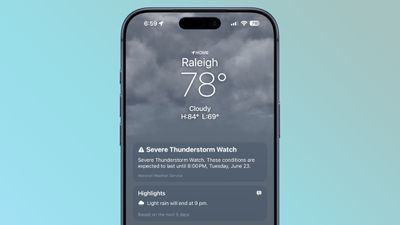
ios 27 weather highlights

Conditions

There are new views for the Conditions section of the main Weather app interface. In addition to viewing temperature and current condition on an hourly basis, you can toggle over to a precipitation or wind view.
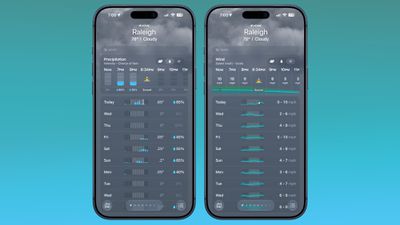
ios 27 weather app conditions
Precipitation shows you an hour-by-hour chance of rain forecast, while wind displays a breakdown of wind speed.

10-Day View

The 10-day view also changes when you swap between the different condition options so you can see precipitation and wind overviews for the next 10 days without having to tap into a more detailed view.

Widgets

There's a new extra large size available for Home Screen widgets, which is applicable to the Weather app. You can set the Weather app to take up an entire app page.
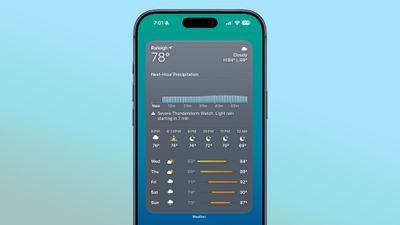
ios 27 weather app widget

More iOS 27 Features

There are a long list of new features in ‌iOS 27‌, with details available in our iOS 27 roundup.

Related Roundups: iOS 27, iPadOS 27

Popular Stories

Everything New Your iPhone Can Do on iOS 27 Feature 1

12 New Things Your iPhone Can Do in iOS 27

Friday July 3, 2026 7:25 am PDT by
Apple will release iOS 27 in September, and despite the company's focus this year on refining its flagship operating system and nixing bugs, there are still many additional features on the way, not least of which is Apple's new context-aware Siri, re-tooled for the generative AI era. This year's major iPhone software update isn't all about AI, though, as the following feature list...
iCloud iPhone 17 Pro

iPhone Users Who Pay for iCloud Storage Get Two New Perks on iOS 27

Thursday July 2, 2026 6:10 am PDT by
If you pay for certain iCloud+ storage plans beyond the 5GB that Apple offers for free, you will receive two more perks on iOS 27 at no additional cost. A summary of the two new iCloud+ perks on iOS 27:Increased daily usage limits for some new Apple Intelligence features, including image generation in the revamped Image Playground app. HomeKit Secure Video cameras receive generated video...


iOS 27 Feature Dark

Apple Seeds iOS 27 and iPadOS 27 Second Betas to Developers

Monday June 22, 2026 10:08 am PDT by
Apple today seeded the second betas of iOS 27 and iPadOS 27 to developers for testing purposes, with the update coming two weeks after Apple released the first betas following the WWDC 2026 keynote. Registered developers can download the betas from the Settings app on the iPhone or iPad by going to the General section and selecting Software Update. iOS 27 introduces Apple's smarter...

Top Rated Comments

3 weeks ago

I wish the sun inside the app icon turned into the moon in dark mode.
That makes no sense.
Score: 16 Votes (Like | Disagree)
jz0309 Avatar
3 weeks ago
What about better accuracy?
Score: 15 Votes (Like | Disagree)
3 weeks ago
The radar still sucks.
Score: 13 Votes (Like | Disagree)
3 weeks ago
Apple weather app is still consistently the worst weather app around! Nothing new to see here.
Score: 11 Votes (Like | Disagree)
DocMultimedia Avatar
3 weeks ago
Alas, many still miss Dark Sky due to the lack of contrast/clarity in the Apple version. I use Carrot and Acme as my primary weather apps.
Score: 10 Votes (Like | Disagree)
Reason077 Avatar
3 weeks ago
I’m frustrated by the direction of the weather app in recent years. Yes, they’ve added a lot more features and data, but it’s just not as good as it used to be as a basic weather app. Everything tiny sized, grey-on-grey design lacking contrast and making everything hard to read (see screenshot above).

On WatchOS it’s even worse. I really wish we could go back to the Weather app from WatchOS 9 or so when you could see conditions throughout the day (not just the current temperature) at a glance. Now you have to scroll through pages and pages of similar-looking data which is all quite difficult and slow to interpret. Sometimes it’s hard to even figure out what screen you’re looking at. Is this wind, humidity, UV??! By adding more data and features, they made the basic functionality worse!
Score: 10 Votes (Like | Disagree)