iOS 27: 13 Ways the Messages App is Smarter and Less Annoying - MacRumors
Skip to Content

iOS 27: 13 Ways the Messages App is Smarter and Less Annoying

The Messages app is arguably the most important app on the iPhone, and in iOS 27, Apple is adding some useful improvements. There are some quality-of-life fixes for longtime issues, and new AI features.


Contextual Suggestions

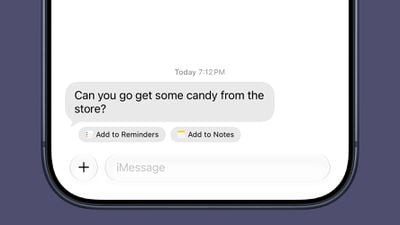
Messages uses Apple Intelligence to surface one-tap suggestions based on what's being discussed in a conversation. If someone you're talking to asks you to send a photo, Messages recognizes the request and suggests adding the relevant photos.
ios 27 messages actions
If someone invites you to an event, Messages offers to add it to your Calendar. If someone asks you to pick something up at the store, Messages will suggest adding it to your Reminders list or to the Notes app.

Messages will also suggest Genmoji you might want to generate based on the conversation.

Write With Siri

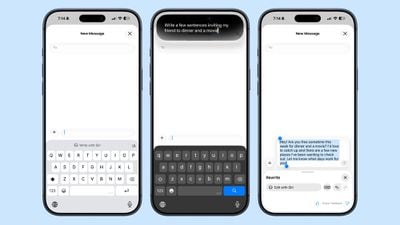
There's a systemwide Write with Siri feature that's available in the Messages app. ‌Siri‌ AI can compose entire messages for you, proofread your messages, or give you feedback.
ios 27 messages write with siri
There is a dedicated Write with ‌Siri‌ button above the keyboard where you can get to the new ‌Siri‌ tools.

Smart Reply suggestions also use your writing style so they sound more natural.

Siri AI

‌Siri‌ AI integrates with the Messages app. You can ask ‌Siri‌ to find images, videos, links, addresses, phone numbers, and more in the Messages app, plus ‌Siri‌ can draft message replies and act on info in the Messages app, like adding an event date to the Calendar app.

Drawing

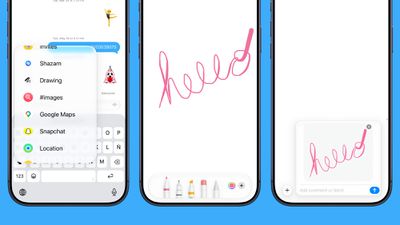
You can use a new Drawing interface in the Messages app to send little sketches and notes. It's available when tapping on the "+" button next to the text bar in a conversation.
ios 27 messages drawing
The drawing interface is the same as the Markup tool available in apps like Photos and Notes. There's a marker, a pen, a highlighter, and an eraser, plus options to use the tools in any color.

Accidental Recordings

The ‌iOS 27‌ Messages app includes an option to remove the audio button from the text bar. In the Messages section of the Settings app, you can navigate to Show in Text Field to set the right-side button to Record Audio, Start Dictation, or None.
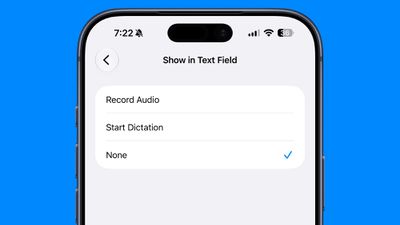
ios 27 text field messages
Setting the option to none will prevent you from accidentally recording a voice message with an errant tap.

Tapbacks

Messages now consolidates notifications for Tapback responses, which is useful when you're in a group thread and tons of people are sending emojis.

Sending

When a message fails to send in ‌iOS 27‌, your iPhone will automatically retry sending it. In iOS 26, you get an alert if a message fails, but you have to manually tap to try to send it again.

The Messages app also supports continuous sending of photos, videos, and texts. If you're sending someone a photo and your connection is poor or you go offline, it automatically resumes sending when the connection is restored.

Syncing

Cross-device syncing is improved in ‌iOS 27‌, so conversations will sync more reliably across the iPhone, iPad, Mac, Apple Watch, and Vision Pro. Fewer messages will fail to sync and display properly when you switch between devices.

Messages, read states, reactions, and attachments sync faster.

When you take a photo and then go to the Messages app to send it, you're more likely to see it right away. Apple says the iPhone is faster to add recent camera captures to Messages.

Apple improved its search index across apps like Mail and Messages, so you're more likely to find what you're looking for.

You can also search for conversations in Messages using a phone number or a contact's nickname.

Offloaded Media

If you have photos or videos that have been offloaded to save storage space, you can still find them in the ‌iOS 27‌ Messages app when you search.

Thumbnails are also displayed for offloaded media instead of a placeholder image, so you know what's there.

RCS

In RCS message conversations with Android users, you can now long press on a message to send an inline reply. ‌iOS 27‌ also shows reaction emoji directly on images and videos, a feature that was not functioning in ‌iOS 26‌.

Genmoji

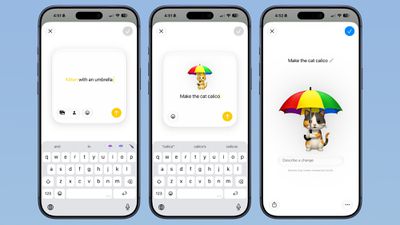
Apple revamped ‌Genmoji‌ creation in ‌iOS 27‌. There's an updated interface for describing an emoji that you want, with options to start from an existing emoji, choose an image from ‌Photos‌, or select a person.

ios 27 genmoji
After uploading an image or using a text phrase to create a ‌‌Genmoji‌‌, there's a new "Describe a change" interface for making updates to what you've already created. You can iterate on designs and change individual elements of a ‌‌Genmoji‌‌, tweaking colors and objects. Each change uses the old base instead of regenerating a new ‌‌Genmoji‌‌.

With a series of requests, it is possible to make a complicated, multi-element ‌‌Genmoji‌‌. Along with describing changes, you can add in additional emoji, and the interface makes suggestions on what to do next.

‌‌Genmoji‌‌ output is more consistent, and ‌‌Genmoji‌‌ look more like real emoji with a 3D, cartoonish style by default. There is now an option to change style, so if you don't want the cartoonish look, you can ask for something else like a drawing or a sketch.

Large Conversations

Large conversations load and scroll faster in ‌iOS 27‌, according to Apple.

Read More

More on all of the features in ‌iOS 27‌ can be found in our iOS 27 guide.

Related Roundups: iOS 27, iPadOS 27
Related Forum: iOS 27

Popular Stories

iOS 27

iOS 27.2 Features: Everything New in iOS 27.2

Monday October 26, 2026 3:56 pm PDT by
Apple released iOS 27.2, uniting the iPhone Duo and other iPhone models on the same version of iOS. iOS 27.2 is the first major iOS 27 update, and it adds several useful new features. Siri AI Improvements Siri AI can recall past conversations you had with it, so you can ask Siri about something it told you before, like a restaurant it previously recommended. It's also able to draw on more...
iOS 27

Apple Releases iOS 27.2 Release Candidate

Monday October 19, 2026 10:26 am PDT by
Apple today seeded the release candidate of an upcoming iOS 27.2 update to developers for testing purposes, with the update coming a week after Apple released the fourth iOS 27.2 beta. Apple also seeded the iPadOS 27.2 RC. Registered developers can download the beta updates by opting in under Settings > General > Software Update and selecting the iOS 27 developer beta. The beta was used...
iOS 27

Apple Releases iOS 27.2 With New Siri AI Languages

Monday October 26, 2026 11:32 am PDT by
Apple today released iOS 27.2 and iPadOS 27.2, the first major updates to the iOS 27 and iPadOS 27 operating systems that came out in September. iOS 27.2 is available for all iPhones able to run iOS 27, including the iPhone Duo, while iPadOS 27.2 is available for all iPads able to run iPadOS 27, including the newly announced OLED iPad mini. The iOS 27.2 update expands Siri AI to new...

Top Rated Comments

9 weeks ago
Unpopular opinion: shoving AI slop down a user’s throat makes Messages more annoying, not less. Don’t need to add a simple task to reminders or notes JFC!

*knocks over water bottle
Score: 13 Votes (Like | Disagree)
9 weeks ago
lol.

Texting is awful compared to day one iPhone. You need to proofread almost every message.


Score: 10 Votes (Like | Disagree)
9 weeks ago
‘The Messages app is arguably the most important app on the iPhone’ - maybe in the US? In the UK everyone is on WhatsApp.
Score: 6 Votes (Like | Disagree)
Eureka20 Avatar
9 weeks ago
I don't want or need Ai. I just want the dang thing to do better when it fails to send a message
Score: 6 Votes (Like | Disagree)
9 weeks ago
I'd trade all of this for simply having better dictation.
Score: 6 Votes (Like | Disagree)
9 weeks ago
Can we PLEASE STOP giving ANY attention to STUPID emoji / Memoji & similar utter garbage?!?

Are there THAT many people with so little going on in their lives that they dedicate so much time & effort to this?
Holy cow… 😑🙄
Score: 5 Votes (Like | Disagree)
Latest Stories
HomeView Software 27.2: Wallpapers, Control Center, and More
1 hour ago
Apple Alerts Stores to iPhone Duo's Display Cracking Issue
2 hours ago
iOS 27.3 Will Enable These Apple Intelligence Features in China
3 hours ago
Apple Says iOS 27.3 Beta Coming Next Week
3 hours ago
Apple's Flash Storage Suppliers Are Finally 'Getting Their Revenge'
4 hours ago
14 New Things Your iPhone Can Do in iOS 27.2
5 hours ago
iPhone Duo Review: One Week Later
6 hours ago
Samsung Mocks iPhone Duo Display Cracks in New Ad Campaign
7 hours ago
The MacRumors Show: OLED MacBook Pro, iPad Mini 8, and More
8 hours ago
MacBook Pro With Touch Display: 15 More Details Revealed
8 hours ago
Russia Places Apple on State Surveillance Registry
10 hours ago
Halloween Weekend Brings Discounts on Apple Accessories and Pre-Orders
10 hours ago
Apple Has Released More Than 25 New Products in the Past Two Months
10 hours ago
Local Code Launches as Free, Private AI Assistant Tool for Mac
11 hours ago
Apple Acquires Ascend.io
12 hours ago
HomePod Mini 2 Launches Today: All the New Features
12 hours ago
AirTag 2 4-Pack Drops to New Low Price of $69.99
12 hours ago
Rian Johnson's iPhone Camera App Goes Viral
12 hours ago
Where Did All the iPhone Duos Go? Mostly to Apple's Stores
14 hours ago
Apple's Touchscreen MacBook Pro Could Ship 1.5M Units in 2027
15 hours ago
New Apple TV 4K and iPad Mini: RAM Amounts Revealed
1 day ago
Apple Executive Comments on New iPad Mini Lacking 120Hz Display
1 day ago
Here's a Hands-On Look at HomePod Mini 2's New Two-Tone Colors
1 day ago
Apple Lowers App Store Fees in Taiwan Starting October 31
1 day ago
HomeView Pre-Order Returns to $289.99 on Amazon
1 day ago
Apple Avoids Showing Pinched Fingers on iPad Mini Page in South Korea
1 day ago
Old 'Popcorn Time' App Left Hundreds of Thousands of Macs at Risk
1 day ago
You Can Turn Off the New MacBook Pro's Touchscreen Functionality
1 day ago
MacBook Pro Mini-LED vs. OLED Buyer's Guide: Every Difference
1 day ago
Where to Pre-Order Apple's New MacBooks, iPad Mini, and iMac
1 day ago