Everything New in iOS 26.2 Beta 1

Just a day after launching iOS 26.1, Apple is ready to test the next update, iOS 26.2. iOS 26.2 brings AirPods Live Translation to the EU, introduces changes to Reminders, adds a Lock Screen Liquid Glass slider, and more.


We've rounded up all of the new iOS 26.2 features that we've found so far.

Lock Screen

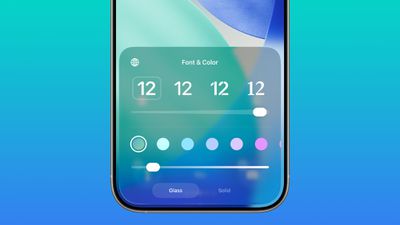
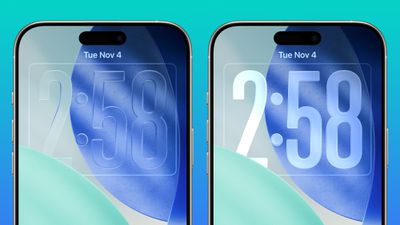
There is a Liquid Glass slider on the Lock Screen that lets you customize the appearance of the clock. When using the "Glass" option, you can use the slider to make the time look almost entirely clear, or give it a more frosted look.
ios 26 2 liquid glass toggle
There continues to be a separate Solid toggle that turns off the Liquid Glass appearance for the clock entirely if you want to opt for a much more opaque design, and you can also still use the color options for the clock.
ios 26 2 liquid glass slider extremes

Sleep Score

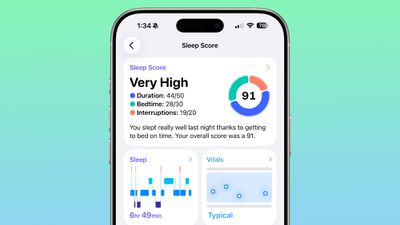
With iOS 26.2 and watchOS 26.2, Apple has adjusted the ranges for the Sleep Score feature that it introduced earlier this year. The new Sleep Score numbers better match how people might be feeling after a night of sleep.
watchos 26 2 sleep score
These are the new scores:

  • Very Low - 0-40 (previously 0-29)
  • Low - 41-60 (previously 30-49)
  • OK - 61-80 (previously 50-69)
  • High - 81-95 (previously 70-89)
  • Very High - 96-100 (previously 90-100)

The "Very High" rank used to be "Excellent," but Apple changed the name to be more in line with the other labels.

Sleep Scores are available on all Apple Watch models compatible with watchOS 26.2 and can be found in the Health app on the iPhone. Apple designed Sleep Score to provide an overall sense of sleep patterns, so users can identify habits that might impact their sleep.

Sleep Score takes into account sleep duration, bedtime, and interruptions to assign a nightly score that represents sleep quality. Duration is worth 50 points, bedtime is worth 30, and interruptions (times woken up in the night) are worth 20, for a total of 100 possible points each night.

Passwords

In the Settings section of the Passwords app, there's now an option to manage websites where passwords are not saved when signing in.
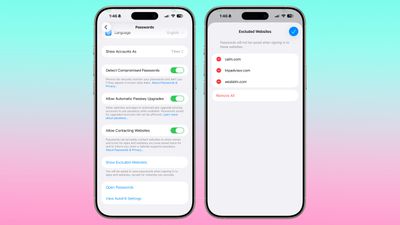
ios 26 2 passwords excluded websites

AirPods Live Translation for EU

iOS 26.2 expands AirPods Live Translation to the European Union. Apple had to delay the feature in the EU to complete the engineering work needed to comply with the requirements of the Digital Markets Act.
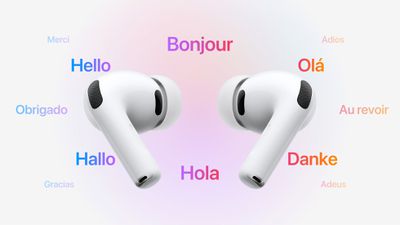
AirPods Live Translation
AirPods Live Translation works with the AirPods Pro 3, AirPods Pro 2, and AirPods 4 with ANC. It is available in English, French, German, Portuguese, Spanish, Italian, Chinese (Simplified and Traditional Mandarin), Japanese, and Korean at the current time.

Freeform

The Freeform app now supports Tables.
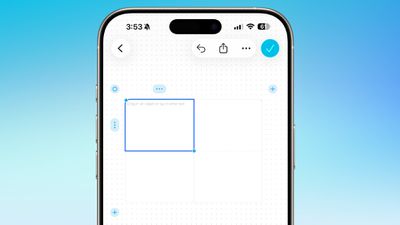
ios 26 2 freeform tables

Reminders

In the Reminders app, there's a new option to have an alarm go off when a reminder is due. Setting up an alarm can be done by toggling on the "Urgent" option when creating a reminder.
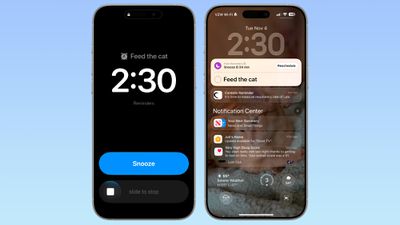
ios 26 2 alarm reminders

When a Reminder alarm activates, it displays a snooze option or a slide to stop option. If you snooze it, it will show a countdown on the Lock Screen that includes an option to complete the reminder or reschedule it. Apple distinguishes Reminders alarms from standard alarms with a new blue color.

Podcasts

The Podcasts app adds support for three new features, including automatically created chapters, options to see mentions of other podcasts from the transcript and the player, and access to links mentioned in a podcast on the episode page.
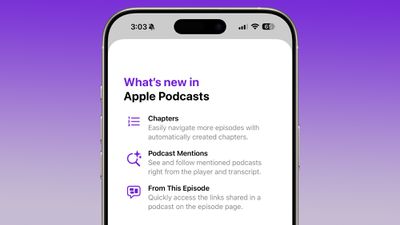
ios 26 2 podcasts

AirDrop

Though not live, iOS 26.2 includes multiple references to a new AirDrop feature. It will allow two people to send a PIN to one another, and the special code will enable AirDrop for the next 30 days.

AirDrop is limited to 10 minutes for people who are not in your contacts, so this setting could extend that period.

Weather

There is also code suggesting that the Weather app now supports relative time for alerts like "next Friday," or "next Tuesday" in reference to upcoming rain or weather conditions.

Apple News

Apple updated the design of Apple News, adding quick access top buttons for categories like sports, puzzles, politics, business, and food.
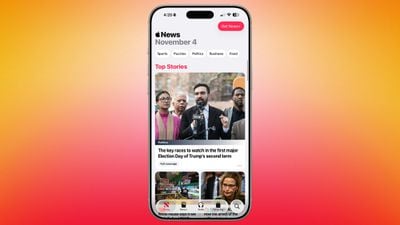
ios 26 2 apple news update
There's also a dedicated tab for Following, which has been decoupled from the search interface.

Flash for Alerts

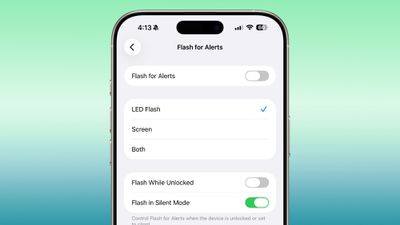
The Flash for Alerts option in the Accessibility section of the Settings app now allows users to have the screen flash. Previously, this setting was limited to the LED on the back of the ‌iPhone‌.

ios 26 2 flash alert
Users can swap to the screen flash or have both flash at the same time when notifications come in.

Enhanced Safety Alerts

In the Notifications section of the Settings app, there's an Enhanced Safety Alerts section for managing earthquake alerts, imminent threat alerts, and activating improved alert delivery, a feature that uses location to improve the reliability of alerts.
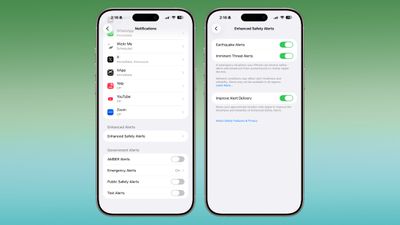
ios 26 2 safety alerts enhanced

Download iOS 26.2

iOS 26.2 is available for developers right now, but a public beta is likely coming later this week. You can sign up for public beta testing by visiting Apple's beta website.

Compatibility

iOS 26.2 is available on all iPhones that support iOS 26.

Release Date

We're expecting Apple to release iOS 26.2 in December, sometime between December 9 and December 16.


Related Roundups: iOS 26, iPadOS 26
Related Forum: iOS 26

Popular Stories

2024 iPhone Boxes Feature

Apple Adjusts Trade-In Values for iPhones, iPads, Macs, and More

Thursday November 6, 2025 11:12 am PST by
Apple today updated its trade-in values for select iPhone, iPad, Mac, and Apple Watch models. Trade-ins can be completed on Apple's website, or at an Apple Store. The charts below provide an overview of Apple's current and previous trade-in values in the U.S., according to its website. Maximum values for most devices either decreased or saw no change, but the iPad Air received a slight bump. ...
Liquid Glass General Feature

Apple Shares Liquid Glass Design Gallery

Thursday November 6, 2025 2:45 pm PST by
Apple is promoting the new Liquid Glass design in iOS 26, showing off the ways that third-party developers are embracing the aesthetic in their apps. On its developer website, Apple is featuring a visual gallery that demonstrates how "teams of all sizes" are creating Liquid Glass experiences. The gallery features examples of Liquid Glass in apps for iPhone, iPad, Apple Watch, and Mac. Apple...
airtag purple

Apple's Website Lists AirTag 4-Pack at Shockingly Low Price [Updated]

Friday November 7, 2025 6:40 am PST by
Apple's online store in the U.S. is suddenly offering a pack of four AirTags for just $29, which is the same price as a single AirTag. This is likely a pricing error, and it is unclear if orders will be fulfilled. Apple has not discounted the AirTag four-pack in any other countries that we checked. Delivery estimates are already pushing into late November to early December, suggesting...
Early Black Friday Deals 1

The Best Early Black Friday Apple Deals on AirPods, Apple Watch, iPad, and More

Saturday November 8, 2025 6:16 am PST by
We're officially in the month of Black Friday, which will take place on Friday, November 28 in 2025. As always, this will be the best time of the year to shop for great deals, including popular Apple products like AirPods, iPad, Apple Watch, and more. In this article, the majority of the discounts will be found on Amazon. Note: MacRumors is an affiliate partner with some of these vendors. When ...
iOS 26

iOS 26.1 Available Now With These 8 New Features

Monday November 3, 2025 5:54 am PST by
Following more than a month of beta testing, Apple released iOS 26.1 on Monday, November 3. The update includes a handful of new features and changes, including the ability to adjust the look of Liquid Glass and more. Below, we outline iOS 26.1's key new features. Liquid Glass Toggle iOS 26.1 lets you choose your preferred look for Liquid Glass. In the Settings app, under Display...
ikea smart home devices

IKEA Debuts 21 HomeKit-Compatible Smart Bulbs, Sensors, and Controls

Thursday November 6, 2025 4:08 pm PST by
IKEA today announced the upcoming launch of 21 new Matter-compatible smart home products that will be able to interface with HomeKit and the Apple Home app. There are sensors, lights, and control options, all of which will be reasonably priced. Some of the products are new, while some are updates to existing lines that IKEA previously offered. There are a series of new smart bulbs that are...
Apple fitness plus feature

Future of Apple Fitness+ 'Under Review'

Sunday November 9, 2025 5:30 am PST by
The future of Apple Fitness+ is "under review" amid a reorganization of the service, according to Bloomberg's Mark Gurman. In the latest edition of his "Power On" newsletter, Gurman said that Apple Fitness+ remains one of the company's "weakest digital offerings." The service apparently suffers from high churn and little revenue. Nevertheless, Fitness+ has a small, loyal fanbase that...
All Screen iPhone 2027 Feature 1

Apple to Hide Selfie Camera Under Display of 20th Anniversary iPhone

Monday November 10, 2025 1:55 am PST by
Apple will conceal the front-facing camera under the screen of its 2027 iPhone, a Chinese leaker said today, corroborating reports that Apple's 20th anniversary iPhone will have no visible cutouts in the display. Weibo-based account Digital Chat Station said Apple's development of under-screen camera technology was progressing as planned for adoption in 2027, one year after it will...
maxresdefault

In-Depth iPhone Battery Experiment Pits Slow Charging Against Fast Charging

Friday November 7, 2025 1:19 pm PST by
HTX Studio this week shared the results from a six-month battery test that compared how fast charging and slow charging can affect battery life over time. Using six iPhone 12 models, the channel set up a system to drain the batteries from five percent and charge them to 100 percent over and over again. Three were fast charged, and three were slow charged. Another set of iPhones underwent...

Top Rated Comments

Archmage Avatar
6 days ago at 01:50 pm
These all sound like solid refinements.
Score: 13 Votes (Like | Disagree)
19callum93 Avatar
6 days ago at 02:26 pm
Now we need the Liquid Glass slider SYSTEM WIDE! ? it’s so close I can smell it!
Score: 8 Votes (Like | Disagree)
cale508 Avatar
6 days ago at 01:54 pm
1 more, per 9to5mac, there's a new ringtone.
[Click to view video attachment]
Score: 5 Votes (Like | Disagree)
DamnDJ Avatar
6 days ago at 02:00 pm
The alarm for reminders sounds wonderful.
Score: 5 Votes (Like | Disagree)
simmerheli Avatar
6 days ago at 06:32 pm

Still waiting for options to:

• Remove all the ugly white borders
• Turn off the constant 'game centre' notification pop-ups, which are even more intrusive than they were in iOS 18.
• TURN OFF LIQUID GLASS ENTIRELY
Remove all the ugly white borders:

Slide the following slider to Off:

Settings/Accessibility/Display & Text Size/Show Borders
Score: 4 Votes (Like | Disagree)
AndyUnderscoreR Avatar
5 days ago at 03:52 am

You might have to wait a long time. These are a total non-issues for most people.
Why do so many online posters have this weird inability to understand that other people might have different opinions to them, and that they personally might not be in the majority?

Try reading anything about liquid glass and you'll learn that it is a nightmare for readability and usability, the presence of distracting white borders is widely criticised. You might not have a problem with it, but plenty of other people do. As for the pop ups about game mode that cover up game UI elements every single time you lunch a game and can't be turned off, I challenge you to find one single person who genuinely finds them consistently useful.
Score: 4 Votes (Like | Disagree)