iOS 18.3 Features: Everything New in iOS 18.3

iOS 18.3 is the third major update to the iOS 18 operating system, and while it isn't as feature rich as iOS 18.1 or iOS 18.2, there are some Apple Intelligence changes worth knowing about, as well as as some other tweaks, bug fixes, and security updates.
iOS 18
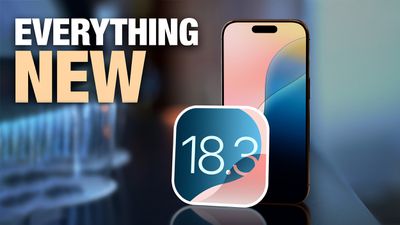
This guide covers everything new in iOS 18.3.

Apple Intelligence

After updating to iOS 18.3, ‌Apple Intelligence‌ is an opt-out feature, not an opt-in feature. If you didn't have ‌Apple Intelligence‌ turned on, it's now turned on automatically, and you will need to go to the ‌Apple Intelligence‌ section of the Settings app to turn it off.
Apple Intelligence General Feature 2
‌Apple Intelligence‌ will also be automatically enabled on devices running iPadOS 18.3 and macOS Sequoia 15.3.

‌Apple Intelligence‌ is available on the iPhone 15 Pro models, iPhone 16 Pro models, the iPad mini 7, and all Macs and iPads with an M-series chip. On these devices, ‌Apple Intelligence‌ is now turned on automatically when iOS 18.3, iPadOS 18.3, or macOS Sequoia 15.3 is installed. In prior updates, you had to explicitly turn ‌Apple Intelligence‌ on to be able to use the feature set.

Visual Intelligence

For ‌iPhone 16‌ models, there are new Visual Intelligence features that are accessible with Camera Control.

ios 18 3 camera control animals
You can now use ‌Visual Intelligence‌ to add an event to the Calendar app, or to identify plants and animals.

Apple Intelligence Notification Summaries

iOS 18.3 makes several changes to ‌Apple Intelligence‌ Notification summaries to address complaints over notifications that have false news headlines.

Notification summaries for the News and Entertainment category have been temporarily disabled, and Apple is working on improvements. The feature will return in a future software update, but for now, these types of notifications will not be aggregated and summarized.

bbc news apple intelligence summaries clean 1
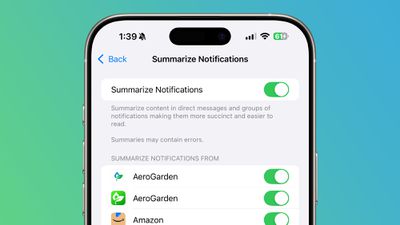
In the Settings app, when a user activates Notification summaries, Apple has added a warning that this is a beta feature, and that errors are a possibility.
notification error warning ios 18 3
For summaries that are still available through ‌‌Apple Intelligence‌‌, the text is italicized as a way to distinguish them from standard notifications.
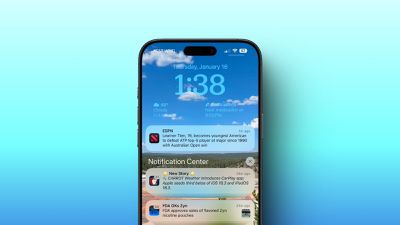
ios 18 3 notification summary italics
Apple also added an option to manage whether notifications are summarized for an app right from the Lock Screen. To turn off summaries from the Lock Screen, swipe to the left on a Notification summary and then tap on options to get to the menu to disable it on a per-app basis.

Calculator

Apple made a change to the Calculator app, returning a feature that was removed with iOS 18. You can once again tap the equals sign twice to repeat the last mathematical operation.
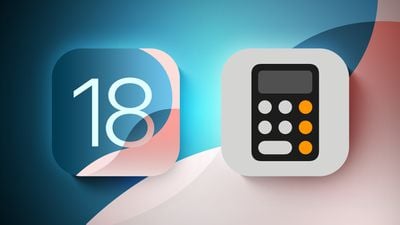
iOS 18 Calculator Feature
Apple removed repeating operations in iOS 18, but it's back. Some ‌iPhone‌ owners who used the Calculator app for things like calculating compound interest will now be able to do so again.

Black Unity Wallpaper

The update adds a new wallpaper to go along with a new watch face and new Apple Watch band that were announced today.
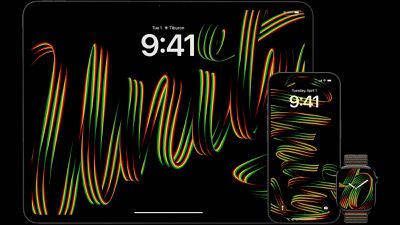
Apple 2025 Black Unity Collection

Bug Fixes

There are fixes for a couple of notable bugs.

  • Siri Keyboard - The update addresses a bug that could cause the keyboard to disappear after you typed in a Siri request with the Type to ‌Siri‌ feature.
  • Apple Music - iOS 18.3 fixes a bug that could cause audio playback to continue even after the Apple Music app is closed.

Security Updates

iOS 18.3 fixes 25 security vulnerabilities, including one that was actively exploited. A CoreMedia vulnerability could be used to elevate privileges, and Apple is aware of reports that it may have been used on devices running iOS 17.1 or earlier.

A Photos vulnerability could allow an attacker with physical access to an unlocked device to access the ‌Photos‌ app even when the ‌iPhone‌ is locked, and Apple fixed several issues with AirPlay that could allow attackers to execute code or crash apps.

Two kernel vulnerabilities that could let malicious apps gain kernel privileges were addressed, and there are a handful of WebKit fixes for Safari. Given the number of security holes that were patched, it's a good idea to install the software to get the latest fixes.

Related Forums: iOS 18, iPadOS 18

Popular Stories

Touchscreen MacBook Feature

Apple Is Expected to Launch These Four MacBooks in 2026

Friday January 9, 2026 8:17 am PST by
2026 could be a bumper year for Apple's Mac lineup, with the company expected to announce as many as four separate MacBook launches. Rumors suggest Apple will court both ends of the consumer spectrum, with more affordable options for students and feature-rich premium lines for users that seek the highest specifications from a laptop. Below is a breakdown of what we're expecting over the next ...
iPhone Top Left Hole Punch Face ID Feature Purple

10 Reasons to Wait for This Year's iPhone 18 Pro

Thursday January 8, 2026 2:56 am PST by
Apple's iPhone development roadmap runs several years into the future and the company is continually working with suppliers on several successive iPhone models at the same time, which is why we often get rumored features months ahead of launch. The iPhone 18 series is no different, and we already have a good idea of what to expect for the iPhone 18 Pro and iPhone 18 Pro Max. One thing worth...
proposed unicode emoji 18%402x

Squinting Face, Pickle, and Lighthouse Among New Emoji Coming to iOS

Friday January 9, 2026 4:24 am PST by
The Unicode Consortium has published a draft list of emoji that could come to smartphones and other devices in the future. The list shared by Emojipedia outlines 19 emoji candidates under consideration for Emoji 18.0, which is expected to be finalized in September 2026. Among the proposed additions are a squinting face emoji, left- and right-pointing thumb gestures, a pickle, a lighthouse, a ...
apple homekit ios 18 5

Apple Reminding Users of Pending Home App Upgrade Requirement

Friday January 9, 2026 10:08 am PST by
Back in late 2022 and early 2023, Apple rolled out a new architecture for its Apple Home platform to deliver improved performance and compatibility, although the rollout came with some hiccups that forced Apple to pull and later re-release the upgrade. Three years later, Apple is now on the verge of ending support for the old version of the Home architecture, which may result in access to...
grok logo purple gradient

U.S. Senators Ask Apple and Google to Remove X and Grok Apps Over Sexualized Image Generation

Friday January 9, 2026 9:43 am PST by
In a letter to Apple CEO Tim Cook and Google CEO Sundar Pichai, U.S. Senators Ron Wyden, Ben Ray Lujan, and Edward Markey have requested that Apple and Google remove X Corp's X and Grok apps from their app stores over recent incidents of "mass generation of nonconsensual sexualized images of women and children." X has come under fire over the past week amid reports of Grok's AI image...
iOS 26 Glass Feature

iOS 26 Shows Unusually Slow Adoption Months After Release

Thursday January 8, 2026 3:44 pm PST by
iOS 26 is showing unusually slow adoption among iPhone users months after release, according to third-party analytics. Usage data published by StatCounter (via Cult of Mac) for January 2026 indicates that only around 15 to 16% of active iPhones worldwide are running any version of iOS 26. The breakdown shows iOS 26.1 accounting for approximately 10.6% of devices, iOS 26.2 for about 4.6%, and ...

iphone fold text

iPhone Fold to Pave Way for Thinner, Brighter Display on iPhone Air 2

Friday January 9, 2026 3:37 am PST by
The iPhone Fold will be the first Apple device to adopt a Samsung-made OLED technology called CoE (Color Filter on Encapsulation), which could make the display brighter and thinner than previous panels, reports The Elec. In a traditional OLED panel, a polarizing film sits above the display to cut reflections and improve contrast. The drawback is that this film also absorbs some of the OLED's ...

Top Rated Comments

Henrikr Avatar
13 months ago
What an absolute disaster of a launch! As a UK user, I still don’t have access to full AI functionality despite spending a fortune on the new MacBook Pro and iPhone 16 Pro. It’s beyond frustrating that I’m expected to manually download 'Apple Intelligence' components—are we in 2005? To top it off, the download has been stuck at '100% complete' for an entire day. What on earth has happened to Apple?


Attachment Image
Score: 16 Votes (Like | Disagree)
menist Avatar
13 months ago
I will still turn it off, sorry AI is completely useless for me.
Score: 15 Votes (Like | Disagree)
TigerNike23 Avatar
13 months ago
So, unless you have a 15 Pro, 16 or 16 Pro… you get:

(Checks notes)

A bug fix on the Calculator app, other bug fixes, security updates, and some godawful wallpapers.

Great! Thanks Tim Apple!
Score: 15 Votes (Like | Disagree)
zenmacx Avatar
13 months ago
Artificial Intelligence remains in its infancy which is to be expected due to the complex nature of it. Having no desire to invest in implementing it until its usefulness and accuracy is improved.

There's no point in paying for subscriptions or even bothering with free versions. Little reason to buy the latest Apple hardware that supports it. Better yet, I will continue to focus on what my various Apple devices do best now.

By taking a wait and see approach there’s an opportunity to save plenty of time and money.
Score: 14 Votes (Like | Disagree)
yustas Avatar
13 months ago

What an absolute disaster of a launch! As a UK user, I still don’t have access to full AI functionality despite spending a fortune on the new MacBook Pro and iPhone 16 Pro. It’s beyond frustrating that I’m expected to manually download 'Apple Intelligence' components—are we in 2005? To top it off, the download has been stuck at '100% complete' for an entire day. What on earth has happened to Apple?


Apple Intelligence is an oxymoron, there's nothing intelligent about it. Just use the ChatGPT app for your MAC, it just works.
Score: 12 Votes (Like | Disagree)
trusso Avatar
13 months ago
Don't care a jot about "AI" or new "features."

Fix the f***ing bugs. Stop chasing the next shiny thing.

It's pretty f***ing simple, Apple.
Score: 9 Votes (Like | Disagree)