

macOS 27 Golden Gate Kills Time Capsule Support - MacRumors
Skip to Content

macOS 27 Golden Gate Kills Time Capsule Support

macOS 27 Golden Gate removes AFP support, ending Time Machine compatibility with Time Capsule after nearly two decades, but a community project from a Microsoft engineer offers a potential workaround for owners not yet ready to move on.
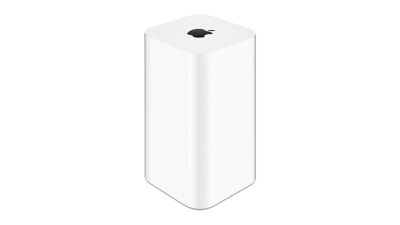
time capsule
Apple's Time Capsule was introduced at Macworld Expo in January 2008, combining a Wi-Fi router with NAS-style network storage designed to work in tandem with the Time Machine backup software. Apple officially ended development on the entire AirPort line in April 2018, with the AirPort Express at $99, the AirPort Extreme at $199, and the AirPort Time Capsule at $299, available only while supplies lasted. The lineup sold out entirely by November 2018. Prior to that, Apple had not updated its AirPort products since 2013.

AFP dates back to 1988, when Apple designed a native file-sharing protocol for the Macintosh as part of the AppleTalk networking suite. SMB became the primary file-sharing protocol in OS X 10.9 Mavericks in 2013, and the ability to run an AFP server was removed in macOS 11 Big Sur in 2020.

Apple formally deprecated the AFP client in macOS Sequoia 15.5, and, when macOS 26 Tahoe launched, a warning in System Settings confirmed that AFP support and Time Capsule compatibility would end with macOS 27. As expected, the first developer beta of macOS 27 Golden Gate contains no AFP client at all, ending a protocol with more than 40 years of history in the Apple ecosystem.

All Time Capsule models rely on AFP and SMBv1, the original Server Message Block version from 1987. From macOS 27 onwards, Time Machine requires SMBv2 or SMBv3, which covers modern NAS hardware but rules out every Time Capsule model in its stock form. macOS 27 also enforces stricter network security requirements, including TLS 1.2 as a minimum, which is a bar that Time Capsule hardware cannot meet.

The community response is a GitHub project called TimeCapsuleSMB, created by James Chang, an engineer at Microsoft. Rather than replacing Apple's firmware, it installs a modern Samba build directly onto the Time Capsule. The device runs a Samba 4.24.3 server, advertises itself over Bonjour, and accepts authenticated SMB3 connections, so users can connect via a standard SMB URL in Finder rather than relying on Apple's legacy stack.

Only the fifth-generation Time Capsule tower model from 2013 auto-restarts the Samba server after a reboot. Earlier models require a manual activate command every time the device loses power, meaning backups may silently stop after an outage. It is also worth noting that switching to SMB via TimeCapsuleSMB begins a new Time Machine backup chain, with the new destination treated as a fresh start. There is no published long-term restore testing for the project, so a second backup destination is advisable.

macOS 27 Golden Gate is currently in developer beta, with a public beta due in July and a general release set for September. It is compatible only with Apple silicon Macs, meaning Intel Mac users who stay on macOS 26 can continue using Time Capsule for the foreseeable future. Apple silicon owners who want to upgrade will need a compliant backup target in place first, whether that is a modern NAS, an external drive, or a patched Time Capsule running TimeCapsuleSMB.
Related Roundup: macOS Golden Gate

Popular Stories

Apple Logo Top Half

Have One of These 16 Apple Devices? Software Support Ends This Fall

Saturday June 13, 2026 8:00 am PDT by
Apple will end software support for 16 devices this fall across four product lines, with the Apple Watch seeing the most sweeping cull in the product's history. The full extent of this year's software drops became clear with the announcements of macOS 27 Golden Gate, iPadOS 27, tvOS 27, and watchOS 27 at WWDC this week. The one bright spot is that iOS 27 features identical device support to...
macOS 27 next to MacBook Pro Running macOS 27

macOS Golden Gate Beta 2 Now available for Developers

Monday June 22, 2026 10:09 am PDT by
Apple today provided developers with the second beta of macOS Golden Gate, with the update coming two weeks after Apple seeded the first beta. Developers can download macOS Golden Gate by going to System Settings > General > Software Update. Beta Updates will need to be enabled, and a free developer account is required. macOS Golden Gate includes multiple design improvements. Liquid Glass ...
Photos App Icon Liquid Glass

iOS 27 Revamps App Icons With Sharper Liquid Glass Layers

Tuesday June 16, 2026 9:18 am PDT by
Apple has redesigned its first-party app icons for the second year running, with iOS 27 addressing blurriness complaints about iOS 26 by integrating additional layers of Liquid Glass directly into the icon artwork itself. When Apple introduced Liquid Glass with iOS 26 last year, it redesigned its entire lineup of first-party app icons to give them a layered glass look with subtle depth. The...

Top Rated Comments

turbineseaplane Avatar
4 weeks ago
It's so frustrating to me that Apple hasn't remained in the router and Time Capsule space.

Why isn't there an Apple router/Home Hub/Time Capsule solution on offer in 2026?
Score: 42 Votes (Like | Disagree)

4 weeks ago

Because you can make one from just about any computer. I personally run multiple TM backups within BSD jails.
Love these kinds of comments- completely insular and clueless that the vast amount of consumers cannot do that. Apple absolutely could offer a router and or router/Time Machine with modern specs.
Score: 19 Votes (Like | Disagree)
4 weeks ago

It's so frustrating to me that Apple hasn't remained in the router and Time Capsule space.

Why isn't there an Apple router/Home Hub/Time Capsule solution on offer in 2026?
Not much room to meaningfully differentiate anymore.

Unifi is great, and has a lot of ex Apple airport team. Enjoy it-- far better than if Apple tried to make routers today.
Score: 17 Votes (Like | Disagree)
4 weeks ago
I had to move on from my AirPort Extreme because I needed some new time based permissions for some devices and children. But that router never gave me trouble in 8 years of constant use with tons of devices. My current router any given day it will just tap a nap and half the devices lose connection. Randomly all the time. I forgot how good I had it with the Airport.
Score: 14 Votes (Like | Disagree)
4 weeks ago

Routers are a commodity.

They are controlling backups by pushing iCloud instead.
I think this is the elephant in the room on this. Apple's entire philosophy has shifted away from doing anything locally to renting everything from them.
Score: 13 Votes (Like | Disagree)
kiranmk2 Avatar
4 weeks ago

Routers are a commodity.

They are controlling backups by pushing iCloud instead.
iCloud is not a backup - it is a syncing/cloud storage service. If you delete a file, you have 30 days to recover it from iCloud, yes. However, if you unintentionally overwrite, delete or modify contents of a file or simply want to see a previous version of the file, or a file becomes corrupted, iCloud can't help you recover from this. I don't really understand why Apple hasn't been selling a proper iCloud-based Time Machine option (so your 2 Tb iCloud storage actually behaves as a Time Machine).
Score: 4 Votes (Like | Disagree)








































