

You Can Easily Install the iOS 27 Beta For Free Right Now, Here's How - MacRumors
Skip to Content

You Can Easily Install the iOS 27 Beta For Free Right Now, Here's How

If you have not been paying close attention, you might still think that you need to be enrolled in the Apple Developer Program for $99 per year to install iOS developer betas, but that has not been the case for a few years now. In fact, anyone can install the iOS 27 developer beta on their iPhone for free, and the process is quite easy.
iOS 27 Install Beta Feature
Even if you are not an app developer and have no current plans to release apps on the App Store, you can still install the iOS 27 developer beta on your iPhone. If you feel more comfortable with waiting for the iOS 27 public beta, though, Apple said that the first public beta of iOS 27 will be available at some point in July.
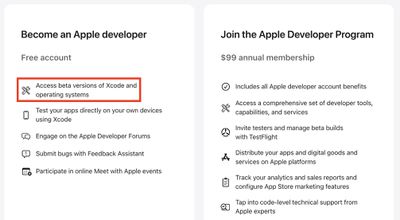
Apple Developer Free vs Program
Warning: While the first iOS 27 developer beta is considered to be relatively stable, iOS betas can and do have bugs and performance issues. You may not be able to use some apps that you rely on, and issues can extend to CarPlay. Backing up your iPhone before installing beta software is highly recommended, and relying on a secondary iPhone altogether is always a good idea if possible.

How to Install the iOS 27 Developer Beta

  • Sign into your Apple Account from this page and accept the Apple Developer Agreement to become a registered Apple developer for free.
  • Open the Settings app and tap on General → Software Update → Beta Updates.
  • Select the iOS 27 Developer Beta option (restart your iPhone if you don't see it) and follow the on-screen steps.

How to Install the iOS 27 Public Beta (in July)

  • Sign up at beta.apple.com for free.
  • Open the Settings app and tap on General → Software Update → Beta Updates.
  • Select the iOS 27 Public Beta option (restart your iPhone if you don't see it) and follow the on-screen steps.

iOS 27 is compatible with the iPhone 11 and newer, but Apple Intelligence features like Siri AI are limited to the iPhone 15 Pro and newer.

Keep in mind that the revamped version of Siri has a waitlist. To join the waitlist, open the Settings app on iOS 27 and tap on Siri and you will find it there. It can take anywhere from hours to many days to receive access to Siri AI and the Siri app.

Related Roundups: iOS 27, iPadOS 27
Related Forum: iOS 27

Popular Stories

iOS 27

iOS 27.2 Features: Everything New in iOS 27.2

Monday October 26, 2026 3:56 pm PDT by
Apple released iOS 27.2, uniting the iPhone Duo and other iPhone models on the same version of iOS. iOS 27.2 is the first major iOS 27 update, and it adds several useful new features. Siri AI Improvements Siri AI can recall past conversations you had with it, so you can ask Siri about something it told you before, like a restaurant it previously recommended. It's also able to draw on more...
iOS 27

Apple Releases iOS 27.2 Release Candidate

Monday October 19, 2026 10:26 am PDT by
Apple today seeded the release candidate of an upcoming iOS 27.2 update to developers for testing purposes, with the update coming a week after Apple released the fourth iOS 27.2 beta. Apple also seeded the iPadOS 27.2 RC. Registered developers can download the beta updates by opting in under Settings > General > Software Update and selecting the iOS 27 developer beta. The beta was used...
iOS 27

Apple Releases iOS 27.2 With New Siri AI Languages

Monday October 26, 2026 11:32 am PDT by
Apple today released iOS 27.2 and iPadOS 27.2, the first major updates to the iOS 27 and iPadOS 27 operating systems that came out in September. iOS 27.2 is available for all iPhones able to run iOS 27, including the iPhone Duo, while iPadOS 27.2 is available for all iPads able to run iPadOS 27, including the newly announced OLED iPad mini. The iOS 27.2 update expands Siri AI to new...

Top Rated Comments

19 weeks ago
Inviting everyone to install a beta 1 on their phones?

Seriously MR?
Score: 40 Votes (Like | Disagree)
Apple_Robert Avatar
19 weeks ago
Terrible idea encouraging people to install the developer beta.
Score: 27 Votes (Like | Disagree)
jz0309 Avatar
19 weeks ago
Sure, go and install the initial beta so you can come back here and complain about bugs and poor battery performance etc ...

If you only have 1 device, STAY OFF betas.
Score: 17 Votes (Like | Disagree)
jclardy Avatar
19 weeks ago
As a developer running the beta since day one, 27b1 is better than every 26 final release by far. On my iPhone Air things are faster, battery life seems fine, camera freezes are now gone (So many times on 26.X I'd open the camera and miss a shot because the phone is doing...something.) And now siri works and I can actually search mail and find things.

Granted - things can always break in future betas that were working fine on the previous build, so still upgrade with caution.
Score: 14 Votes (Like | Disagree)
tonywalker23 Avatar
19 weeks ago

Sure, go and install the initial beta so you can come back here and complain about bugs and poor battery performance etc ...

If you only have 1 device, STAY OFF betas.
If I only have one Apple device my phone, is it safe to install the beta? Also, every photo I have ever taken is in the Photos app. In every file I have ever created is in the Files app, but I don’t pay for any iCloud backup so I keep getting a warning that none of my files are backed up, but I just ignore it. This device is also my only means of accessing my bank account. Also, work provides it since I don’t even have any personal devices and it is the only way I’m able to perform digital task where I work at and the only way my boss can get in touch with me.


I just joined Mac rumors today and this is my first ever post. I don’t know why it would be unsafe to install it. If it was unsafe Apple will not release it. I don’t really know how to test features. I just want to try out the new desktop background and see if it really has a 27 hidden if you look at it sideways.
Score: 13 Votes (Like | Disagree)
Spinarelo Avatar
19 weeks ago

Inviting everyone to install a beta 1 on their phones?

Seriously MR?
MR readers are such a tiny portion of iOS users that this isn’t the big deal you’re trying to make it seem
Score: 9 Votes (Like | Disagree)
Latest Stories
Apple Acquires Ascend.io
16 minutes ago
HomePod Mini 2 Launches Today: All the New Features
42 minutes ago
AirTag 2 4-Pack Drops to New Low Price of $69.99
48 minutes ago
Rian Johnson's iPhone Camera App Goes Viral
59 minutes ago
Where Did All the iPhone Duos Go? Mostly to Apple's Stores
3 hours ago
Apple's Touchscreen MacBook Pro Could Ship 1.5M Units in 2027
4 hours ago
New Apple TV 4K and iPad Mini: RAM Amounts Revealed
13 hours ago
Apple Executive Comments on New iPad Mini Lacking 120Hz Display
17 hours ago
Here's a Hands-On Look at HomePod Mini 2's New Two-Tone Colors
17 hours ago
Apple Lowers App Store Fees in Taiwan Starting October 31
18 hours ago
HomeView Pre-Order Returns to $289.99 on Amazon
18 hours ago
Apple Avoids Showing Pinched Fingers on iPad Mini Page in South Korea
19 hours ago
Old 'Popcorn Time' App Left Hundreds of Thousands of Macs at Risk
20 hours ago
You Can Turn Off the New MacBook Pro's Touchscreen Functionality
20 hours ago
MacBook Pro Mini-LED vs. OLED Buyer's Guide: Every Difference
21 hours ago
Where to Pre-Order Apple's New MacBooks, iPad Mini, and iMac
23 hours ago
Apple Releasing HomePod Mini 2 Tomorrow With These New Features
1 day ago
How macOS Adapts Its Controls for Touch on the New MacBook Pro
1 day ago
Just Got an iPhone Duo? Try These Features First
1 day ago
Apple Announced Scott Forstall's Departure 14 Years Ago Today
1 day ago
Best Buy Opens Pre-Orders for PROLED XDR MacBook Pro With $100 Bonus Gift Cards
2 days ago
Here's Everything Apple Announced This Week
2 days ago
Here's a Real-World Look at the New MacBook Pro's Glowing Apple Logo
2 days ago
How Accurate Were Rumors About Apple's OLED Touchscreen MacBook Pro?
2 days ago
Apple Has 8 New Products Available for Pre-Order
2 days ago
iPhone Duo: Turn the Hinge Into an App Launcher
2 days ago
OLED MacBook Pro vs. Mini-LED MacBook Pro: Size and Weight Compared
2 days ago
Best Buy Offering Up to $100 Gift Cards With iPad Mini 8 and M6 MacBook Pro Pre-Orders
2 days ago
Adding Touch Didn't Cost the MacBook Pro Any Battery Life
2 days ago
Apple Releases Redesigned Mac Chargers and 'World Travel Adapter Kit'
2 days ago






































