

14 Ways Apple Is Improving Messages in iOS 27 - MacRumors
Skip to Content

14 Ways Apple Is Improving Messages in iOS 27

Apple at this year's WWDC emphasized that its approach to iOS 27 development was to add fewer newer features and instead make existing features better. Examples of that approach can be seen across the operating system, but it is arguably most obvious in the changes coming to Messages.
ios 27 messages
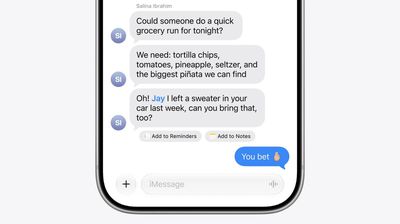
That's not to say there's nothing original coming to Messages in iOS 27. For instance, one new Apple Intelligence feature brings content-aware suggestions directly into conversations. If someone asks for photos, for example, Messages can recognize what's being discussed and suggest searching your photo library, using details like people, places, and keywords to surface relevant images.

The app can also detect when a conversation would benefit from creating a reminder or note and offer a shortcut to do so without leaving the thread. Apple is also bringing drawing tools directly into Messages, allowing users to create and share hand-drawn sketches within conversations.

Otherwise, Apple's focus has been on making the following enhancements and improvements to its broader Messages platform:

  • Faster message loading: Large conversations, especially those containing years of history and thousands of attachments, should load and scroll more quickly.
  • Improved syncing across devices: Apple says Messages, read states, reactions, and attachments sync more reliably and quickly between iPhone, iPad, Mac, Apple Watch, and Vision Pro.
  • Find offloaded media in Messages: Search can surface photos and videos that have been offloaded from local storage and stored in iCloud.
  • Thumbnails for offloaded media: Offloaded photos and videos now get visible preview thumbnails instead of generic placeholders, making older media easier to identify.
  • Personalized Smart Reply suggestions: Apple Intelligence-generated Smart Reply suggestions can now reflect a user's own writing style, making suggested responses feel more natural and personal.
  • Consolidated notifications for multiple Tapbacks: Multiple reactions to a message are grouped into a single notification rather than generating separate alerts.
  • Continuous sending of photos, videos, and text: Messages continue sending in the background and automatically resume when connectivity returns, reducing interrupted sends.
  • Search conversations by phone number or nickname: Conversation search now works with saved nicknames and phone numbers, not just contact names.
  • Faster access to recent camera captures: Newly captured photos and videos appear more quickly in the Messages media picker.
  • Failed messages automatically retry sending: Messages that fail because of temporary network issues will automatically attempt to resend without the user's intervention.

Early adopters of iOS 27 will receive access to the public beta next month, when they can try out the new features and improvements themselves. Apple is expected to make a general release available in the fall.

Related Roundups: iOS 27, iPadOS 27

Popular Stories

Everything New Your iPhone Can Do on iOS 27 Feature 1

12 New Things Your iPhone Can Do in iOS 27

Friday July 3, 2026 7:25 am PDT by
Apple will release iOS 27 in September, and despite the company's focus this year on refining its flagship operating system and nixing bugs, there are still many additional features on the way, not least of which is Apple's new context-aware Siri, re-tooled for the generative AI era. This year's major iPhone software update isn't all about AI, though, as the following feature list...

iCloud iPhone 17 Pro

iPhone Users Who Pay for iCloud Storage Get Two New Perks on iOS 27

Thursday July 2, 2026 6:10 am PDT by
If you pay for certain iCloud+ storage plans beyond the 5GB that Apple offers for free, you will receive two more perks on iOS 27 at no additional cost. A summary of the two new iCloud+ perks on iOS 27:Increased daily usage limits for some new Apple Intelligence features, including image generation in the revamped Image Playground app. HomeKit Secure Video cameras receive generated video...
iOS 27 Feature Dark

Apple Seeds iOS 27 and iPadOS 27 Second Betas to Developers

Monday June 22, 2026 10:08 am PDT by
Apple today seeded the second betas of iOS 27 and iPadOS 27 to developers for testing purposes, with the update coming two weeks after Apple released the first betas following the WWDC 2026 keynote. Registered developers can download the betas from the Settings app on the iPhone or iPad by going to the General section and selecting Software Update. iOS 27 introduces Apple's smarter...

Top Rated Comments

Parowdy Avatar
5 weeks ago
The fact that they only this year thought about the miserable experience that was sending multiple photos, videos or texts is telling.
Until there is a way to archive chats, like it’s possible in any other messaging app, iMessage will continue to be looked down by non-US residents. Even grouping chats for like work, private, family, etc. would be a big step up. But no.
Score: 11 Votes (Like | Disagree)
5 weeks ago
I wish they had this focus more often to just fix bugs and improve, and not focus so much on new features.
Score: 8 Votes (Like | Disagree)
PDavidAlexander Avatar
5 weeks ago
How about message previews in the recently deleted section? Trying to recover a specific message with no preview is impossible. So annoying.
Score: 6 Votes (Like | Disagree)
contacos Avatar
5 weeks ago
And still no select all button to mass delete old and useless attachments that I have already saved in the Photo App and don't need twice? I'll continue to stick with WhatsApp for that reason alone. Ain't got no time to open the list of photos in messages to tap on each one by one. Ridiculous
Score: 6 Votes (Like | Disagree)
5 weeks ago
You still can't pin or star messages lol
Score: 6 Votes (Like | Disagree)
turbineseaplane Avatar
5 weeks ago
I REALLY want the ability to disable icon badges from appearing for muted threads.
Score: 5 Votes (Like | Disagree)










































