iOS 26.5 Brings End-to-End Encryption to iPhone-Android RCS Messages - MacRumors
Skip to Content

iOS 26.5 Brings End-to-End Encryption to iPhone-Android RCS Messages

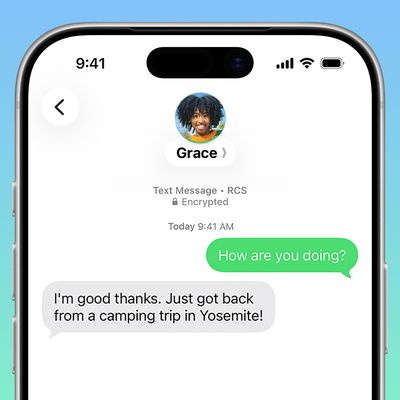
End-to-end encryption (E2EE) for RCS messages between iPhone and Android devices is coming in iOS 26.5, Apple confirmed today. The feature is listed in Apple's iOS 26.5 release notes.
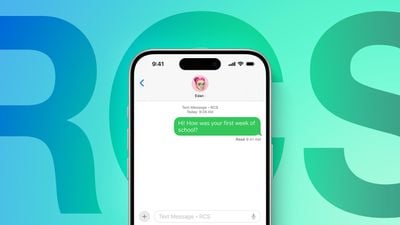
RCS Feature 1
Apple says end-to-end encrypted ‌RCS‌ messaging remains in beta even though it is being released in iOS 26.5. The feature is available with supported carriers and will roll out over time, and for conversations to be encrypted, both the receiver and the sender must use a carrier that supports the latest version of ‌RCS‌.

End-to-end encryption is on by default, and there is a toggle for it in the Messages section of the Settings app. Encrypted messages are denoted with a small lock symbol.

Testing of E2EE for ‌RCS‌ began in iOS 26.4, but Apple did not launch the feature in the iOS 26.4 update. It returned in the iOS 26.5 beta, and has been available throughout the beta testing process.

E2EE means that messages sent between devices cannot be intercepted and read by a third party. As of now, ‌RCS‌‌ messages sent between Android and iPhone users do not have E2EE, but iOS 26.5, iPadOS 26.5, macOS Tahoe 26.5, and watchOS 26.5 will put Android/iPhone conversations on par with iPhone to iPhone conversations that are encrypted through iMessage.

Apple worked with the GSM Association to implement E2EE for ‌RCS‌ messages. E2EE is part of the ‌RCS‌ Universal Profile 3.0, published with Apple's help and built on the Messaging Layer Security protocol. ‌‌RCS‌‌ Universal Profile 3.0 also includes editing and deleting messages, cross-platform Tapback support, and replying to specific messages inline during cross-platform conversations.


Related Roundups: iOS 26, iPadOS 26
Related Forum: iOS 26

Popular Stories

iOS 27 Feature Dark

Apple Now Pushing iPhone Users Still on iOS 26 to Install iOS 27

Thursday October 8, 2026 1:17 pm PDT by
Starting today, iPhone users still running iOS 26 will see iOS 27.0.1 as the prominent software update in the Settings app under General → Software Update, with iOS 26.7.1 now relegated to a smaller "Also Available" section at the bottom. iOS 27 was released on September 14, but until now that update and later iOS 27.0.1 were shown under the "Also Available" section, with iOS 26.7 and...
apple lock security bug vulnerability fix privacy

iOS 26.7.1 Fixes Vulnerability Used in Targeted Attacks

Monday September 28, 2026 11:45 am PDT by
iOS 26.7.1, iPadOS 26.7.1, macOS Tahoe 26.7.1, and macOS Sequoia 15.8.1 address a major vulnerability that Apple believes was used against a small number of people. Apple's security support pages say there was a CoreGraphics out-of-bounds write issue that could be exploited with a maliciously crafted file, allowing for arbitrary code execution. It has been fixed with improved bounds...
ios 26 5 rcs

iOS 27.3 May Expand RCS Support to Australia's Telstra in December

Tuesday October 20, 2026 9:04 am PDT by
In a support document that it has since deleted, Australian carrier Telstra said RCS support would be available starting with an iOS update coming in December. If this timeframe remains accurate, then iPhone users with Telstra will likely be able to use RCS in the Messages app starting with iOS 27.3. RCS has many benefits over the traditional SMS standard for text messaging with Android users, ...

Top Rated Comments

25 weeks ago
Looking forward to this being rolled out widely.

sms 2 factor codes being encrypted would be a major plus.

Score: 8 Votes (Like | Disagree)
HouseLannister Avatar
25 weeks ago
Now get started on undo send, edit, better quality media sharing (UP 3.1) and video conferencing via RCS (UP 4.0).

Score: 7 Votes (Like | Disagree)
25 weeks ago
How can one tell which version of RCS their carrier supports?
Score: 7 Votes (Like | Disagree)
25 weeks ago

Providing your every movement to Google.
Big deal, let them look.
Score: 5 Votes (Like | Disagree)
25 weeks ago

For the first time ever I’m going to turn off automatic updates and not update my iPhone. Well done Apple. 🤡
So edgy of you...
Score: 5 Votes (Like | Disagree)
Bevan Avatar
25 weeks ago
For the first time ever I’m going to turn off automatic updates and not update my iPhone. Well done Apple. 🤡
Score: 5 Votes (Like | Disagree)
Latest Stories
Apple Wants to Fix Safari's Cramped Layout on iPhone Duo
8 hours ago
Instagram Launches Apple TV App With Reels and More
8 hours ago
Apple's 'Servant' Copyright Lawsuit Win Upheld on Appeal
9 hours ago
'Arguably Better Than Face ID': the iPhone Duo Touch ID Tip to Try
13 hours ago
Verizon Apologizes for iPhone Duo Pre-Order Delays, Giving Customers $100 Gift Card
18 hours ago
Skip the Touch ID Scan: Unlock iPhone Duo With Apple Watch
18 hours ago
iPhone Duo Fails JerryRigEverything's Dusty Durability Test
18 hours ago
Make iPhone Duo Volume Buttons Follow Screen Rotation
21 hours ago
iPhone Duo Teardowns Reveal Two Batteries and More
22 hours ago
M5 MacBook Air Returns to Prime Day Low With $200 Amazon Discount
22 hours ago
Top Stories: Apple 'Pro and Tell' Debut, iPhone Duo Launch, and More
1 day ago
Apple Store Pickup System for iPhone Duo Just Went Live Again in U.S. and Canada
1 day ago
Apple Closes French Stores Ahead of Further Protests
1 day ago
Apple Pushes Back on DOJ Request for More Evidence
1 day ago
The iPhone Duo Can Be a Tiny Mac, a Toaster, and a Nintendo DS
2 days ago
Using an Apple Pencil With the iPhone Duo: What to Know
2 days ago
Apple Store Pickup for iPhone Duo Starting to Resume But Very Limited
2 days ago
iPhone Duo Jailbroken on Launch Day
2 days ago
Apple Seeds Updated watchOS 27.2 Release Candidate
2 days ago
Apple Store in UK Reopens With New Design on iPhone Duo Launch Day
2 days ago
Crackgate? iPhone Duo Owners Report Screens Breaking Along the Hinge
2 days ago
iPhone Duo Brings Back Long Lines at Apple Stores
2 days ago
The MacRumors Show: iPhone Duo Arrives, Touchscreen MacBooks Next
2 days ago
Apple Released iOS 27.1 for iPhone Duo Only
2 days ago
iPhone Duo: Open Two Apps Side by Side and Lock Them As an App Pair
2 days ago
iPhone Duo Launches With Carrier and Accessory Discounts Available
2 days ago
Apple Music Has a Hidden iPod You Can Play With
2 days ago
iPhone Duo Says 'Hello' to You Personally
2 days ago
iPhone Duo: How to Skip the Swipe Up After Touch ID
2 days ago
Where to Buy iPhone Duo: Stores, Pickup, and Wait Times
1 hour ago