iOS 26.2 Adds New CarPlay Setting
iOS 26 extended pinned conversations in the Messages app to CarPlay, for quick access to your most frequent chats. However, some drivers may prefer the classic view with a list of individual conversations only, and Apple now lets users choose.
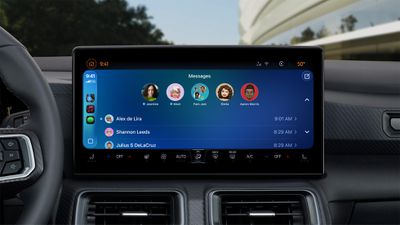
Apple released the second beta of iOS 26.2 this week, and it introduces a new CarPlay setting for turning off pinned conversations in the Messages app. After installing the beta on your iPhone, simply open the Settings app on CarPlay, look for the Pinned Conversations toggle in the main menu, and turn it off if you prefer to.
iOS 26.2 will be released to all users in December, according to Apple.
CarPlay received many other upgrades on iOS 26, including a Liquid Glass design, Live Activities, widgets, a compact view for phone calls, and more.
Popular Stories
In iOS 27, available now, CarPlay gets its biggest update in years, but some features depend on what type of car you have rather than your iPhone model. Some of the biggest additions won't do anything in the vast majority of vehicles on the road today. Here's how the new features pan out.
Works in Any CarPlay Vehicle
Custom widgets: In iOS 27, CarPlay is no longer limited to Apple's handful ...
Today's iOS 27 update addresses over 100 security vulnerabilities, which is a good reason to install the new software.
If you don't want to update to iOS 27 yet, Apple also released iOS 26.7 with over 80 security fixes. 75 of the fixes are shared across both updates, so iOS 26.7 addresses many of the same issues.
There are multiple kernel fixes, including one that could allow a malicious...
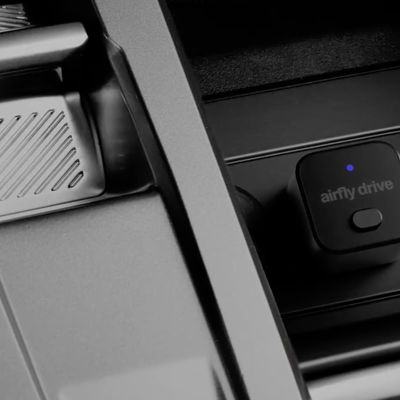
Twelve South, a well-known accessory maker for Apple products, has released a new AirFly Drive accessory that turns wired CarPlay into wireless CarPlay.
AirFly Drive uses Wi-Fi to establish a connection between your iPhone and vehicle, eliminating the need to use a USB-C cable for CarPlay.
Priced at $39.99 in the U.S., the AirFly Drive plugs into a USB data port in your vehicle. The...