Google Adds 'AI Mode' Button to Chrome for iPhone and iPad
Google is updating the Chrome app for the iPhone and the iPad with a dedicated "AI Mode" button that matches functionality found in the desktop version of Chrome. AI Mode is located under the Google search bar, next to an Incognito Mode button.
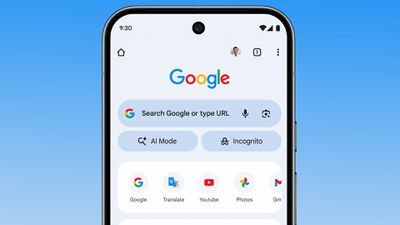
The AI Mode option provides quicker access to Chrome's Gemini-powered AI search feature. Google says that AI Mode lets users ask more complex, multi-part questions, and follow up on answers.
Chrome users in the United States will see the AI Mode button in the Chrome apps for iPhone, iPad, and Android as of today, with Google planning to expand it to additional countries in the near future.
Popular Stories
While the iPhone 18 Pro and iPhone 18 Pro Max are not expected to launch for another six months or so, there are already plenty of rumors about the devices.
It was initially reported that the iPhone 18 Pro models would have fully under-screen Face ID, with only a front camera visible in the top-left corner of the screen. However, the latest rumors indicate that only one Face ID component...
Apple provided developers and public beta testers with the release candidate versions of iOS 26.4 and iPadOS 26.4, which means we're going to see a public launch as soon as next week. The RC versions of the software include Apple's official release notes, giving us final details on what's included in the update.
Apple Music
- Playlist Playground (beta) generates a playlist from your...
Apple has unveiled a whopping eight new products so far this March, including an iPhone 17e, iPad Air models with the M4 chip, MacBook Air models with the M5 chip, MacBook Pro models with M5 Pro and M5 Max chips, the all-new MacBook Neo, an updated Studio Display, a higher-end Studio Display XDR, and now the AirPods Max 2 this week.
iPhone 17e features the same overall design as the iPhone...