Apple Expands Spotlight Clipboard Settings in macOS Tahoe 26.1
Apple quietly added a small but notable enhancement to Spotlight in macOS Tahoe 26.1, which was released on Monday. The update introduces new clipboard history controls for Spotlight, allowing users to decide how long copied items remain accessible in search results.
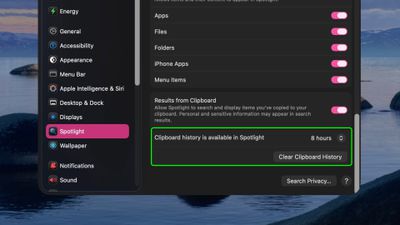
Previously, Spotlight could optionally retain clipboard contents for up to eight hours, but the latest update expands that flexibility with three options – 30 minutes, 8 hours, or 7 days. There's also a new "Clear Clipboard History" button in System Settings ➝ Spotlight, giving users the ability to manually wipe stored clipboard data without having to wipe Spotlight search history wholesale.
The changes should be welcomed by anyone wanting finer control over how long potentially sensitive information is retained by Spotlight, and it puts the feature more on par with third-party clipboard management apps. Apple did not mention the change in its macOS 26.1 release notes, suggesting it may be just one of several under-the-radar refinements to macOS Tahoe 26.
Popular Stories
Alongside macOS Golden Gate, Apple today released new versions of macOS Tahoe and macOS Sequoia. macOS Tahoe 26.7 and macOS Sequoia 15.8 are available for users with older Macs or those who don't yet want to update to Golden Gate.
The updates can be downloaded through the Software Update section of the System Settings app. On Macs eligible to install macOS Golden Gate, users will see both...
The macOS Tahoe 26.7 release candidate that Apple seeded today has references to several unreleased products, from home devices to iPhones, iPads, AirPods, and Macs.
Subscribe to MacRumors on YouTube
Some of these codenames have shown up in prior software updates but have new feature flags, while others haven't been seen in the code before.
Home Accessories
Home Hub...
The iOS 26.6.1, iPadOS 26.6.1, and macOS Tahoe 26.6.2 updates Apple released today fix almost 30 security vulnerabilities, according to Apple's security support document. This is Apple's third security release in three weeks as AI surfaces bugs faster than the company's typical release schedule can absorb.
Apple says the software includes security fixes that were previously added to the iOS...