Apple Expands Spotlight Clipboard Settings in macOS Tahoe 26.1
Apple quietly added a small but notable enhancement to Spotlight in macOS Tahoe 26.1, which was released on Monday. The update introduces new clipboard history controls for Spotlight, allowing users to decide how long copied items remain accessible in search results.
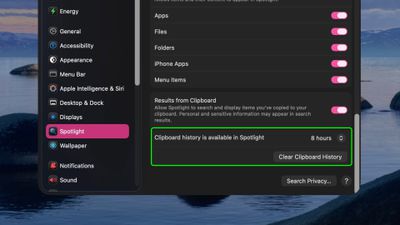
Previously, Spotlight could optionally retain clipboard contents for up to eight hours, but the latest update expands that flexibility with three options – 30 minutes, 8 hours, or 7 days. There's also a new "Clear Clipboard History" button in System Settings ➝ Spotlight, giving users the ability to manually wipe stored clipboard data without having to wipe Spotlight search history wholesale.
The changes should be welcomed by anyone wanting finer control over how long potentially sensitive information is retained by Spotlight, and it puts the feature more on par with third-party clipboard management apps. Apple did not mention the change in its macOS 26.1 release notes, suggesting it may be just one of several under-the-radar refinements to macOS Tahoe 26.
Popular Stories
iOS 26.4 was released today, and it includes a couple of new features for CarPlay: an Ambient Music widget and support for voice-based chatbot apps.
To update your iPhone 11 or newer to iOS 26.4, open the Settings app and tap on General → Software Update. CarPlay will automatically offer the new features so long as the iPhone connected to your vehicle is running iOS 26.4 or later....
Apple today released new firmware for the AirPods Pro 2, AirPods Pro 3, and the AirPods 4. The firmware has a version number of 8B39, up from 8B34 on the AirPods Pro 3, 8B28 on the AirPods Pro 2, and 8B21 on the AirPods 4.
There is no word on what's included in the firmware, but Apple has a support document with limited notes. Most updates are limited to bug fixes and performance...
Apple this week released tvOS 26.4, and the software update includes a handful of new features and changes for the Apple TV.
tvOS 26.4 is compatible with all Apple TV 4K and Apple TV HD models released since 2015. To update your Apple TV, open the Settings app on the device, navigate to System → Software Updates, and select Update Software.
Below, we have recapped what is new in tvOS...























