MacRumors Giveaway: Win an iPhone Air or iPhone 17 Pro From iMazing

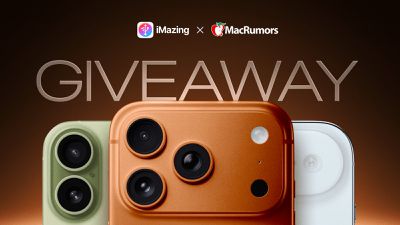
For this week's giveaway, we've teamed up with iMazing to offer MacRumors readers a chance to win one of Apple's new iPhone Air or iPhone 17 Pro models. For those unfamiliar with iMazing, it is Mac and PC software that offers a simple, fast way to manage everything on your iPhone and other Apple products. You can transfer data, make backups, manage media, save content like messages, and more.
imazing mr giveway 2025
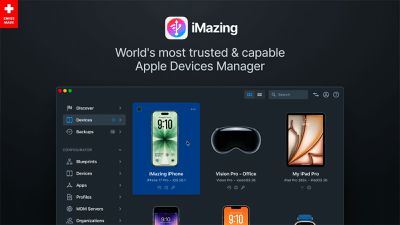
Apple has the built-in Finder on the Mac for managing the ‌iPhone‌, and an app for PCs, but iMazing's tools give you much more control than Apple's native functionality.

Creating and managing backups is easy with iMazing's backup tools. You can set up automatic backups for hassle-free protection, and the app supports snapshots so you can browse through your backups to find something specific that you're looking for. With selective restore, you can bring back just what you need. Backups are encrypted and can be saved to any computer, a local storage setup, or an external drive, and iMazing is ideal for managing multiple Apple devices.
imazing overview
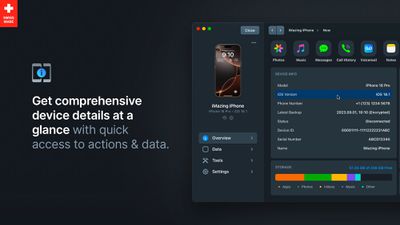
The Device overview provides detailed information on your ‌iPhone‌ in one spot, and it gives you a quick way to access all of iMazing's capabilities. The layout is straightforward and it's easy to find the exact tool that you're looking for. The Device overview lists information like serial number, model number, device ID, and stored data, and there's even a section for battery management that shows details on temperature, max charge, and charge cycles.
imazing device overview
iMazing can be used to browse, export, and archive content, so you can transfer photos, music, books, movies and other media and files from your computer to your ‌iPhone‌ and vice versa. It's not limited to the ‌iPhone‌, either. You can use the data management tools with the iPad, iPod, and Vision Pro, too. iMazing's tools are useful for moving photos from one device to another, or transferring music files without the need for a streaming service. With Quick Transfer, you can even drag and drop files and folders to your ‌iPhone‌ and choose an iOS app to transfer the file to.

Apple has no way to get your messages off of your ‌iPhone‌, but iMazing can create an entire archive from the Messages app or WhatsApp, and it works for RCS/SMS/MMS messages and iMessages. You can save your messages into a PDF, an Excel document, or use other file formats.

imazing business tools
iMazing can be used by businesses for advanced device management too, and it supports bulk provisioning, configuring, and streamlining MDM enrollment for fleets of Apple devices. iMazing was updated to version 3.4 recently, bringing full support for iOS 26, macOS 26, and the iPhone 17 models. There are also new features for both everyday users and IT professionals.

imazing notes
When you import notes, tables, colors, and attachments are included. There's a photo viewer for imported texts from Messages and WhatsApp, and useful filters for Contacts and Books.

Imported call history and voicemail show total duration, which is a useful feature for professionals who log billable calls. There is also support for multi-SIM organization. For businesses, iMazing 3.4 features advanced export filters, developer tools, Configurator updates, and CLI enhancements to streamline automation and fleet management.

imazing call history
iMazing can be downloaded from the iMazing website at prices starting at $30. There are options for personal subscriptions, family subscriptions, and enterprise subscriptions. iMazing also offers free trials, and some functions are free even without a purchase.

iMazing is offering an ‌iPhone 17 Pro‌ or ‌iPhone Air‌ for one lucky MacRumors reader, with the winner to choose their preferred device. To enter to win, use the widget below and enter an email address. Email addresses will be used solely for contact purposes to reach the winner(s) and send the prize(s). You can earn additional entries by subscribing to our weekly newsletter, subscribing to our YouTube channel, following us on Twitter, following us on Instagram, following us on Threads, or visiting the MacRumors Facebook page.

Due to the complexities of international laws regarding giveaways, only U.S. residents who are 18 years or older, UK residents who are 18 years or older, and Canadian residents who have reached the age of majority in their province or territory are eligible to enter. All federal, state, provincial, and/or local taxes, fees, and surcharges are the sole responsibility of the prize winner. To offer feedback or get more information on the giveaway restrictions, please refer to our Site Feedback section, as that is where discussion of the rules will be redirected.

The contest will run from today (October 3) at 9:00 a.m. Pacific Time through 9:00 a.m. Pacific Time on October 10. The winner will be chosen randomly on or shortly after October 10 and will be contacted by email. The winner will have 48 hours to respond and provide a shipping address before a new winner is chosen.



Popular Stories

iphone 17 models

No iPhone 18 Launch This Year, Reports Suggest

Thursday January 1, 2026 8:43 am PST by
Apple is not expected to release a standard iPhone 18 model this year, according to a growing number of reports that suggest the company is planning a significant change to its long-standing annual iPhone launch cycle. Despite the immense success of the iPhone 17 in 2025, the iPhone 18 is not expected to arrive until the spring of 2027, leaving the iPhone 17 in the lineup as the latest...
duolingo ad live activity

Duolingo Used iPhone's Dynamic Island to Display Ads, Violating Apple Design Guidelines

Friday January 2, 2026 1:36 pm PST by
Language learning app Duolingo has apparently been using the iPhone's Live Activity feature to display ads on the Lock Screen and the Dynamic Island, which violates Apple's design guidelines. According to multiple reports on Reddit, the Duolingo app has been displaying an ad for a "Super offer," which is Duolingo's paid subscription option. Apple's guidelines for Live Activity state that...
Clicks Communicator Feature

'Clicks Communicator' Unveiled — Will You Carry This With Your iPhone?

Friday January 2, 2026 6:35 am PST by
The company behind the BlackBerry-like Clicks Keyboard accessory for the iPhone today unveiled a new Android 16 smartphone called the Clicks Communicator. The purpose-built device is designed to be used as a second phone alongside your iPhone, with the intended focus being communication over content consumption. It runs a custom Android launcher that offers a curated selection of messaging...
Low Cost MacBook Feature A18 Pro

Low-Price 12.9-Inch MacBook With A18 Pro Chip Reportedly Launching Early This Year

Friday January 2, 2026 9:08 am PST by
Apple plans to introduce a 12.9-inch MacBook in spring 2026, according to TrendForce. In a press release this week, the Taiwanese research firm said this MacBook will be aimed at the entry-level to mid-range market, with "competitive pricing." TrendForce did not share any further details about this MacBook, but the information that it shared lines up with several rumors about a more...
Low Cost A18 Pro MacBook Feature Pink

Apple's 2026 Low-Cost A18 Pro MacBook: What We Know So Far

Friday January 2, 2026 4:33 pm PST by
Apple is planning to release a low-cost MacBook in 2026, which will apparently compete with more affordable Chromebooks and Windows PCs. Apple's most affordable Mac right now is the $999 MacBook Air, and the upcoming low-cost MacBook is expected to be cheaper. Here's what we know about the low-cost MacBook so far. Size Rumors suggest the low-cost MacBook will have a display that's around 13 ...
Apple Fitness Plus hero

Apple Announces New Fitness+ Workout Programs, Strava Challenge, and More

Friday January 2, 2026 6:43 am PST by
Apple today announced a number of updates to Apple Fitness+ and activity with the Apple Watch. The key announcements include: New Year limited-edition award: Users can win the award by closing all three Activity Rings for seven days in a row in January. "Quit Quitting" Strava challenge: Available in Strava throughout January, users who log 12 workouts anytime in the month will win an ...
govee floor lamp

CES 2026: Govee Announces New Matter-Connected Ceiling and Floor Lights

Sunday January 4, 2026 5:00 am PST by
Govee today introduced three new HomeKit-compatible lighting products, including the Govee Floor Lamp 3, the Govee Ceiling Light Ultra, and the Govee Sky Ceiling Light. The Govee Floor Lamp 3 is the successor to the Floor Lamp 2, and it offers Matter integration with the option to connect to HomeKit. The Floor Lamp 3 offers an upgraded LuminBlend+ lighting system that can reproduce 281...
Belkin 25W Battery magnetic

CES 2026: Belkin Announces Magnetic Ring Power Bank, Modular Dock, and More

Sunday January 4, 2026 3:02 pm PST by
Belkin today announced a range of new charging and connectivity accessories at CES 2026, expanding its portfolio of products aimed at Apple device users. UltraCharge Pro Power Bank 10K with Magnetic Ring The lineup includes new Qi2 and Qi2.2 wireless chargers, magnetic power banks, a high-capacity laptop battery, and USB-C productivity accessories, with an emphasis on higher charging...

Top Rated Comments

Westside guy Avatar
13 weeks ago

No one ever wins these things.
I've "won these things". Got a very nice Woolnut laptop sleeve from a MacRumors giveaway a few years ago.
Score: 4 Votes (Like | Disagree)
keenkreations Avatar
12 weeks ago

The email will be from "giveaways@macrumors.com" & for my wins the subject line was " Congratulations! You Won MacRumors' XXX Giveaway" with instructions to reply within 48 hours with a shipping address and telephone number.
I can confirm since I won this iMazing giveaway last year as well. You will be notified by email. They will try to send you the actual device itself, since they purchase it straight from Apple. Delivery or pickup from the local Apple Store, your choice.
Score: 3 Votes (Like | Disagree)
asdfjkl; Avatar
13 weeks ago
I won an iPad from one of these MacRumors giveaways. So people do win.
Score: 3 Votes (Like | Disagree)
Westside guy Avatar
13 weeks ago
Good luck to all!
Score: 2 Votes (Like | Disagree)
iPhone-Guy Avatar
13 weeks ago
Why does this always happen? It says it’s saving but never finishes. The first 1 or 2 giveaways I entered worked fine but since then I’ve mostly just skipped them but really would like to enter

Attachment Image
Score: 2 Votes (Like | Disagree)
ronntaylor Avatar
13 weeks ago

No one ever wins these things.
Laughs while listening to music using my orange blaze AirPod Pros won ('https://forums.macrumors.com/threads/macrumors-giveaway-win-custom-colored-airpods-or-airpods-pro-from-colorware.2386818/page-2?post=32164400#post-32164400') a while ago. ;)
Score: 2 Votes (Like | Disagree)