Everything New in iOS 26.1 Beta 1 - MacRumors
Skip to Content

Everything New in iOS 26.1 Beta 1

Apple released the first beta of iOS 26.1 today, just a week after launching iOS 26. iOS 26.1 mainly adds new languages to Apple Intelligence, but there are a few other features that are worth knowing about.
iOS 26

New Apple Intelligence Languages

‌Apple Intelligence‌ is now available in Danish, Dutch, Norwegian, Portuguese (Portugal), Swedish, Turkish, Chinese (Traditional), and Vietnamese.

AirPods Live Translation Languages

AirPods Live Translation works with additional languages in iOS 26.1, including Japanese, Korean, Italian, and Chinese (both Mandarin Traditional and Simplified).

Phone

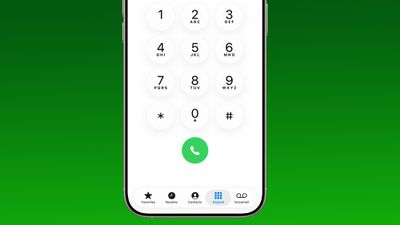
The Phone keypad now uses Liquid Glass for the numbers.
ios 26 1 phone app keypad

Apple Music

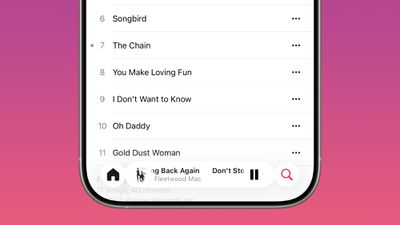
You can swipe on the music player in Apple Music to switch songs. Just slide a finger over where the song title is listed, and it'll go to the next song or back to the previous song.
ios 26 1 apple music swipe

Photos

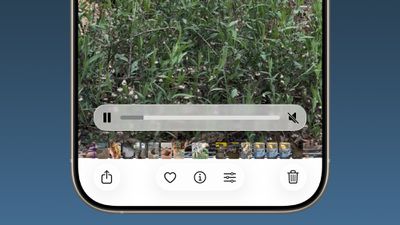
The slider for scrubbing through videos in the Photos app has been updated.
ios 26 1 photos app video

The navigation bar also has a slightly more frosted look that makes it easier to see on light backgrounds.
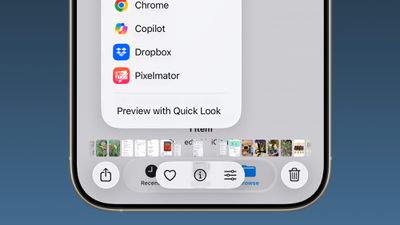
ios 26

Calendar

In the Calendar app, some of the views now show events from different calendars with a full color background.
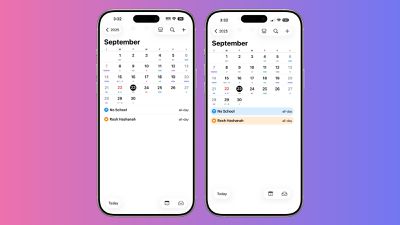
ios 26 1 calendar colors‌iOS 26‌ on left, iOS 26.1 on right

Safari

The Tab Bar (Bottom) in Safari is wider with less padding around the edges.
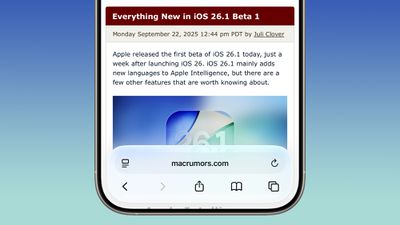
ios 26 1 safari bar

Background Security Improvement

Apple appears to have changed the name of Rapid Security Updates to Background Security Improvement, which is mentioned in the iOS 26.1 code.

"Background Security Improvement improves the security of your iPhone by installing security improvements and system files before they are available in iOS Software Updates. In rare instances of compatibility issues, these deliveries may be temporarily removed and then improved in a feature software update."

More Features

Know of something new in iOS 26.1 that we missed? Let us know in the comments below.

Popular Stories

Apple Skipping iPhone 18 This Year

Apple Skipping iPhone 18 Launch This Year

Wednesday August 12, 2026 6:59 am PDT by
Apple supplier Pegatron today indirectly confirmed that the standard iPhone 18 model will not be released until next year, according to a new report. Pegatron held an earnings call for the second quarter of 2026 today. On the call, Taiwan's Economic Daily News said Pegatron indicated that one of its customers will be changing its usual smartphone shipment schedule. As widely expected, the...

Apple Event Logo

Apple Working on All-New Operating System

Tuesday August 11, 2026 1:11 pm PDT by
Apple is developing an all-new operating system that is essentially a mix of tvOS, watchOS, and iOS, according to Bloomberg's Mark Gurman. In a recent report, he said the operating system will feature a grid of icons, widgets, and apps, along with customizable clock faces. The new software platform is intended for Apple's long-rumored smart home hub. With built-in facial recognition, the...
iPhone 18 Pro Dark Cherry Feature

iPhone 18 Pro Max's Larger Battery Capacity Allegedly Revealed

Monday August 10, 2026 9:37 am PDT by
The upcoming iPhone 18 Pro Max will be equipped with a nearly 12% larger battery compared to the iPhone 17 Pro Max, according to an apparent leak. An alleged photo of a battery pack for a Chinese model of the iPhone 18 Pro Max with a SIM card tray lists a capacity of 5,391 mAh, up from 4,823 mAh for the equivalent iPhone 17 Pro Max battery. The photo was shared on the Korean platform Naver...

Top Rated Comments

IceCool Avatar
12 months ago
I don’t know about everything new…

1) App Library now has updated Liquid Glass with specular highlights
2) Fixed animation when the AirPlay view is invoked from Now Playing in Apple Music, Live Activities on the Lock Screen, Dynamic Island, or other similar source
3) Phone app keypad now uses Liquid Glass
4) When expanding a platter in the Control Center, the content inside of the platter (ie. Brightness or volume progress, Wifi/Cellular/Airplane Mode buttons) now animate properly where before there were minor visual issues
5) Apple Intelligence and Live Translation expand
6) You can now slide on the current song in the Tab Bar or full screen player views in Apple Music to change the song
7) For a song or album, Go to… actions have been condensed down into “Go To ->” that opens a sub menu
8) When viewing a contact in Phone or FaceTime, “Details” and “Voicemail” now use a proper segmented picker. This change is not reflected everywhere (ie. Messages does not adapt this) for some reason
9) In Messages, the "+" button no longer expands out and up, rather it now expands just outward.
10) In Calendar, the "Calendars" dismiss view button now uses an "X" in the top leading as opposed to a checkmark in the top trailing edge
11) Photos Filter and View Options button now uses an ellipsis icon, rather than the filter icon
12) "Show Map" option in the menu with Filter and View Options
13) "Use as Ringtone" is no longer an option when sharing a photo using the Share Sheet
14) In Notes, the keyboard toolbar can be scrolled even when there's nothing else
15) In Games, the "Invite Friends" button no longer uses a green plus
16) In Maps, the Recents, Find Nearby, and other similar list views use a darker gray (almost certainly a bug)
17) In Settings, some toggles that would not use Liquid Glass now do
18) Home app uses Liquid Glass and light SF Symbol colors more liberally
19) Podcasts gets updated splash screen
20) Apple Books tab bar no longer shrinks when scrolled
21) Apple Vision Pro app now uses a 3D visual render of the device that animates as you scroll under the "Vision Pro" tab
22) Apple Vision Pro app now lets you configure AirPlay Receiver options in the "Vision Pro" tab
23) Under Tips in the Apple Vision Pro app, there's a new "What's new?" section that replaces "Essentials"
24) In jiggle mode, "-" buttons are significantly more blurred than before
25) Apps such as Health and Wallet now let you configure their widgets from the long press quick actions platter where they did not before
26) iMac once again has an SF Symbol in the AirPlay menu

I'm certain there's more, but I didn't do a very deep dive as I'm short on time.
Score: 54 Votes (Like | Disagree)
phuklok1 Avatar
12 months ago
swiping to to switch songs is cool, but please apple, eventually add a real parametric EQ (no old Ipod presets) that works system wide and can remember individual settings for each Bluetooth or other audio device you connect to.
Score: 30 Votes (Like | Disagree)
ShivneelSingh Avatar
12 months ago
I just want to "downgrade" my iPhone 17 Pro Max to iOS 18.7.
Score: 27 Votes (Like | Disagree)
12 months ago

Nope. Not for me, I’m staying 18.7. iOS, Mac OS, etc 26 has been an absolute ball drop and Tim Cook/software won’t own up to it.
Says the person who doesn’t use it.
Score: 20 Votes (Like | Disagree)
cjsuk Avatar
12 months ago
So basically it should be finished around .3 ?
Score: 19 Votes (Like | Disagree)
12 months ago
Nope. Not for me, I’m staying 18.7. iOS, Mac OS, etc 26 has been an absolute ball drop and Tim Cook/software won’t own up to it.
Score: 17 Votes (Like | Disagree)