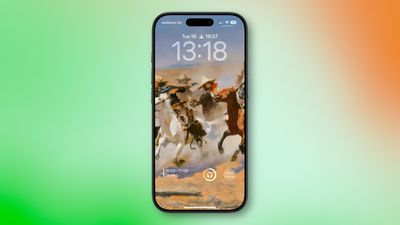
iOS 26: All the New iPhone Lock Screen Customizations

Apple has now made iOS 26 available to download on compatible iPhone models, and if you just installed the new software, Apple has made some changes and feature additions to the iPhone Lock Screen that you may want to check out.
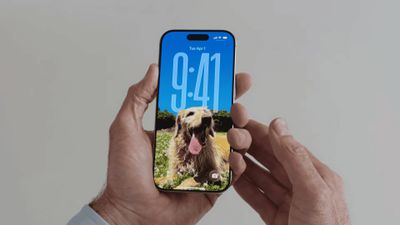
new iphone lockscreen ios 26
To download iOS 26 on your iPhone, go to Settings ➝ General ➝ Software Update, then let your device check Apple's servers for the latest software. Wait for the update screen to appear, then hit Update Now. With that done, here are five new things you can do to customize your the Lock Screen in iOS 26.

Change iPhone Clock to Liquid Glass
ios 26 bottom widgets lock screen
In iOS 26, Liquid Glass is Apple's new translucent material that reflects and refracts its surroundings, while dynamically transforming to help bring greater focus to content across system controls, navigation elements, app icons, and widgets. The design represents the most significant visual overhaul since iOS 7, and it also brings a new clock appearance option to your iPhone Lock Screen.

  1. Wake your iPhone so the Lock Screen is showing.
  2. Long press anywhere on the Lock Screen, then tap Customize.
  3. Tap the time within the square frame.
  4. Tap the new Glass option to switch from Solid.
  5. Make any other desired changes to the clock's color and style, then tap Done to finish.
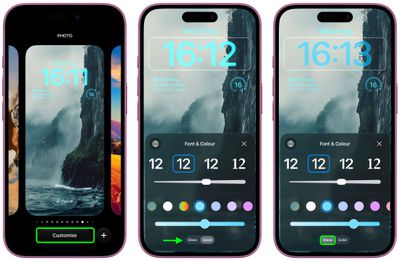
liquid glass clock ios

Move Lock Screen Widgets to Bottom

lock screen widgets bottom 2
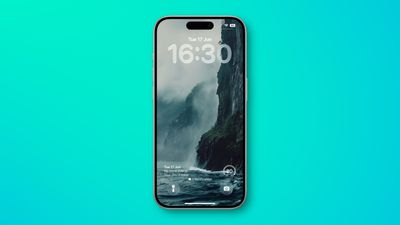
In iOS 18, the row of widgets on your Lock Screen is literally locked in place right below the clock. In iOS 26, however, Customize mode lets you drag them down to the bottom of the screen, so that they hover just above the two quick actions (assuming you have any). The new optional positioning makes tapping a widget during one-handed use a lot easier.

  1. Long press anywhere on the Lock Screen, then tap Customize.
  2. Below the clock, drag the widgets frame to the bottom of the screen.
  3. Make any other desired changes to the Lock Screen, then tap Done to finish.
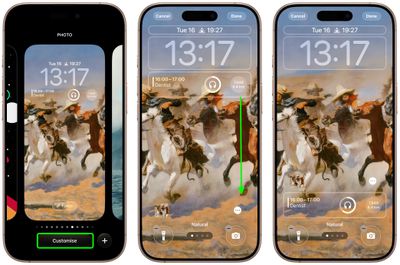
lock screen widgets bottom

Resize Lock Screen Clock

ios 26 lock screen time
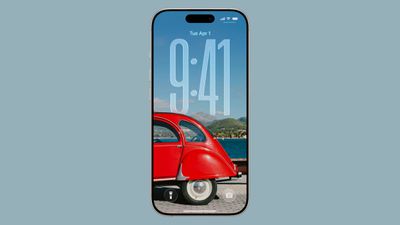
In iOS 26, Apple has made it so that the clock on the Lock Screen can be expanded to fill more of the display, making it easier to read. This can be done in Customize mode thanks to a new drag handle on the bottom-right corner of the selection frame around the time.

You can make the digits take up half of the screen, though if you have any widgets, they will slide down to the bottom of the display. In addition, if you have a depth effect applied to a photo and pinch to crop, the time will automatically adjust to accommodate the subject. Bear in mind that the ability to expand the time depends on the selected photo – if there's no space above the photo's subject, the drag handle won't appear.

  1. Long press anywhere on the Lock Screen, then tap Customize.
  2. Rest your finger on the drag handle located at the bottom-right of the clock frame.
  3. Drag down to resize the clock, then up to adjust if it's too big.
  4. Make any other desired changes to the Lock Screen, then tap Done to finish.
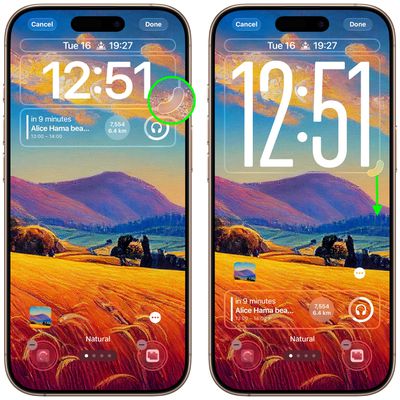
resze lock screen clock ios

Turn Lock Screen Wallpaper Into a Spatial Scene

spatial scenes lock screen
In iOS 26, your iPhone can convert 2D images into a 3D Spatial Scene that can be viewed on your Lock Screen.

When you're browsing Lock Screen wallpaper options, iOS automatically suggests photos from your library that are compatible with the feature. And if you manually select a Lock Screen photo that supports Spatial Scenes, you'll see a toggle on the customization screen that lets you enable or disable the effect.
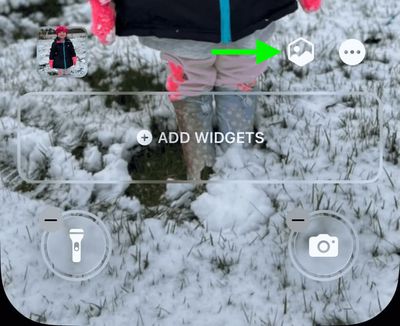
spatial scene gif 1
The feature works using generative AI that analyzes your photos to identify different elements and create depth maps. Importantly, it doesn't require Apple Intelligence to function, meaning Spatial Scenes works on iPhone 12 and newer models.

It's hard to appreciate without trying it yourself, but the results are impressive as the image animates when you move your device. Spatial Scenes use machine learning rather than Apple Intelligence, which means the feature is available on iPhone 12 and newer devices.

Make Music Albums Animate
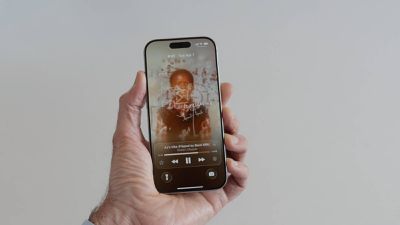
liquid glass music lock screen
iOS 26 introduces full-screen animated album art on the iPhone Lock Screen for select Apple Music tracks. By tapping the album art in the Lock Screen music player, the artwork expands and animates, creating a more immersive listening experience. While animated album art has been available within the Apple Music app for some time, this marks its first appearance on the Lock Screen. Not all songs support it yet, but the number is steadily increasing. Apple is also opening the Animated Album Art feature to third‑party developers, so expect it to work with apps like Spotify and YouTube Music soon.


Popular Stories

maxresdefault

Where's the New Apple TV?

Monday December 22, 2025 11:30 am PST by
Apple hasn't updated the Apple TV 4K since 2022, and 2025 was supposed to be the year that we got a refresh. There were rumors suggesting Apple would release the new Apple TV before the end of 2025, but it looks like that's not going to happen now. Subscribe to the MacRumors YouTube channel for more videos. Bloomberg's Mark Gurman said several times across 2024 and 2025 that Apple would...
top stories 2025 12 20

Top Stories: iOS 26.3 Beta, Major Apple Leaks, and More

Saturday December 20, 2025 6:00 am PST by
You'd think things would be slowing down heading into the holidays, but this week saw a whirlwind of Apple leaks and rumors while Apple started its next cycle of betas following last week's release of iOS 26.2 and related updates. This week also saw the release of a new Apple Music integration with ChatGPT, so read on below for all the details on this week's biggest stories! Top Stories i...
iPhone Top Left Hole Punch Face ID Feature Purple

iPhone 18 Pro Features Leaked in New Report, Including Under-Screen Face ID

Tuesday December 16, 2025 8:44 am PST by
Next year's iPhone 18 Pro and iPhone 18 Pro Max will be equipped with under-screen Face ID, and the front camera will be moved to the top-left corner of the screen, according to a new report from The Information's Wayne Ma and Qianer Liu. As a result of these changes, the report said the iPhone 18 Pro models will not have a pill-shaped Dynamic Island cutout at the top of the screen....
ios 18 security update

Don't Want to Upgrade to iOS 26? Here's How to Stay on iOS 18 [Update: Now Unavailable]

Friday December 19, 2025 10:37 am PST by
Since the beginning of December, Apple has been pushing iPhone users who opted to stay on iOS 18 to install iOS 26 instead. Apple started by making the iOS 18 upgrades less visible, and has now transitioned to making new iOS 18 updates unavailable on any device capable of running iOS 26. If you have an iPhone 11 or later, Apple is no longer offering new versions of iOS 18, even though there...
iOS 26

iOS 26.3 Brings AirPods-Like Pairing to Third-Party Devices in EU Under DMA

Monday December 22, 2025 3:20 pm PST by
The European Commission today praised the interoperability changes that Apple is introducing in iOS 26.3, once again crediting the Digital Markets Act (DMA) with bringing "new opportunities" to European users and developers. The Digital Markets Act requires Apple to provide third-party accessories with the same capabilities and access to device features that Apple's own products get. In iOS...
iPhone Chips

Apple Clings to Samsung as RAM Prices Soar

Monday December 22, 2025 6:17 am PST by
Apple is significantly increasing its reliance on Samsung for iPhone memory as component prices surge, according to The Korea Economic Daily. Apple is said to be expanding the share of iPhone memory it sources from Samsung due to rapidly rising memory prices. The shift is expected to result in Samsung supplying roughly 60% to 70% of the low-power DRAM used in the iPhone 17, compared with a...
iOS 26

iOS 26.2 Adds These 8 New Features to Your iPhone

Monday December 22, 2025 8:47 am PST by
Earlier this month, Apple released iOS 26.2, following more than a month of beta testing. It is a big update, with many new features and changes for iPhones. iOS 26.2 adds a Liquid Glass slider for the Lock Screen's clock, offline lyrics in Apple Music, and more. Below, we have highlighted a total of eight new features. Liquid Glass Slider on Lock Screen A new slider in the Lock...
apple beta 26 lineup

Apple's 2026 and 2027 Product Roadmap: Foldable iPhone, iPhone 18 Pro, M5 Macs, and More

Tuesday December 16, 2025 4:42 pm PST by
There has been a whirlwind of rumors over the last few days, sourced from leaked internal software designed for the iPhone and the Mac, and news sites like The Information. Below, we have a quick recap of everything we've heard this week, which serves as a guide to Apple's product plans in 2026 and beyond. We've organized the info by likely release date, though there are some products that...

Top Rated Comments

rbf1138 Avatar
14 weeks ago
Does anyone else accidentally engage the lock-screen customizer when you grab your phone and your thumb does a long press on the screen? I wish I could lock the customizer to stop the accidental long press.
Score: 12 Votes (Like | Disagree)
Taq'aix Avatar
14 weeks ago
Having the widgets at the bottom is quite nice tbh.
Score: 7 Votes (Like | Disagree)
Ntombi Avatar
14 weeks ago
I like an uncluttered lock screen, but I’m glad there’s more options available.

Attachment Image
Score: 5 Votes (Like | Disagree)
Twvs05 Avatar
14 weeks ago
Extending the clock on lock screen doesn't work for me on Iphone 13, tried multiple times and restarted my phone. I hold my finger the on sides but it doesn't do anything, am I the only one?
Score: 5 Votes (Like | Disagree)
LordArchie Avatar
14 weeks ago
Day to day, I keep it simple. No widget and no quick access buttons.. When I travel I add a couple of travel related widgets.

Attachment Image
Score: 5 Votes (Like | Disagree)
ItsASpider Avatar
14 weeks ago
Apple should add a background to the widgets, even if optionally. Especially on iPad they look like such a mess when using various formats. Having clear borders through background would be a much welcome improvement. And make them work in landscape mode, too.
Score: 4 Votes (Like | Disagree)