iOS 26 Available Now With These 8 New Features

Following three months of beta testing, iOS 26 was released today, September 15. The update is compatible with the iPhone 11 series and newer, and it is available to install via the Settings app, under General → Software Update.

iOS 26 Feature
Below, we have highlighted eight new features included in iOS 26. Even more new features and changes are outlined in Apple's release notes for the update.

Some of the features are only available on newer iPhone models.

Liquid Glass
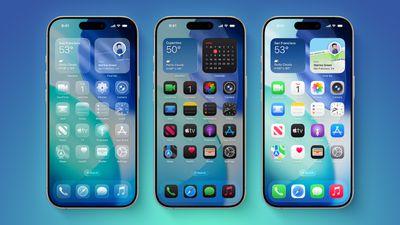
iOS 26 on Three iPhones
iOS 26 introduces an all-new Liquid Glass design with translucent menus, buttons, and icons.

Apple describes Liquid Glass as "a new translucent material that reflects and refracts its surroundings, bringing greater focus to content, and delivering a new level of vitality across controls, navigation, app icons, widgets, and more."

Lock Screen Enhancements
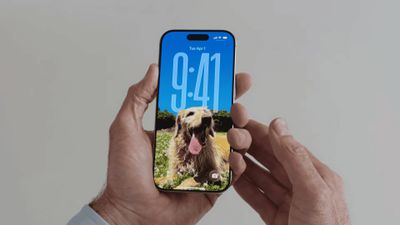
new iphone lockscreen ios 26
On iOS 26, the Lock Screen's clock automatically adapts to fill the empty space, and you can view full-screen animated album art for supported Apple Music songs.

New iMessage Features
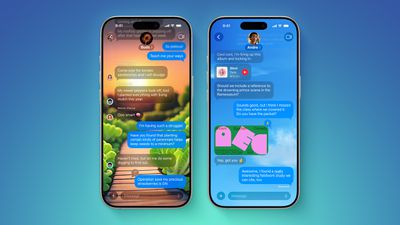
ten messages features
Here are some of the key new features and changes in the Messages app on iOS 26:

  • Backgrounds: You can now add a background to any conversation, and all participants will see it. You can choose from Apple's selection of backgrounds, or you can set any of your own photos as a background. You can turn off conversation backgrounds in the Settings app if desired.
  • Polls: You can now create polls in group chats, allowing people to vote on topics or questions, such as which restaurant to go to. Apple Intelligence can detect when a poll might come in handy and suggest one.
  • Apple Cash in group chats: You can now send and receive Apple Cash in group chats.
  • Typing indicators in group chats: You can now see who is typing in group chats.
  • "Add Contact" button in group chats: This button makes it easier to add people to the Contacts app in group chats.
  • "Select" option: When you tap and hold on a message bubble, a new "Select" option appears. Tapping on it allows you to select a portion of text in a message, whereas you could previously only copy an entire message.
  • Unknown sender screening: When turned on, this setting automatically moves messages from unknown senders to the Unknown Senders folder, and hides notifications for them until you accept them.

Call Screening and Hold Assist
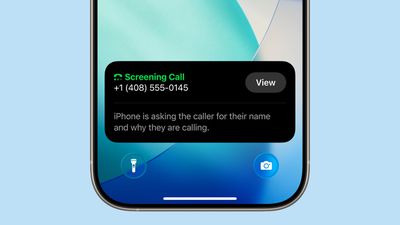
ios 26 phone app screening
iOS 26 adds a couple of useful features to the Phone app: Call Screening and Hold Assist.

Call Screening is an opt-in setting that asks unknown callers for their name, and the reason why they are calling. And with Hold Assist, your iPhone can automatically wait on hold for you during a call, and notify you when the agent on the other line is ready.

Adaptive Power Mode
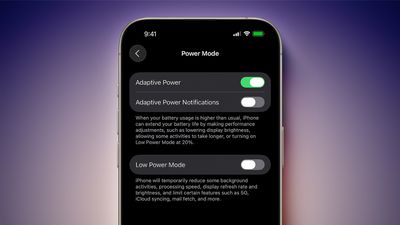
iOS 26 Adaptive Power Notifications
iOS 26 introduces an Adaptive Power Mode on the iPhone, alongside the existing Low Power Mode.

Apple says Adaptive Power Mode can make "performance adjustments" when necessary to extend an iPhone's battery life, including slightly lowering the display brightness, allowing some activities to "take longer," and automatically turning on Low Power Mode when the iPhone's remaining battery life reaches the 20% mark.

Adaptive Power Mode is only available on the iPhone 15 Pro models and newer. The setting can be turned on in the Settings app, under Battery → Power Mode.

AutoMix

apple music automix ios 26
A new AutoMix feature in the Apple Music app can seamlessly transition from one song to the next, like a DJ would. AutoMix replaces the previous Crossfade feature.

Preview App
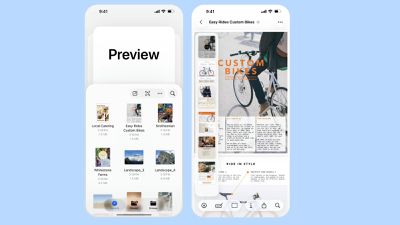
Apple Preview App iPhone
iOS 26 extends a version of the Apple's Preview app from the Mac to the iPhone, providing you with a built-in app to edit and mark up PDFs and images.

CarPlay Upgrades
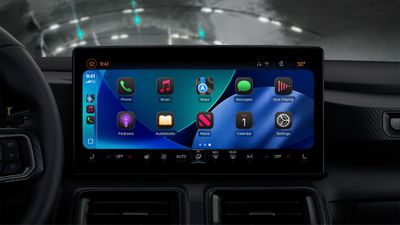
CarPlay Liquid Glass Dark
When you are using CarPlay with an iPhone running iOS 26, the new Liquid Glass design extends to the CarPlay interface. Like on the iPhone, the new look includes more shimmery app icons and translucent user interface elements.

Starting with iOS 26, you can respond to messages with standard Tapbacks like a heart, thumbs up, or exclamation marks directly through CarPlay.
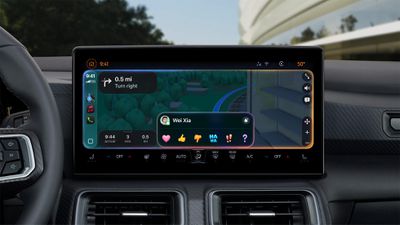
CarPlay Messages Tapbacks

You can now view your pinned conversations in the Messages app on CarPlay.
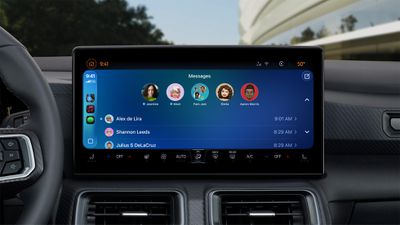
CarPlay Pinned Messages

CarPlay has a new compact view for incoming phone calls, so that you can still see other information on the screen, such as turn-by-turn directions.
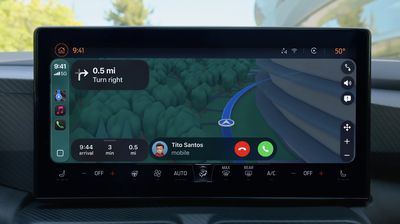
CarPlay Compact Phone Calls
CarPlay's Dashboard screen can now show Live Activities, letting you keep track of things like a flight's arrival time at a glance.
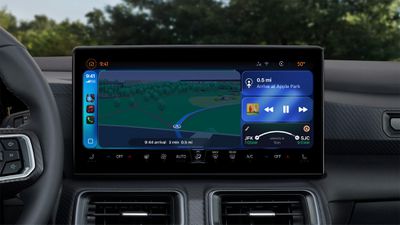
CarPlay Live Activities
The regular version of CarPlay now has a widgets screen, for things like calendar appointments and HomeKit accessory controls.
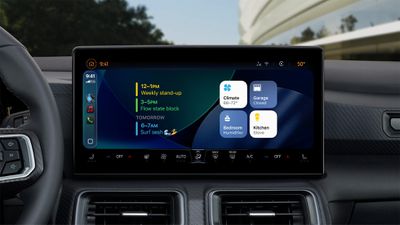
CarPlay Widgets
iPhone users will be able to wirelessly stream videos to the CarPlay screen using AirPlay, according to Apple. For safety reasons, video playback will only be available when the vehicle is parked, to prevent distracted driving. The connected iPhone will be able to detect when the vehicle is in motion and end playback.

Automakers need to add support for this feature, so it might be limited to newer vehicles and take some time to roll out.

More

Read our iOS 26 roundup linked below to learn more about the update.

Related Roundups: iOS 26, iPadOS 26
Related Forum: iOS 26

Popular Stories

iOS 26

iOS 26.4 and iOS 27 Features Revealed in New Leak

Friday December 12, 2025 10:56 am PST by
Macworld's Filipe Espósito today revealed a handful of features that Apple is allegedly planning for iOS 26.4, iOS 27, and even iOS 28. The report said the features are referenced within the code for a leaked internal build of iOS 26 that is not meant to be seen by the public. However, it appears that Espósito and/or his sources managed to gain access to it, providing us with a sneak peek...
iOS 26

iOS 26.2 Coming Soon With These 8 New Features on Your iPhone

Thursday December 11, 2025 8:49 am PST by
Apple seeded the second iOS 26.2 Release Candidate to developers earlier this week, meaning the update will be released to the general public very soon. Apple confirmed iOS 26.2 would be released in December, but it did not provide a specific date. We expect the update to be released by early next week. iOS 26.2 includes a handful of new features and changes on the iPhone, such as a new...
iOS 26

Apple Releases iOS 26.2 With Alarms for Reminders, Lock Screen Changes, Enhanced Safety Alerts and More

Friday December 12, 2025 10:10 am PST by
Apple today released iOS 26.2, the second major update to the iOS 26 operating system that came out in September, iOS 26.2 comes a little over a month after iOS 26.1 launched. ‌iOS 26‌.2 is compatible with the ‌iPhone‌ 11 series and later, as well as the second-generation ‌iPhone‌ SE. The new software can be downloaded on eligible iPhones over-the-air by going to Settings >...
AirPods Pro Firmware Feature

Apple Releases New Firmware for AirPods Pro 2 and AirPods Pro 3

Thursday December 11, 2025 11:28 am PST by
Apple today released new firmware designed for the AirPods Pro 3 and the prior-generation AirPods Pro 2. The AirPods Pro 3 firmware is 8B30, up from 8B25, while the AirPods Pro 2 firmware is 8B28, up from 8B21. There's no word on what's include in the updated firmware, but the AirPods Pro 2 and AirPods Pro 3 are getting expanded support for Live Translation in the European Union in iOS...
macOS Tahoe 26 Thumb

Apple Releases macOS Tahoe 26.2 With Edge Light

Friday December 12, 2025 10:08 am PST by
Apple today released macOS Tahoe 26.2, the second major update to the macOS Tahoe operating system that came out in September. macOS Tahoe 26.2 comes five weeks after Apple released macOS Tahoe 26.1. Mac users can download the macOS Tahoe update by using the Software Update section of System Settings. macOS Tahoe 26.2 includes Edge Light, a feature that illuminates your face with soft...
AirTag 2 Mock Feature

Apple AirTag 2: Four New Features Found in iOS 26 Code

Thursday December 11, 2025 10:31 am PST by
The AirTag 2 will include a handful of new features that will improve tracking capabilities, according to a new report from Macworld. The site says that it was able to access an internal build of iOS 26, which includes references to multiple unreleased products. Here's what's supposedly coming: An improved pairing process, though no details were provided. AirTag pairing is already...
ipados 26 1 slide over

Apple Releases iPadOS 26.2 With Multitasking Improvements

Friday December 12, 2025 10:09 am PST by
Apple today released iPadOS 26.2, the second major update to the iPadOS 26 operating system released in September. iPadOS 26.2 comes a month after iPadOS 26.1. The new software can be downloaded on eligible iPads over-the-air by going to Settings > General > Software Update. iPadOS 26.2 continues with the multitasking improvements that were added with iPadOS 26.1. You can now drag and...
bug security vulnerability issue fix larry

Update Now: iOS 26.2 Fixes 20+ Security Vulnerabilities

Friday December 12, 2025 11:11 am PST by
Apple today released iOS 26.2, iPadOS 26.2, and macOS 26.2, all of which introduce new features, bug fixes, and security improvements. Apple says that the updates address over 20 vulnerabilities, including two bugs that are known to have been actively exploited. There are a pair of WebKit vulnerabilities that could allow maliciously crafted web content to execute code or cause memory...

Top Rated Comments

Porco Avatar
13 weeks ago
The public beta moves to the global beta. I’ll likely wait and see a bit longer, I don’t need surprises this week.
To all who install immediately: I thank you for your service.
Score: 32 Votes (Like | Disagree)
QuarterSwede Avatar
13 weeks ago

The public beta moves to the global beta. I’ll likely wait and see a bit longer, I don’t need surprises this week.
To all who install immediately: I thank you for your service.
There are some very minor bugs. Don’t listen to anyone here crying that it isn’t ready (when are updates really done anyway?). I wasn’t on the beta till the RC this year and I think its a pretty solid release in my personal as professional use over the last few days. After a day of settling down it runs smoother than 18 ever did. Icon caching took a few days to stop happening so that isn’t a long term issue. Now that could be because my 12 Pro Max has 6GB and it wouldn’t work well on the 4GB phones (12). No idea.

I personally like the fun and whimsy being brought back to a boring OS and the glass look is absolutely gorgeous in use. Much better than pictures try to convey. I’ve yet to run into any legibility problems. I’m not saying there won’t be any but don’t think actual usage is anything like it’s being portrayed as. Sad that the MR community is helping to spread this FUD.

I very much disagree with certain very vocal developers on how bad it is and how they can’t believe Apple is shipping it. That just isn’t what I’m experiencing on a 12 Pro Max (nothing new by any means). It’s fine and not even close to Apple’s worst .0 release. No, I don’t work for Apple and I never have. I also don’t own stock in them. This is just my personal experience and opinion. I like iOS 26. ?‍♂️
Score: 24 Votes (Like | Disagree)
Johnny907 Avatar
13 weeks ago
Yeah I wanted to mess with it over the weekend so already downloaded the RC.
Liquid Glass is trash. I’m 45, I don’t want all this bubbly bouncy nonsense. Spent an hour going back and forth between a couple Reddit subs and the settings/accessibility menus just turning most of it off.
While I like the rounding and softening of certain elements, it’s the transparency and goofy animations that are annoying. It’s like Apple turned iOS into a fidget spinner for the easily distracted. I’m sure there is a demo for that, but would really appreciate if Apple added a “Professional Adult” toggle to switch it all off instead of making us deep dive through pages of settings.
Score: 24 Votes (Like | Disagree)
vertsix Avatar
13 weeks ago
1. Bugs
Score: 20 Votes (Like | Disagree)
klasma Avatar
13 weeks ago
Time to update to iOS 18.
Score: 14 Votes (Like | Disagree)
jz0309 Avatar
13 weeks ago

Yeah I wanted to mess with it over the weekend so already downloaded the RC.
Liquid Glass is trash. I’m 45, I don’t want all this bubbly bouncy nonsense. Spent an hour going back and forth between a couple Reddit subs and the settings/accessibility menus just turning most of it off.
While I like the rounding and softening of certain elements, it’s the transparency and goofy animations that are annoying. It’s like Apple turned iOS into a fidget spinner for the easily distracted. I’m sure there is a demo for that, but would really appreciate if Apple added a “Professional Adult” toggle to switch it all off instead of making us deep dive through pages of settings.
I'm 66 and I quite like it, nothing really that bothers me ... guess we are all different
Score: 11 Votes (Like | Disagree)