iOS 26 Allows You to Restore Any iPhone Without a Mac or PC - MacRumors
Skip to Content

iOS 26 Allows You to Restore Any iPhone Without a Mac or PC

iOS 26 adds a new Recovery Assistant feature to all compatible iPhones, and it can help return the device to a working state, with no Mac or PC required.
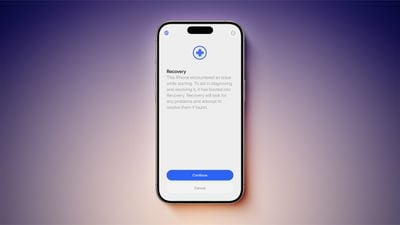
iOS 26 Recovery Assistant Feature Clean
Recovery Assistant was introduced in the first iOS 26 beta, but Apple only mentioned the feature in its release notes for the second iOS 26 beta today.

"Recovery Assistant is a new way to recover your device if it doesn't start up normally," says Apple. "It can look for problems and attempt to resolve them if found."

Apple says an iPhone running iOS 26 will boot into a Recovery mode if the device has "encountered an issue while starting."

Here is what Recovery mode says on the iPhone's screen: "This iPhone encountered an issue while starting. To aid in diagnosing and resolving it, it has booted into Recovery. Recovery will look for any problems and attempt to resolve them if found."

According to a Reddit post, Recovery Assistant can help you return an iPhone to a working state with help from another Apple device, such as an iPad. This process can be initiated through the menu in the top-right corner of the Recovery mode on the affected iPhone. On the other Apple device, you can follow the on-screen steps to download and install a newer iOS version on the iPhone that is in Recovery mode, to help revive it.

This seems to expand on a recovery feature that debuted on iPhone 16 models last year.

Related Roundups: iOS 26, iPadOS 26
Related Forum: iOS 26

Popular Stories

iPhone 18 Pro Deep Red Feature

iPhone 18 Pro Launching Later This Year With These 12 New Features

Wednesday March 18, 2026 7:39 am PDT by
While the iPhone 18 Pro and iPhone 18 Pro Max are not expected to launch for another six months or so, there are already plenty of rumors about the devices. It was initially reported that the iPhone 18 Pro models would have fully under-screen Face ID, with only a front camera visible in the top-left corner of the screen. However, the latest rumors indicate that only one Face ID component...
imac video apple feature

Apple Released Yet Another New Product Today

Friday March 20, 2026 2:39 pm PDT by
Apple has unveiled a whopping nine new products so far this March, including an iPhone 17e, iPad Air models with the M4 chip, MacBook Air models with the M5 chip, MacBook Pro models with M5 Pro and M5 Max chips, the all-new MacBook Neo, an updated Studio Display, a higher-end Studio Display XDR, AirPods Max 2, and now the Nike Powerbeats Pro 2. iPhone 17e features the same overall design as...
ios 26 4 pastel

iOS 26.4: Top 10 New Features Coming to Your iPhone

Friday March 20, 2026 2:44 pm PDT by
iOS 26.4 isn't the major update with new Siri features that we hoped for, but there are some useful quality of life improvements, and a little bit of fun with an AI playlist generator and new emoji characters. Playlist Playground - Apple Music has a Playlist Playground option that lets you generate playlists from text-based descriptions. You can include moods, feelings, activities, or...

Top Rated Comments

10 months ago
this is absolutely huge!
there have been code references to this since iOS 13.3 over five years ago.
The fact that you’ve still needed access to a Mac or PC to restore an iPhone or iPad in 2025, 18 years since the original iPhone released and 13 years since it’s been PC free for set up and software updates has never made sense and has been one of the most dated parts of the iPhone. this is one of the best features introduced this year.
Score: 19 Votes (Like | Disagree)
klasma Avatar
10 months ago

I've never seen an iPhone "not start normally".
Maybe they are expecting it to happen more frequently with iOS 26.
Score: 9 Votes (Like | Disagree)
10 months ago

I've never seen an iPhone "not start normally". Is this a beta only thing?
I never have either. But that doesn't mean it has never happened before. I would assume they built this because it can happen.
Score: 8 Votes (Like | Disagree)
winxmac Avatar
10 months ago
Reminds me of Recovery/Troubleshooter in Windows 8.x and newer
Score: 8 Votes (Like | Disagree)
10 months ago
Not to worry, everyone, because the Apple Support SOP has been updated!

1. Reboot your device.
2. Force restart your device.
3. Reset Network Settings.
4. Check for Recovery Assistant. If Recovery Assistant doesn't appear, your phone is operating as expected and no further troubleshooting will be provided. Remember to keep your device up to date. Thank you for contacting Apple Support. Have a nice day.
Score: 7 Votes (Like | Disagree)
Devyn89 Avatar
10 months ago
I wonder if this would work if you’re trying to downgrade from a beta version to a release version of the software. That’s the only reason I still have a Mac haha.
Score: 7 Votes (Like | Disagree)