Apple has announced iOS 26, and the upcoming software update includes a long list of new features and changes for iPhones.
The first iOS 26 developer beta is now available, and a public beta will follow next month. The update will be released later this year.
iOS 26 is compatible with the iPhone 11 and newer.
Below, we have provided a high-level overview of 100 new features and changes that are coming with iOS 26, in no particular order:
- A new Liquid Glass design with shimmery app icons and a translucent interface that reflects and refracts the surrounding colors
- There is a redesigned tab bar in apps
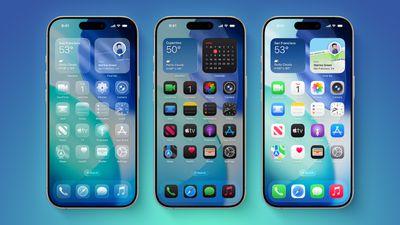
- A new "Clear" option for Home Screen app icons and widgets, alongside the existing "Light" and "Dark" options
- On the Lock Screen, the clock dynamically adapts to fill empty space
- On the Lock Screen, there is an option to view full-screen album artwork
- Polls in group chats in the Messages app
- Add a custom background to any conversation in the Messages app
- You can now send and receive Apple Cash in group chats in the Messages app
- Typing indicators are now visible in group chats in the Messages app
- There is a new "Add Contact" button in group chats in the Messages app
- A new "Select" option in the Messages app lets you select a portion of text within a message bubble
- Messages app can screen messages from unknown senders, placing them into an Unknown Senders folder
- Messages app has gained natural language search
- Hold Assist can wait on hold for you during a phone call, and notify you when the live agent is ready for you
- Call Screening automatically answers unknown callers, and asks for their name and the reason for their call, before your iPhone rings
- Live Translation for calls and texts across the Phone, FaceTime, and Messages apps
- A preinstalled Apple Games app lets you discover games, in-game events, and compete with friends with new challenges
- A preinstalled Preview app lets you create, edit, annotate, markup, and export PDFs, plus crop, flip, rotate, and resize images
- Photos app is now split into Library and Collections tabs
- Relevant video thumbnails are now shown in search results in the Photos app
- In the Photos app, you can create 3D spatial versions of photos, which was previously only possible using the Apple Vision Pro
- Camera app has a simpler design with Video and Photo tabs
- In the Camera app, you will receive an alert if a camera lens needs to be cleaned, so long as "Lens Cleaning Hints" is toggled on in the Settings app
- The screenshot editing interface has been slightly redesigned
- In the Settings app, you can now turn off CarPlay screenshots under General → Screen Capture, so that taking a screenshot on your iPhone does not also generate a CarPlay screenshot while the device is connected to CarPlay
- In the Settings app, can now turn off iCloud Drive syncing via cellular data
- Phone app now has an optional all-in-one layout that combines Favorites, Recents, and Voicemails
- Phone app now supports screen sharing and SharePlay during phone calls
- Phone app offers new Monogram styles for contacts
- A new Focus mode lets you silence an individual SIM
- Journal app now lets you create multiple journals
- Journal app entries can now be viewed on a map
- Journal app now lets images be added inline with text
- Passwords app now shows password history
- Safari now has three layouts: Compact, Bottom, and Top
- Safari now offers advanced fingerprinting protection for all browsing by default
- Tips app now offers step-by-step guides for troubleshooting common iPhone issues
- You can now test AirPods beta firmware directly via the Settings app
- You can start recording video in the Camera app by pressing and holding on the stem of AirPods 4 or AirPods Pro 2
- AirPods 4 and AirPods Pro 2 now offer studio-quality audio recording
- AirPods can now detect when you fall asleep and automatically pause audio
- You are now notified when your AirPods are fully charged
- You can be reminded to charge your AirPods when their battery life is low
- AirPods audio can now automatically switch to CarPlay as necessary
- You can now set a custom snooze duration of 1 to 15 minutes in the Clock app
- Visual Intelligence now works with on-screen content, so you can ask ChatGPT questions about what you are looking at
- Visual Intelligence can now read aloud and summarize screenshots with text
- Genmoji can now combine two standard emoji into one custom one
- Image Playground offers new ChatGPT image styles, including Oil Painting, Watercolor, Vector, Anime, and Print
- In the Shortcuts app, there is a new set of shortcuts powered by Apple Intelligence
- Apple Music lets you pin playlists, albums, and artists at the top of the Library tab
- Apple Music lets you create playlist folders
- Lyrics translation for Apple Music songs
- AutoMix for Apple Music can seamlessly mix from one song to the next like a DJ
- Live Activities support for boarding passes in the Apple Wallet app
- Wallet app now displays relevant information below the boarding pass, such as Apple Maps directions to the appropriate airport terminal, and a shortcut to the Find My app's baggage tracking feature
- Create a digital ID in the Wallet app using your U.S. passport, for age and identity verification in supported apps, and at select stores and TSA checkpoints
- In participating U.S. states, "Verify with Wallet on the Web" enables you to present your driver's license or state ID in the Wallet app to websites for age and identity verification, starting with Chime, Turo, Uber Eats, and U.S. Bank, as well as the Arizona MVD, Georgia DDS, and Maryland MVA
- You can now manage AutoFill credit cards in the Wallet app
- When toggled on, a new Adaptive Power mode can make small adjustments to extend battery life, such as by slightly lowering display brightness or allowing certain background activities to take longer
- In the Settings app, you can see how long it will take for your iPhone's battery to achieve a full charge when the device is charging
- The entire Battery section of the Settings app was overhauled
- A new "Keep Audio in Headphones" setting prevents audio from automatically switching to newly connected devices, like car speakers or Bluetooth speakers, when you are already listening through AirPods or other headphones
- You can now access a list of blocked contacts via the Settings app
- Safety Check is now an option when blocking a contact
- Apple News+ subscribers in the U.S. and Canada can play a new Emoji Game
- A new set of Background Sounds include Babble, Steam, Airplane, Boat, Bus, Train, Rain on Roof, and Quiet Night
- The so-called Home bar at the bottom of the screen is now hidden more often
- Weather via satellite will allow you to receive the latest forecast information while outside of Wi-Fi or cellular range
- In the Notes app, notes can be exported as a Markdown file
- With Apple Intelligence, the Reminders app can suggest tasks, grocery items, and follow-ups based on emails or other text on your device
- Apple Intelligence can automatically categorize reminders in the Reminders app
- You can now create reminders in the Reminders app via the Action button
- Apple Maps can now learn your commute between home and work, and notify you if there are any significant delays along your typical route, and offer alternate routes if available
- Apple Maps can intelligently detect and save the places that you frequently visit and spend time in, such as restaurants or stores
- Apple Maps now lets you choose from additional types of incidents on the "Report an Incident" screen
- You can use an iPhone as a wireless microphone for the Apple Music Sing feature on the Apple TV 4K (3rd generation)
- In the Apple Podcasts app, there are now a wider range of playback speed options, from 0.5x to 3x
- In the Apple Podcasts app, an Enhance Dialogue option lets you hear speech more clearly over background sounds
- In the Apple Wallet app, Apple Intelligence can now automatically identify, summarize, and display order tracking details from emails sent from merchants or delivery carriers
- Apple Pay now lets you use rewards and installments for in-store purchases
- Custom Plans in Apple Fitness+ now automatically create a personalized schedule based on users' workout and meditation preferences
- New accessibility features, such as Accessibility Reader and Braille Access
- Personal Voice can now create a smoother, more natural-sounding replication of your voice in less than a minute, using only 10 recorded phrases
- Vehicle Motion Cues has gained new options to further help reduce motion sickness
- Parents can now create or move kids into Child Accounts even more easily
- Parents can grant an exception for their child to download an app with an age rating that exceeds the app content restriction they set
- Enhancements across Communication Limits, Communication Safety, and the App Store include parental approvals for contact requests from kids, and blurring out sensitive content in FaceTime calls and photos in Shared Albums
- There is a new "Transfer From Android" option during eSIM setup
- Wi-Fi Aware is now supported
- You can now sync captive Wi-Fi portal login information across Apple devices
- Arabic calculator
- Multiscript keyboard for Arabic/English
- You can now specify spelling while using the Dictation feature
- Liquid Glass design extends to CarPlay when using an iPhone running iOS 26
- CarPlay now can now show Live Activities on the Dashboard screen
- CarPlay can now display widgets for things like calendar appointments and Home app accessory controls (previously CarPlay Ultra only)
- CarPlay now has a compact view for incoming phone calls
- CarPlay now shows pinned conversations in the Messages app
- CarPlay now lets you respond to messages with the standard set of Tapbacks in the Messages app
Related Forum: iOS 26