iPadOS 26 Gains Revamped Files App - MacRumors
Skip to Content

iPadOS 26 Gains Revamped Files App

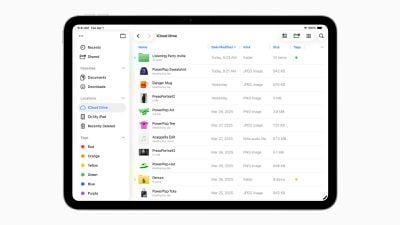
iPadOS 26 introduces new capabilities for managing, accessing, and editing files.
ipados 26 files app
The iPad's Files app is enhanced with a new List view that features resizable columns and collapsible folders, allowing users to see more document details at a glance and organize their files. To help users identify folders more easily, the app now supports folder customization with custom colors, icons, and emoji, all of which sync across devices.

For quicker access, users can drag any folder from the Files app directly into the Dock. ‌iPadOS 26‌ also allows users to set a default app for opening specific files or file types.

Popular Stories

Apple Event Logo

Apple Unveiled Four New Products Today

Tuesday August 25, 2026 8:39 am PDT by
Apple today unveiled a new Mac mini with M6 and M5 Pro chip options, a new Mac Studio with M5 Max and M5 Ultra chip options, a new version of the Polishing Cloth with a lower price, and updated Magic Keyboards for Macs. To learn more about these products, read our coverage below: Apple Announces New Mac Mini With M6 and M5 Pro Chips and More Apple Unveils New Mac Studio With M5 Max and M5...

Apple Logo Gradient 16x9 1

Apple Just Made an Extremely Rare Product Announcement

Thursday August 27, 2026 7:58 am PDT by
The new Mac mini and Mac Studio models unveiled by Apple this week are the company's first new Macs announced in August since 2020. It is extremely rare for Apple to announce new products of any kind in August, excluding smaller things like new color options and accessories. As mentioned, Apple's last notable August product announcement was in 2020, when it updated the 27-inch iMac and a...

apple magic keyboard with glyphs 2026 refresh

Apple Quietly Refreshes Magic Keyboards

Tuesday August 25, 2026 7:22 am PDT by
Apple today quietly introduced updated Magic Keyboard models with revised U.S. English key labeling. On the new keyboards, the tab, caps lock, shift, return, and delete keycaps are labeled with glyphs rather than edge text. On the full-size models with a numeric keypad, the change goes further, with the home, page up, page down, end, clear, and enter keys also swapping their text labels for...

Top Rated Comments

filmantopia Avatar
16 months ago
They did it. The iPad is way more Mac-like now. Great job Apple.
Score: 22 Votes (Like | Disagree)
16 months ago

Just get a Mac if you really need to do something productive.

Jesus. This whole "I want Mac on my iPad" is a complete waste of millions of hours of engineering
What is a waste is M4 power for iPad just for watching videos.
Score: 13 Votes (Like | Disagree)
filmantopia Avatar
16 months ago

Just get a Mac if you really need to do something productive.

Jesus. This whole "I want Mac on my iPad" is a complete waste of millions of hours of engineering
I think they did a good job keeping it simple for times you want the basic iPad experience, while making more complex workflows possible when they're called for.
Score: 13 Votes (Like | Disagree)
16 months ago
It looks cool but fundamentally it doesn’t matter what they do with it unless they make it extendable. Oh sorry, someone sent me a RAR, guess I can’t open it. Oh you sent a mkv, I can’t that sorry.

It’s nice for a bit more control, but in the end, it’s still going to fall short. Something this new Apple seems quite good at doing. Cool F1 roof race bruh.
Score: 9 Votes (Like | Disagree)
16 months ago
Will it finally be possible to sort by name but keep folders separated at the top?
Score: 9 Votes (Like | Disagree)
16 months ago

Just get a Mac if you really need to do something productive.

Jesus. This whole "I want Mac on my iPad" is a complete waste of millions of hours of engineering
Lol or just don’t use the features :)
Score: 8 Votes (Like | Disagree)











































