HomeKit in iOS 18 Includes Guest Access, Hands-Free Unlock, Electricity Usage Integration and More

HomeKit and the Home app weren't focused on much during Apple's WWDC keynote, but there are several new features that are coming in iOS 18, iPadOS 18, and macOS Sequoia.
home app ios 18 features
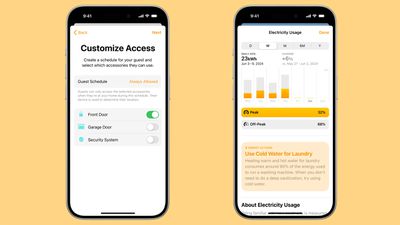
With Customize Access, you can manage how and when people can access your ‌HomeKit‌ devices like garage openers, alarm systems, and door locks. You can create guest schedules and specific accessories that your guests can use, limiting times that your home is accessible. A home hub is required for this feature.

You can enable Express Mode for unlocking door locks automatically as you approach with an iPhone or an Apple Watch, so you don't need to tap your device to the lock to get it to open. You'll need an ‌iPhone‌ or Apple Watch with an Ultra Wideband chip for this to work, along with an Ultra Wideband lock.

Later this year, Apple plans to add support for robot vacuum cleaners. The Home app will support the core functionality of robot vacuums, like power control, cleaning mode, vacuum, mop, and charge status. The vacuums can also be used in automations and scenes, and respond to Siri requests.

Apple is adding electricity usage integration into the Home app, but it's only available to select Pacific Gas and Electric Company customers in the United States to begin. With this feature, users can see their home electricity usage from the Home app, along with rate plan.

Electricity usage integration is coming later in 2024, and Apple also plans to add other providers in the future.


Related Forums: iOS 18, iPadOS 18

Popular Stories

m5 macbook pro deal

Why You Shouldn't Buy the Next MacBook Pro

Tuesday February 10, 2026 4:27 pm PST by
Apple is planning to launch new MacBook Pro models as soon as early March, but if you can, this is one generation you should skip because there's something much better in the works. We're waiting on 14-inch and 16-inch MacBook Pro models with M5 Pro and M5 Max chips, with few changes other than the processor upgrade. There won't be any tweaks to the design or the display, but later this...
iOS 26

Apple Releases iOS 26.3 and iPadOS 26.3

Wednesday February 11, 2026 10:07 am PST by
Apple today released iOS 26.3 and iPadOS 26.3, the latest updates to the iOS 26 and iPadOS 26 operating systems that came out in September. The new software comes almost two months after Apple released iOS 26.2 and iPadOS 26.2. The new software can be downloaded on eligible iPhones and iPads over-the-air by going to Settings > General > Software Update. According to Apple's release notes, ...
Apple Logo Zoomed

Apple Expected to Launch These 10+ Products Over the Coming Months

Tuesday February 10, 2026 6:33 am PST by
It has been a slow start to 2026 for Apple product launches, with only a new AirTag and a special Apple Watch band released so far. We are still waiting for MacBook Pro models with M5 Pro and M5 Max chips, the iPhone 17e, a lower-cost MacBook with an iPhone chip, long-rumored updates to the Apple TV and HomePod mini, and much more. Apple is expected to release/update the following products...
iPhone 16e Bottom Crop

Apple Reportedly Unveiling a New iPhone Next Week

Tuesday February 10, 2026 1:51 pm PST by
Apple plans to announce the iPhone 17e on Thursday, February 19, according to Macwelt, the German equivalent of Macworld. The report said the iPhone 17e will be announced in a press release on the Apple Newsroom website, so do not expect an event for this device specifically. The iPhone 17e will be a spec-bumped successor to the iPhone 16e. Rumors claim the device will have four key...
Apple Logo Black

Apple Acquires New Database App

Wednesday February 11, 2026 6:44 am PST by
Apple acquired Canadian graph database company Kuzu last year, it has emerged. The acquisition, spotted by AppleInsider, was completed in October 2025 for an undisclosed sum. The company's website was subsequently taken down and its Github repository was archived, as is commonplace for Apple acquisitions. Kuzu was "an embedded graph database built for query speed, scalability, and easy of ...

Top Rated Comments

xizdun Avatar
22 months ago
When will HomeKit add the option for when I say "My bedroom", it can differentiate between the different bedrooms in the house?

Parents: "My bedroom" = Master bedroom
Child 1: "My bedroom" = Child 1's bedroom
Child 2: "My bedroom" = Child 2's bedroom
etc.

Example: "Turn [my] bedroom lights off." and it knows exactly which bedroom I'm referencing.
Score: 6 Votes (Like | Disagree)
Diopter Avatar
22 months ago
What I really want is for them to have fixed the incredibly buggy camera UI.
Score: 6 Votes (Like | Disagree)
Arran Avatar
22 months ago
My stairs are right inside my front door. So are we saying that every time I run upstairs or downstairs my front door is going to unlock?

Or if I’m out mowing the front lawn the door will unlock when I approach? Too much automation.

Personally, I love express mode triggered by just waving my Apple Watch near my front door lock. I can do it with full hands. Super easy but still intentional.
Score: 3 Votes (Like | Disagree)
NightFox Avatar
22 months ago

I thought that’s why they gave the option of creating rooms with any name you want. Name a room Timmy or Sally, whatever, add devices. “Hey Siri, turn the lights on in Timmy‘s room.”, they turn on.

If not, https://www.macrumors.com/how-to/how-to-set-up-homepod-multi-user-voice-recognition/, may work if you have HomePods. First option seems easier to me though.
I think the OP is asking about context-aware requests, so it know's that if Sally says 'my room', it mean's Sally's room, whereas if Timmy says 'my room' it means his room. It makes for more natural commands.
Score: 3 Votes (Like | Disagree)
Kaptajn Haddock Avatar
22 months ago
Perhaps they should fix Homekit bugs first, like it never registers when everybody has left the house, so no automations are triggered.
Score: 3 Votes (Like | Disagree)
22 months ago
Nevermind locks, get the UWB & AI activated on the HomePods and make it contextually aware. Can't count the number of times I'll be in the living room watching something & I'll say something like, Hey Siri play.... meaning for the Apple TV I'm watching, the phones pick it up & start playing music through the phone, or Siri turn something off & it doesn't know the only thing that's on.

I'm hoping there's more updates to Home than this.
Score: 2 Votes (Like | Disagree)