iOS 18 and macOS Sequoia Let Websites and Apps Automatically Update Existing Logins to Passkeys
With the new Passwords app in iOS 18, iPadOS 18, and macOS Sequoia, there's a feature that is designed to allow websites and apps to upgrade existing accounts to passkeys automatically.
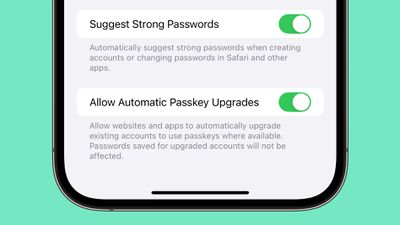
Enabled by default, the feature will speed up the adoption of passkeys, which are more secure than a traditional login and password. Passkeys log you in with Face ID or Touch ID rather than a password, and because on-device authentication is required, passkeys put a stop to online attacks like phishing. There's no password to steal or authentication code that can be intercepted.
Several popular websites and services have implemented Passkey support since Apple started using passkeys in 2022, including Twitter, Google, WhatsApp, TikTok, PayPal, Best Buy, Microsoft, PlayStation, and eBay.
Passkeys are supported in the new Passwords app that's available in iOS 18, iPadOS 18, macOS Sequoia, and Windows PCs through iCloud for Windows.
Popular Stories
Apple is launching five new products on Friday, November 6, following pre-orders that opened last week, including its first touchscreen MacBook Pro models.
The following new products will be available from today:
iPad mini with OLED display and A20 Pro chip
iMac with M6 chip
14-inch MacBook Pro with M6 chip
14-inch MacBook Pro with OLED touchscreen
16-inch MacBook Pro with OLED...
Apple today announced that its Festival Place store in Basingstoke, England will be permanently closing on Saturday, November 21.
Apple Festival Place
Apple had already announced that the store would be closing in November, but it had not provided the public with a specific date until now.
Apple's store inside the Festival Place shopping center opened in 2011, so it had a 15-year run....
Apple is sending email surveys to some iPhone Duo buyers to get feedback on display size, crease, under-display camera, and other features.
The first question asks why the buyer chose the iPhone Duo now, with answers like "I wanted to try Apple's first foldable," "It was an impulse purchase," and "I expect smartphone prices to increase."
Other questions ask about the size of the iPhone...