High Power Mode Expands to 14-Inch MacBook Pro With M3 Max Chip
Apple has expanded High Power Mode to the new 14-inch MacBook Pro with the M3 Max chip, according to Six Colors editor-in-chief Jason Snell. The feature was previously only available on the 16-inch MacBook Pro with the M1 Max and M2 Max.
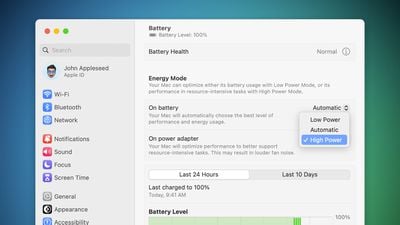
"For some tests, I switched the MacBook Pro into High Power Mode, which is now available on both 14- and 16-inch models in the M3 Max configuration," wrote Snell, in his review of the new MacBook Pros. "I didn't actually find it made much of a difference in the tests I was running, but it sure did make the fans kick in at a very loud volume."
In a support document, Apple says High Power Mode allows a MacBook Pro's fans to run at higher speeds, and this additional cooling may allow the system to deliver higher performance for "intensive sustained workloads," such as 8K video color grading.
On macOS Ventura and later, High Power Mode can be enabled in the System Settings app under Battery by clicking on the dropdown menus next to "On battery" or "On power adapter" and selecting the "High Power" option.
9to5Mac was first to report this news.
Popular Stories
Apple has unveiled a whopping nine new products so far this March, including an iPhone 17e, iPad Air models with the M4 chip, MacBook Air models with the M5 chip, MacBook Pro models with M5 Pro and M5 Max chips, the all-new MacBook Neo, an updated Studio Display, a higher-end Studio Display XDR, AirPods Max 2, and now the Nike Powerbeats Pro 2.
iPhone 17e features the same overall design as...
Apple has unveiled nine new products this month, but the wait continues for the next-generation Apple TV 4K and HomePod mini models.
In his Power On newsletter today, Bloomberg's Mark Gurman said new versions of the Apple TV and HomePod mini have been "ready" since last year, but he reiterated that Apple has held off on releasing them until the more personalized version of Siri and other...
iOS 26.4 was released today, and it includes a couple of new features for CarPlay: an Ambient Music widget and support for voice-based chatbot apps.
To update your iPhone 11 or newer to iOS 26.4, open the Settings app and tap on General → Software Update. CarPlay will automatically offer the new features so long as the iPhone connected to your vehicle is running iOS 26.4 or later....