Everything New in iOS 17 Beta 4

Apple has released the fourth beta of the upcoming iOS 17 software release to developers for testing purposes, and like almost all new betas, the operating system brings a number of small tweaks and changes as Apple refines the software ahead of launch.
General iOS 17 Feature Blue Green
Here's everything new that we've found so far in the fourth beta of iOS 17.

NameDrop Toggle

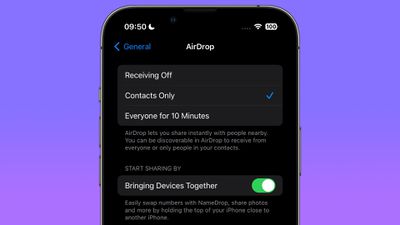
In the AirDrop menu in Settings, Apple has added a "Start Sharing By" section that includes a toggle called "Bringing Devices Together," which allows users to manually switch NameDrop on and off.
namedrop settings toggle
NameDrop is the new iOS 17 feature that lets you hold your iPhone near someone else's ‌iPhone‌ or Apple Watch to exchange contact information. Previously, there was no way to disable it.

iMessage App Menu

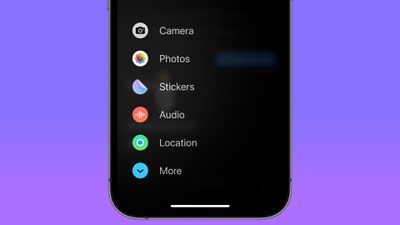
In iOS 17, all Messages apps and tools like the camera and photo options can be accessed by tapping on the "+" button, which brings up a menu column. In fourth beta, Apple has tweaked the design of the icons.
messages apps menu
The Camera icon has changed from a shutter button to a traditional camera glyph. The Photos icon no longer shows the most recent picture taken, and is now just the standard ‌Photos‌ app icon. Cash, where it appears, now has a black circular background. The Audio icon has become a white waveform on a red background instead of a red waveform on a black background, and the Location icon is now encircled in green to look similar to Find My. The More icon is also circular instead of an oblong shape.

Standby Notification Preview Toggle

In the Standby menu in Settings, Apple has added a toggle called "Show Preview on Tap Only," which when enabled causes Standby to hide the preview of a notification until you tap on it.
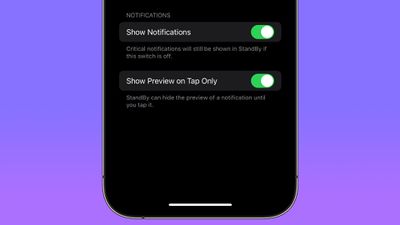
standby preview toggle
When you're not using your ‌iPhone‌, you can put it horizontally on a charger to activate iOS 17's new StandBy mode, a full-screen display with information you can see at a glance.

Mental Wellbeing

Apple has made minor design refinements to the Mental Wellbeing section of the Health app, with updated animations when logging your mood.
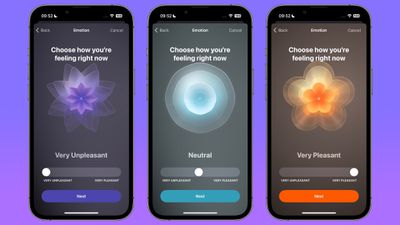
log mood animations
The animations have been made a little less angular, and are now softer, smoother, and slightly more florid.

New Home Screen & App Library Icon

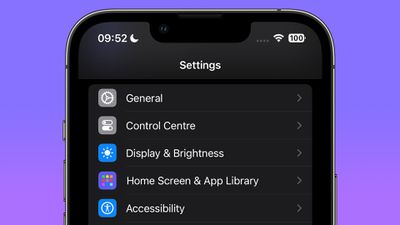
Apple has changed the Settings menu icon for Home Screen & App Library, which was previously a white outline of an ‌iPhone‌ showing a ‌Home Screen‌ on a blue background.

home screen settings
In the fourth beta, it is now represented by three rows of multicolored app-style icons on a purple background.

Tweaked Apple TV Remote Icon

In Control Center, Apple has made a minor tweak to the Apple TV Remote button, which now has a black circle representing the click wheel, while the Standby button in the top-right corner has been removed.
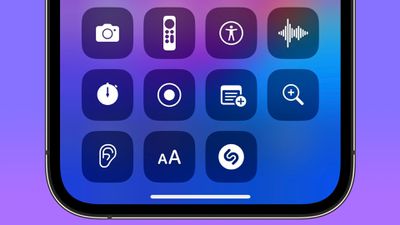
apple remote button

Other New Features and Changes

Find something that we didn't mention here? Let us know in the comments below.

Related Forums: iOS 17, iPadOS 17

Popular Stories

iOS 26

When Will Apple Release iOS 26.2?

Monday December 1, 2025 4:37 pm PST by
We're getting closer to the launch of the final major iOS update of the year, with Apple set to release iOS 26.2 in December. We've had three betas so far and are expecting a fourth beta or a release candidate this week, so a launch could follow as soon as next week. Past Launch Dates Apple's past iOS x.2 updates from the last few years have all happened right around the middle of the...
Sad Siri Feature

Apple AI Chief John Giannandrea Retiring After Siri Delays

Monday December 1, 2025 2:16 pm PST by
Apple AI chief John Giannandrea is stepping down from his position and retiring in spring 2026, Apple announced today. Giannandrea will serve as an advisor between now and 2026, with former Microsoft AI researcher Amar Subramanya set to take over as vice president of AI. Subramanya will report to Apple engineering chief Craig Federighi, and will lead Apple Foundation Models, ML research, and ...
Netflix Smaller 4

Netflix Kills Casting From Its Mobile App to Most Modern TVs

Monday December 1, 2025 4:36 am PST by
Netflix has quietly removed the ability to cast content from its mobile apps to most modern TVs and streaming devices, including newer Chromecast models and the Google TV Streamer. The change was first spotted by users on Reddit and confirmed in an updated Netflix support page (via Android Authority), which now states that the streaming service no longer supports casting from mobile devices...
Cyber Week Deals 2025

Best Cyber Week Apple Deals Include Big Discounts on AirPods, Apple Watch, and More

Sunday November 30, 2025 7:33 am PST by
Cyber Week is here, and you can find popular Apple products like AirPods, iPad, Apple Watch, and more at all-time low prices. In this article, the majority of the discounts will be found on Amazon. Note: MacRumors is an affiliate partner with some of these vendors. When you click a link and make a purchase, we may receive a small payment, which helps us keep the site running. Specifically,...
maxresdefault

iPhone Fold: Launch, Pricing, and What to Expect From Apple's Foldable

Monday December 1, 2025 3:00 am PST by
Apple is expected to launch a new foldable iPhone next year, based on multiple rumors and credible sources. The long-awaited device has been rumored for years now, but signs increasingly suggest that 2026 could indeed be the year that Apple releases its first foldable device. Subscribe to the MacRumors YouTube channel for more videos. Below, we've collated an updated set of key details that ...
studio display purple february

M5 iPad Pro Could Hint at New Studio Display Feature

Sunday November 30, 2025 10:30 am PST by
The updated specs of the M5 iPad Pro may point toward a major new feature for Apple's next-generation Studio Display expected in early 2026. Apple's latest iPad Pro debuted last month and contains one display-related change that stands out: it can now drive external monitors at up to 120Hz with Adaptive Sync. The feature should deliver lower latency, smoother motion, and fewer visual...
Touchscreen MacBook Feature

Here Are the Four MacBooks Apple Is Expected to Launch Next Year

Monday December 1, 2025 5:00 am PST by
2026 could be a bumper year for Apple's Mac lineup, with the company expected to announce as many as four separate MacBook launches. Rumors suggest Apple will court both ends of the consumer spectrum, with more affordable options for students and feature-rich premium lines for users that seek the highest specifications from a laptop. Below is a breakdown of what we're expecting over the next ...
iPhone Pocket Short

iPhone Pocket is Now Completely Sold Out Worldwide

Tuesday November 25, 2025 7:16 am PST by
Apple recently teamed up with Japanese fashion brand ISSEY MIYAKE to create the iPhone Pocket, a limited-edition knitted accessory designed to carry an iPhone. However, it is now completely sold out in all countries where it was released. iPhone Pocket became available to order on Apple's online store starting Friday, November 14, in the United States, France, China, Italy, Japan, Singapore, ...
iOS 26

What to Expect From Apple This December: iOS 26.3 Beta, Replay 2025, and More

Monday December 1, 2025 8:40 am PST by
The calendar has turned to December, and the quieter year-end holiday season is now upon us. Nevertheless, we can still expect a few things from Apple this month. Apple previously announced that iOS 26.2 will be released to the general public in December, and we can expect corresponding updates to be released as well, including iPadOS 26.2, macOS 26.2, watchOS 26.2, tvOS 26.2, and visionOS...
ios 18 to ios 26 upgrade

Apple Pushes iPhone Users Still on iOS 18 to Upgrade to iOS 26

Tuesday December 2, 2025 11:09 am PST by
Apple is encouraging iPhone users who are still running iOS 18 to upgrade to iOS 26 by making the iOS 26 software upgrade option more prominent. Since iOS 26 launched in September, it has been displayed as an optional upgrade at the bottom of the Software Update interface in the Settings app. iOS 18 has been the default operating system option, and users running iOS 18 have seen iOS 18...

Top Rated Comments

dreamerstree Avatar
31 months ago
I found in the beta that you can reorder or change the defaults in the messages + screen.

If you tap the +, you can touch and hold, and then drag the options to reorder them. If you go to more, you can touch and hold and then drag to the top of the screen to add the item to the defaults list. Likewise, you can remove defaults by dragging them to the bottom of the screen
Score: 15 Votes (Like | Disagree)
hagar Avatar
31 months ago

A lot of nothing ?
What did you expect? iOS 18?
Score: 10 Votes (Like | Disagree)
SkimPappa Avatar
31 months ago

I found in the beta that you can reorder or change the defaults in the messages + screen.

If you tap the +, you can touch and hold, and then drag the options to reorder them. If you go to more, you can touch and hold and then drag to the top of the screen to add the item to the defaults list. Likewise, you can remove defaults by dragging them to the bottom of the screen
Thank you so much! It was driving me bananas that they were hiding one that I use all the time! This was so wonderful to learn!
Score: 8 Votes (Like | Disagree)
il_teo77 Avatar
31 months ago
I don't know if it is new or not. But when you ask Siri to perform a task and it cannot do it immediately there is now a sound when the app is "thinking". I know I didn't explain myself very well, but I hope you get the idea.
Score: 8 Votes (Like | Disagree)
thiscatisfat Avatar
31 months ago
Can't wait to make my 12 mini even slower with iOS 17.
Score: 7 Votes (Like | Disagree)
secDJ Avatar
31 months ago
Horrible that they removed the thin font option from the Lock Screen. It looked so clean. Why not giving people options? tThey have the slider anyways.
Score: 6 Votes (Like | Disagree)