iOS 17 Promises to Dramatically Improve iPhone's Autocorrect
Apple today previewed iOS 17 for the iPhone, and one of the key new features coming with the update is improved autocorrect functionality.
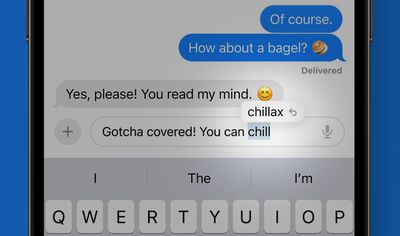
Apple says iOS 17 includes a state-of-the-art language model for word prediction that will greatly improve autocorrection on the iPhone. Any time you type, on-device machine learning will intelligently correct mistakes with greater accuracy than ever before. In addition, you will now receive predictive text recommendations inline as you type, allowing for words or complete sentences to be added by tapping the space bar.
Autocorrection has an updated design on iOS 17 that briefly underlines an autocorrected word. Tapping on an underlined word reveals the original word that you typed, making it easy to quickly revert the change. The system will also learn your typing habits over time and avoid some corrections, which Apple's software engineering chief Craig Federighi said is designed for "those moments where you just want to type a ducking word."
iOS 17 is available in beta starting today for members of Apple's Developer Program, and will be publicly released later this year. Autocorrection can be enabled or disabled in the Settings app under General → Keyboard → Auto-Correction.
Popular Stories
Apple is releasing five new products this Friday, November 6, following pre-orders that opened last week, including its first touchscreen MacBook Pro models.
The following new products will be available from Friday:
iPad mini with OLED display and A20 Pro chip
iMac with M6 chip
14-inch MacBook Pro with M6 chip
14-inch MacBook Pro with OLED touchscreen
16-inch MacBook Pro with OLED...
Apple's busiest season isn't over yet. Far from it. With two hardware launch dates still to come in November, plus software updates and new smart home accessories running into December, there's more on the way from Apple before the end of 2026, so be sure to stick around.
Below, we've rounded up what's still coming, along with one date in particular that's worth watching if you're a holiday...
Apple is releasing five new products this Friday, November 6, following pre-orders that opened last week, including its first touchscreen MacBook Pro models.
The following new products will be available from tomorrow:
iPad mini with OLED display and A20 Pro chip
iMac with M6 chip
14-inch MacBook Pro with M6 chip
14-inch MacBook Pro with OLED touchscreen
16-inch MacBook Pro with OLED...
















































