Zillow's iOS App Gains Apple Maps Look Around Integration
Zillow today announced that it has integrated the Apple Maps Look Around feature into its real estate app, allowing potential home buyers to get a closer look at the neighborhood around a house they are interested in.
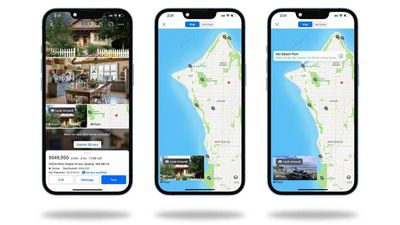
Apple with iOS 16 added the Apple Maps Look Around feature to the MapKit API that is available to developers, letting developers add the feature to third-party apps for the first time. Third-party apps are also now able to use MapKit with the new 3D map experience that is available in some areas.
Zillow says that with interactive floor plans and 3D tours, the Look Around integration makes it "easier than ever" to get a "deep sense of your home and community." Look Around can be accessed from Zillow listing pages using the Zillow app for iOS devices.
The Zillow app has already integrated SharePlay, with Zillow also rolling out support for Shared with You. Shared with You will let Zillow app users see listings in the Zillow app that have been shared with them through the Messages app on iOS and Mac devices.
Zillow can be downloaded from the App Store for free. [Direct Link]
Popular Stories
Apple this week shared a new Advertising Services policy outlining the kinds of ads that won't be allowed in the Maps app.
As noted by TechCrunch, Apple has a list of ad categories that are not permitted in Apple Maps.
Home services - Ads that directly or indirectly promote home services are not allowed. That includes but is not limited to plumbing, electrical, locksmith, HVAC, pest...
Apple and Ford today announced announced that Apple Maps will power the navigation system in Ford's upcoming Universal Electric Vehicle (UEV) Platform, launching in 2027 at a price point around $30,000.
The integration leverages Apple's new MapKit for Automotive SDK, allowing Ford to embed Apple Maps directly into the vehicle's displays while maintaining the ability to customize the...
It is now August, and that means the iPhone 18 Pro and iPhone 18 Pro Max are just a month away. The devices are expected to look similar to the iPhone 17 Pro and iPhone 17 Pro Max, but there will still be many year-over-year changes, with rumored features including a smaller Dynamic Island, 5G via satellite, and more.
Apple is expected to unveil the iPhone 18 Pro, iPhone 18 Pro Max, and a...