Google Launches 'Switch to Android' iOS App to Attract iPhone Users
Google this week launched a new "Switch to Android" app on iOS, which is designed to make it easy for iPhone users to swap over to an Android-based device.
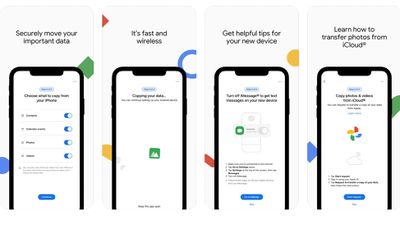
As noted by TechCrunch, Google rolled the app out on Monday in the United States and several other markets, but with little fanfare. The app promises to help users securely move important data, quickly and wirelessly.
Google already maintains a "Switch to Android" website with instructions for transitioning, but the app should make it even easier. iPhone to Android switchers can swap over photos, videos, contacts, and calendar events, plus Google provides instructions on turning off iMessage and moving photos and videos from iCloud.
Apple has its own competing website designed for Android users that want to swap over to iPhone, along with a dedicated "Move to iOS" app that transfers contacts, message history, photos and videos, web bookmarks, mail accounts, and calendars. Apple's app works just like Google's, with wireless data transfer capabilities.
Popular Stories
Apple has temporarily removed Keynote, Pages, and Numbers from the App Store, just after releasing an update that added iPhone Duo support and a new Intelligent Assistant.
It is not clear if the apps were removed intentionally, or if it is a bug. Apple has not said when the apps will be reinstated, but if it was in error, they should return soon.
Update: The Mac versions are back without...
With just three days to go until the iPhone Duo is released, Apple is getting ready for the launch. Behind the scenes, the App Store now has screenshots of Apple's built-in apps running on the Duo. We've seen some apps in marketing materials, but images of the ones we haven't seen give us an idea of what it will be like using the iPhone Duo day to day.
Many apps are shown in landscape...
Apple Music has a 404 page easter egg on the web: a functional iPod that appears when you load a page that does not exist, such as music.apple.com/macrumors.
"Page Not Found," says Apple. "Give this a spin instead."
Apple is clever with this. If you navigate to music.apple.com/ipod instead, the page says "Looking for something?" instead of "Page Not Found."
The easter egg is only...














































![Apple Pulls Keynote, Pages and Numbers From App Store [Update: Back]](https://images.macrumors.com/t/Okb7kitB_gNr6qe5Pex9nQIysD8=/112x112/article-new/2026/01/Apple-Creator-Studio-iWork-suite.jpg)



