Unlock Your Door by Tapping Your iPhone With Schlage's New Smart Lock - MacRumors
Skip to Content

Unlock Your Door by Tapping Your iPhone With Schlage's New Smart Lock

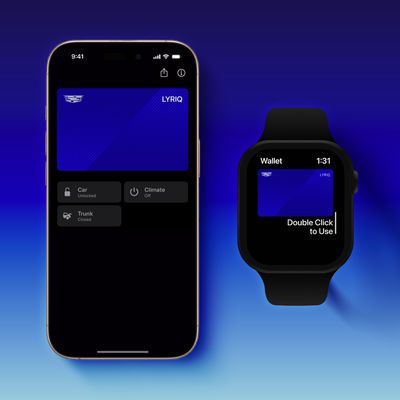
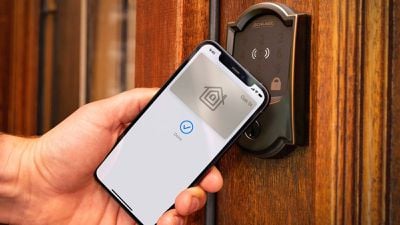
Schlage today released its Encode Plus smart lock with support for Apple's home keys feature in the Wallet app on the iPhone and Apple Watch. The smart lock is available in a variety of finishes at The Home Depot, Lowe's, and Build.com for $300 in the United States.
schlage encode plus iphone
Apple's home keys feature lets you add a key card to the Wallet app, eliminating the need to use a physical key. Upon doing so, you can simply hold a compatible iPhone or Apple Watch near the Encode Plus to lock or unlock the door that it is installed on. The feature, powered by NFC technology, requires an iPhone XR or newer updated to iOS 15 or an Apple Watch Series 4 or newer updated to watchOS 8.

Express Mode allows you to unlock the door by simply holding your iPhone or Apple Watch near the lock, or there is an option to require Face ID or Touch ID as an additional layer of security. With Power Reserve, you may still be able to tap to unlock the door for up to five hours after your iPhone has run out of battery.

Encode Plus also supports HomeKit for controlling the lock with the Home app or Siri voice commands on an iPhone or Apple Watch, as well as Amazon Alexa and Google Assistant. The lock has a physical keypad and a keyhole to unlock the door without a device if necessary, providing peace of mind if you are without your iPhone or Apple Watch.

With built-in Wi-Fi connectivity, the Schlage Encode Plus does not require a smart home bridge or any other hardware. The lock is battery operated, with four AA batteries included and a low-battery indicator built into the keypad.

In the Home app on an iPhone, you can set up access codes for guests who need temporary access to your home.

Encode Plus is the first smart lock to support Apple's home keys feature, but additional options should enter the market over time.

Popular Stories

iOS 26 Wallet Glass Feature

iOS 27 Will Let You Create Custom Wallet Passes

Monday May 4, 2026 11:01 am PDT by
Back in April, we highlighted a new add-your-own card Wallet app option coming in iOS 27, and now Bloomberg has shared additional information. At the time, we said Apple was working on a feature that would let users generate digital passes from scans of things like movie tickets, concert passes, and gym membership cards. The option will be called "Create a Pass," and it will bridge the gap...
Atlantas MARTA Breeze Card Now Available in Apple Wallet Feature

Atlanta's MARTA Breeze Card Now Available in Apple Wallet

Wednesday May 27, 2026 8:10 am PDT by
Starting today, the Metropolitan Atlanta Rapid Transit Authority (MARTA)'s Breeze Card can be added to the Apple Wallet app, allowing commuters in the Atlanta, Georgia area to tap an iPhone or Apple Watch to pay their fare at train stations and on buses. To add the Breeze Card to Apple Wallet, open the app and tap on the plus sign in the top-right corner. Next, tap on Transit Card and scroll ...
apple wallet drivers license feature iPhone 15 pro

Apple Just Expanded iPhone Driver's License Feature to Arkansas

Wednesday May 27, 2026 9:41 am PDT by
In select U.S. states, residents can add their driver's license or state ID to the Apple Wallet app on the iPhone and Apple Watch, and then use it to display proof of identity or age at select airports and businesses, and in select apps. Starting today, the feature is available in Arkansas, which is the 14th state to offer it. However, it may take some time to roll out to all users. To...

Top Rated Comments

macsplusmacs Avatar
54 months ago

Because keys were just such a poor choice...
Actually. Yes. And I have spent years trying to widdle down to no keys. Almost got there last summer. Now back to a few.

But for me.

ALWAYS having fewer keys makes my life just a little bit more stress-free.

Score: 20 Votes (Like | Disagree)
BrennanWDavis Avatar
54 months ago

That's cool, but I never understood these. Won't you still need a key to unlock the door knob? All my exterior doors have a lock on the door knob and a dead bolt. This seems to just replace the deadbolt and unlock that. You still have to take out a physical key to unlock the door knob.

I guess that's your setup, but it's not everyone's. I have a door knob with no lock, and only the deadbolt as my only lock on my front door. This will work perfect for my home.
Score: 10 Votes (Like | Disagree)
nvmls Avatar
54 months ago
Apple™, bricking homes since 2022.
Score: 9 Votes (Like | Disagree)
MrRom92 Avatar
54 months ago
Got the availability email this morning and ordered immediately (Camelot in Satin Nickel) along with a pack of Eneloop Pro AAs, which should hopefully provide a nice long battery life in this unit.
My grandmother now has severe mobility issues and can’t answer the door for anybody, so we were looking for a smart lock that we could open remotely. We held out as long as we possibly could so we could get this version which has HomeKey support, which is really a major plus. Looking forward to installing it.
Score: 8 Votes (Like | Disagree)
macsplusmacs Avatar
54 months ago

Apple™, bricking homes since 2022.
Dumb.

Also, it's Schlage we are talking about.
Score: 8 Votes (Like | Disagree)
54 months ago

Yes, but I have never used the knob lock in any house I have lived in. The deadbolt is far more secure so I never really saw the point of the added hassle. That said, I don't see myself ever going keyless. The off-chance of my phone quitting while I am out exists, and I am not a fan of leaving spare keys hidden about.
If you use a deadbolt, there isn't much to be gained by also locking a doorknob.
Score: 7 Votes (Like | Disagree)