

Aerial 3 Screen Saver for Mac Gains Redesigned UI, New Video Overlay and Storage Options, and More - MacRumors
Skip to Content

Aerial 3 Screen Saver for Mac Gains Redesigned UI, New Video Overlay and Storage Options, and More

Aerial, the popular open-source screen saver that lets you play Apple TV screen saver videos on Mac, has received an annual update that brings some notable new features and possibilities opened up by macOS Monterey.
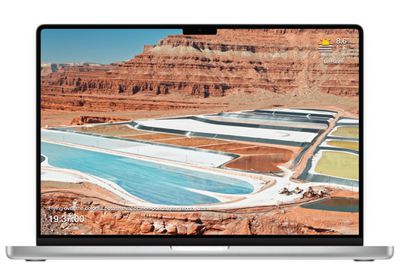
macbookpro aerial
First up, Aerial 3 brings full support for all the videos that tvOS 15 brought to Apple TV, including Grand Canyon and Patagonia, but also the latest Iceland and Scotland videos that Apple released a few weeks back.

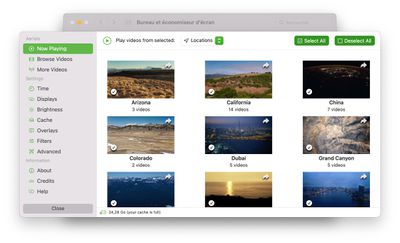
In addition, Aerial 3 introduces an overhauled interface to simplify previously complex tasks. At the center of this redesign is a new "Now Playing" menu that lets users easily make playback selections based on location, favorites, times, scenes, and sources.
mainui
Staying on the topic of sources, thanks to improvements made by Apple in macOS Monterey, Aerial 3 also includes perhaps its most-awaited feature – the ability to store downloaded videos in a custom location, whether that's an internal drive, an external drive, or even a network-shared storage device. In the latter scenario, multiple users on the same machine can also share the same cache.

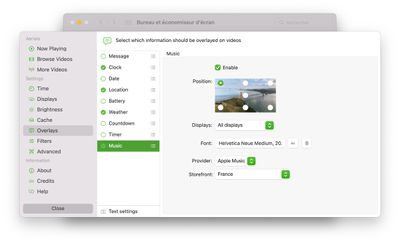
Meanwhile, there are several improvements to custom video overlays, including more options for weather forecasts (with support for wind and humidity), more formats for clocks and dates, and perhaps most notably, support for Apple Music and Spotify to show which track is playing in the background.
aerial music
Lastly, among other improvements, this version adds support for vertical displays and the ability to slow down or speed up videos.

In conjunction with Aerial 3's release, Josh Michael and Hal Bergman, who gifted 20 videos to the project last year, have released over four hours of video filmed in Monterey, New York and around American Southwest for purchase. The production process was reworked so that the content fits with Apple's official aerials, making them slower-paced and longer so they feel just right.

You can download Aerial 3 for free from the Aerial webpage, or use the direct download option on Github.


Popular Stories

iOS 26

iOS 26.4 Adds Two New Features to CarPlay

Tuesday March 24, 2026 1:55 pm PDT by
iOS 26.4 was released today, and it includes a couple of new features for CarPlay: an Ambient Music widget and support for voice-based chatbot apps. To update your iPhone 11 or newer to iOS 26.4, open the Settings app and tap on General → Software Update. CarPlay will automatically offer the new features so long as the iPhone connected to your vehicle is running iOS 26.4 or later....
AirPods Pro Firmware Feature

Apple Releases New Firmware for AirPods Pro 3, AirPods Pro 2 and AirPods 4

Tuesday March 24, 2026 12:31 pm PDT by
Apple today released new firmware for the AirPods Pro 2, AirPods Pro 3, and the AirPods 4. The firmware has a version number of 8B39, up from 8B34 on the AirPods Pro 3, 8B28 on the AirPods Pro 2, and 8B21 on the AirPods 4. There is no word on what's included in the firmware, but Apple has a support document with limited notes. Most updates are limited to bug fixes and performance...
apple tv 4k new orange

tvOS 26.4 Adds These New Features to Your Apple TV

Wednesday March 25, 2026 3:33 pm PDT by
Apple this week released tvOS 26.4, and the software update includes a handful of new features and changes for the Apple TV. tvOS 26.4 is compatible with all Apple TV 4K and Apple TV HD models released since 2015. To update your Apple TV, open the Settings app on the device, navigate to System → Software Updates, and select Update Software. Below, we have recapped what is new in tvOS...

Top Rated Comments

orbital~debris Avatar
55 months ago
Nice, and great to have as an option, but this really should be official Apple and part of macOS.
Score: 16 Votes (Like | Disagree)
55 months ago

What exactly is the new functionality in macOS 12 that allows Aerial to store cached data in custom locations?
Author of Aerial here, it's a long story but to make it short/simple, Apple used to block screen savers from accessing most locations.

They added the ability in Monterey for screen saver developers to "securely" ask for those, so that's the new feature I'm using to make this work.
Score: 13 Votes (Like | Disagree)
blazerunner Avatar
55 months ago

Some of us use older displays! One of my 30" apple cinema displays has some image burn if I leave it for 30 minutes or so, static. So a screensaver still works, in 2022! amazing
Some of us just like to see the world. The images are beautiful.
Score: 11 Votes (Like | Disagree)
guzhogi Avatar
55 months ago
Bring back Flying Toasters! Damn I miss After Dark ('https://en.wikipedia.org/wiki/After_Dark_(software)')! So many cool screensavers!
Score: 8 Votes (Like | Disagree)
55 months ago
I love Aerial and this is fantastic. I just sent a tip to the developer for their hard work since they are not charging for this great screen saver - https://ko-fi.com/glouel
Score: 8 Votes (Like | Disagree)
nathan_reilly Avatar
55 months ago

I haven't used a screen saver since screens stopped needing to be saved
Some of us use older displays! One of my 30" apple cinema displays has some image burn if I leave it for 30 minutes or so, static. So a screensaver still works, in 2022! amazing
Score: 7 Votes (Like | Disagree)















