Universal Control Remains Unavailable in macOS Monterey Beta 10, But Now Has 'Beta' Label
Universal Control, one of the main new features that Apple highlighted for macOS Monterey back in June, has yet to be implemented even in the tenth beta and it is still unclear if it will be available when the software launches.
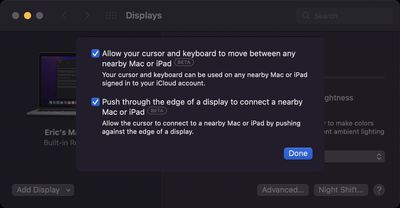
Though not yet implemented, Universal Control settings can be force enabled with a feature flag, and it is clear that Apple is working on it behind the scenes. In the latest beta update released this morning, Universal Control settings that have been manually enabled have a "Beta" label.
The "Beta" labeling suggests that Apple could be planning to make the feature available to users when macOS Monterey launches, even if all the bugs have not been worked out. Apple did something similar for the iCloud+ Private Relay feature, which is also available in a beta capacity at the current time.
Universal Control, which is an iPadOS 15 and Monterey feature, is designed to allow multiple Macs and iPads to be operated the same time using the same input devices, so Mac and iPad owners can use a single mouse and keyboard across more than one Mac, more than one iPad, or a mix of Macs and iPads.
Popular Stories
It is now mid-July, and that means the iPhone 18 Pro and iPhone 18 Pro Max are now just two months away. The devices are expected to look similar to the iPhone 17 Pro and iPhone 17 Pro Max, but there will still be many year-over-year changes, with rumored features including a smaller Dynamic Island, 5G via satellite, and more.
Apple is expected to unveil the iPhone 18 Pro, iPhone 18 Pro Max, ...
While the monthly and annual prices of AppleCare+ plans for Macs and iPads received a slight increase this week, AppleCare One continues to start at $19.99 per month in the U.S., making the multi-device plan even more valuable.
Launched in July 2025, AppleCare One allows you to cover up to three devices as part of a single subscription for $19.99 per month, and additional devices can be...
Apple has increased the price of iCloud+ in Nigeria, Türkiye, Vietnam, Japan, Egypt, New Zealand, the Philippines, and Indonesia, according to an updated version of its iCloud support document.
Price increases range from 11 percent to 55 percent depending on the plan and the country. Nigeria saw the biggest hike, and a 50GB plan is now ₦1,300, up from ₦900. Türkiye saw the next largest...