Apple today released iOS 15 and iPadOS 15, the newest operating system updates designed for the iPhone, iPad, and iPod touch. As with all of Apple's software updates, iOS and iPadOS 15 can be downloaded at no cost. iOS 15 is available on the iPhone 6s and later while iPadOS 15 is available on the iPad Air 2 and later.

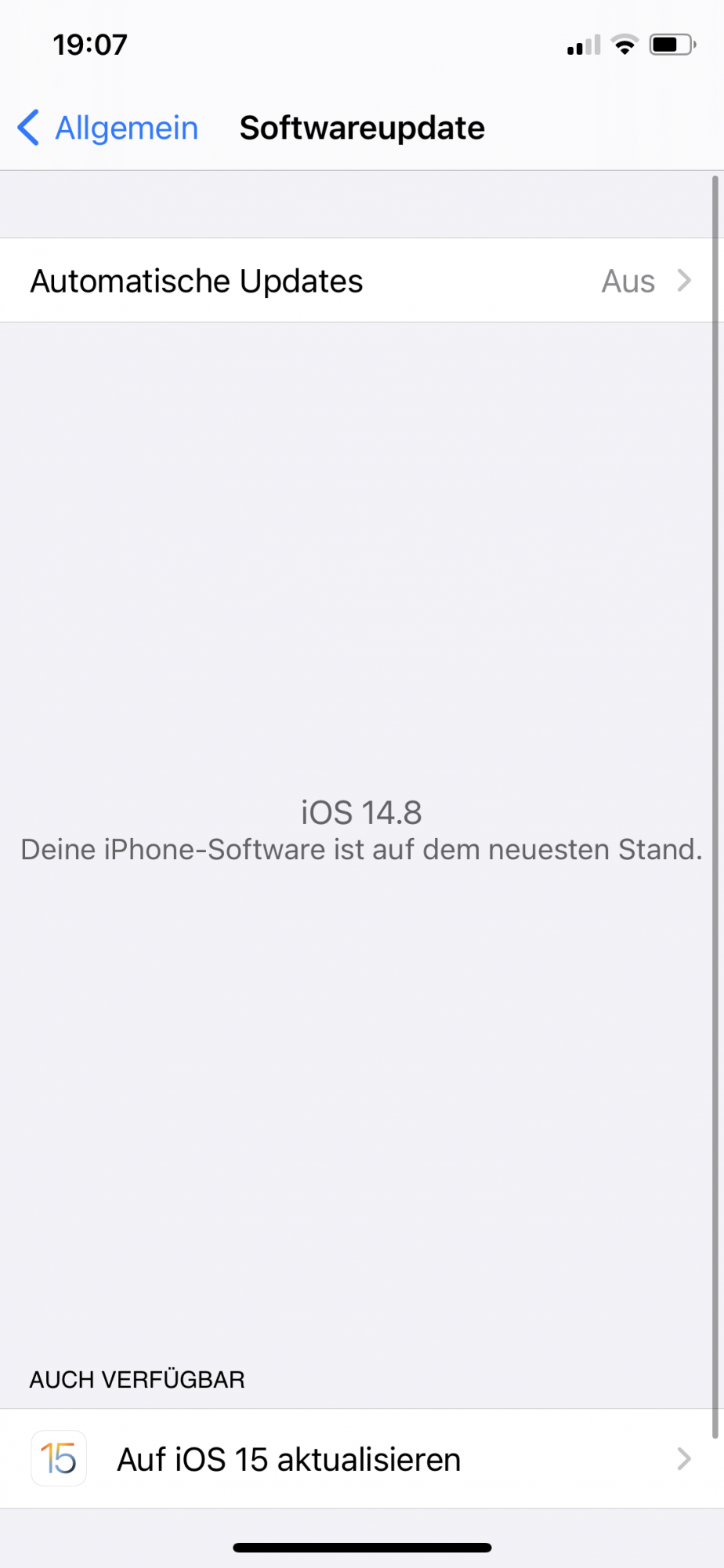
The new software can be downloaded on eligible devices over-the-air by going to Settings > General > Software Update. It may take a few minutes for the updates to propagate to all users due to high demand.
While the update downloads, read over our quick feature highlights below, and make sure to visit our full iOS 15 and iPadOS 15 roundups to get a complete overview of everything that's new.
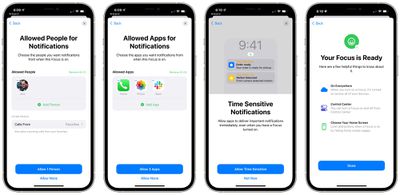
A new Focus mode cuts down on distractions by limiting what's accessible and who can contact you, and notifications can now be grouped up in daily summaries. There's an option for a new Safari design that moves the tab bar to the bottom of the interface, and Tab Groups keep all of your tabs organized.
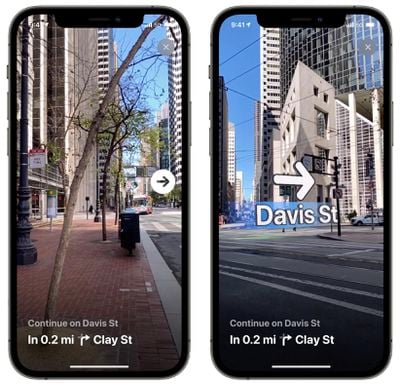
Maps has been overhauled with even more detail, a 3D view in major cities, a globe view, improved transit, a close-up driving view when navigating complicated routes, and AR walking directions.
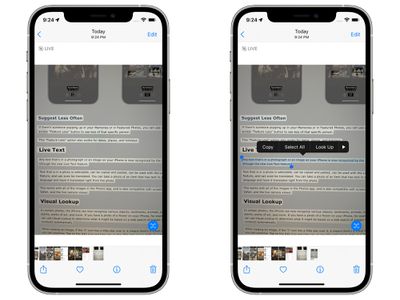
Across the operating system, there's a new Live Text feature that detects text in any image and lets you copy, paste, and translate it, plus there's a system-wide translation feature. In Photos, plants, pets, landmarks, and more can be identified, and there's a system-wide translation feature that goes well with Live Text.
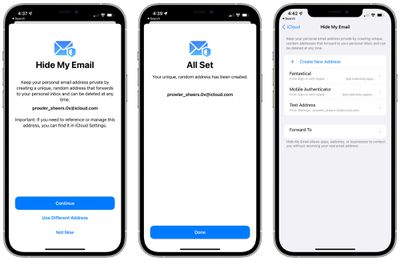
iCloud+ with iCloud Private Relay protects your IP address and obscures your location to prevent websites from tracking you, and a Hide My Email feature lets you create temporary email addresses. You can even use your personal domain with iCloud in iOS 15.
One of the most notable new iOS 15 features, SharePlay, has been delayed and won't be coming until later in the year. SharePlay lets you share your screen with people over FaceTime to watch movies, listen to music together, and more. In the future, you'll also be able to see details on apps that are accessing your sensitive data, and in the Wallet app, you'll be able to add your driver's license. When macOS Monterey launches, Apple will also introduce an iPadOS Universal Control feature that will let a single mouse and keyboard to be used across multiple Macs or iPads.
Apple's full release notes for the iOS 15 update are below:
FaceTime
- Spatial audio makes people’s voices sound like they’re coming from the direction in which they’re positioned on the screen on Group FaceTime calls (iPhone XS, iPhone XS Max, iPhone XR and later)
- Voice Isolation blocks background noises so your voice is crystal clear (iPhone XS, iPhone XS Max, iPhone XR and later)
- Wide Spectrum brings all background noises into your call (iPhone XS, iPhone XS Max, iPhone XR and later)
- Portrait mode blurs your background and puts the focus on you (iPhone XS, iPhone XS Max, iPhone XR and later)
- Grid view displays up to six people at a time in Group FaceTime calls in the same-size tiles and highlights the current speaker
- FaceTime links allow you to invite your friends into a FaceTime call, even friends on Android or Windows devices can join from their browserMessages and Memoji
- Shared with You shows content sent to you by friends in Messages conversations in a new section in Photos, Safari, Apple News, Apple Music, Apple Podcasts, or the Apple TV app
- Pinned content elevates the shared content you choose and makes it more prominent in Shared with You, Messages search, and the Details view of the conversation
- Multiple photos sent in Messages are displayed as a glanceable collage or a swipeable stack
- Over 40 Memoji outfit choices and up to three different colors to customize your Memoji stickers’s clothing and headwearFocus
- Focus lets you automatically filter notifications based on what you’re currently doing, such as fitness, sleep, gaming, reading, driving, work, or personal time
- Focus uses on-device intelligence during set up to suggest apps and people you want to allow notifications from in a Focus
- Home Screen pages can be customized to match your apps and widgets to a specific Focus
- Contextual suggestions intelligently suggest a Focus based on your context, using signals like location or time of day
- Status appears to your contacts in Messages conversations, indicating your notifications are silenced with FocusNotifications
- A new look displays contact photos for people and larger icons for apps
- Notification summary delivers a helpful collection of your notifications daily, based on a schedule you set
- Notifications can be muted from any app or messaging thread for the next hour or for the dayMaps
- Detailed city maps display elevation, trees, buildings, landmarks, crosswalks and turn lanes, and 3D views to navigate complex interchanges, and more in San Francisco Bay Area, Los Angeles, New York, and London, with more cities coming in the future (iPhone XS, iPhone XS Max, iPhone XR and later)
- New driving features include a new map that highlights details like traffic and incidents, and a route planner that lets you view your upcoming journey by choosing a future departure or arrival time
- Immersive walking directions show step-by-step directions in augmented reality (iPhone XS, iPhone XS Max, iPhone XR and later)
- Updated transit experience provides one-tap access to departures near you, makes it easy to see and interact with your route using one hand, and notifies you when approaching your stop
Interactive 3D globe shows enhanced details for mountain ranges, deserts, forests, oceans, and more (iPhone XS, iPhone XS Max, iPhone XR and later)
- Redesigned place cards make it easy to learn about and interact with places, and a new home for Guides editorially curates the best recommendations for places you’ll loveSafari
- Bottom tab bar is easier to reach and helps you move between tabs by swiping left or right
- Tab Groups help you save and organize your tabs and easily access them across devices
- Tab overview grid view displays your open tabs
- Start page can be customized with a background image and new sections like Privacy Report, Siri Suggestions, and Shared With You
- Web extensions on iOS help you personalize your browsing and can be downloaded through the App Store
- Voice search lets you search the web using your voiceWallet
- Home keys let you tap to unlock a supported home or apartment door lock (iPhone XS, iPhone XS Max, iPhone XR and later)
- Hotel keys allow you to tap to unlock your room at participating hotels
- Office keys allow you to tap to unlock your office doors for participating corporate offices
- Car keys with Ultra Wideband help you unlock, lock, and start your supported car without having to take your iPhone out of your bag or pocket (iPhone 11 and iPhone 12 models)
- Remote keyless entry functions on your car keys allow you to lock, unlock, honk your horn, preheat your car, or open your trunk on your supported vehicleLive Text
- Live Text makes text interactive in your photos so you can copy and paste, look up, and translate in Photos, Screenshot, Quick Look, Safari, and live previews with Camera (iPhone XS, iPhone XS Max, iPhone XR and later)
- Data detectors for Live Text recognize phone numbers, emails, dates, street addresses, and more in photos so you can take action on them
- Live Text is available from the keyboard letting you insert text directly from the camera viewfinder into any text fieldSpotlight
- Rich results brings together all the information you’re looking for on contacts, actors, musicians, movies, and TV shows
- Photos can be searched from your photo library by locations, people, scenes, text in the photos or other things in the photos, like a dog or a car
- Web image search allows you to search for images of people, animals, monuments, and morePhotos
- New look for Memories with a new interactive interface, animated cards with smart, adaptive titles, new animation and transition styles, and multiple image collages
- Apple Music can be added to your Memories for Apple Music subscribers, and personalized song suggestions combine expert recommendations with your music tastes and what’s in your photos and videos
- Memory mixes let you set the mood by selecting from different songs and a Memory look to match
- New memory types include additional international holidays, child-focused memories, trends over time, and improved pet memories
- Info pane now displays rich information about the photo like which camera and lens, shutter speed, file size, and more
- Visual Look Up recognizes art, landmarks around the world, plants and flowers, books, and dog and cat breeds in your photos so you can learn more about themHealth
- Sharing lets you choose health data, alerts, and trends to share with people important to you or those who are caring for you, including your healthcare provider
- Trends lets you see how a given health metric is progressing over time and can notify you when a new trend has been detected
- Walking Steadiness is a new metric that can assess your risk of falling and notify you if your walking steadiness is low (iPhone 8 and later)
- Verifiable health records enable you to download and store verifiable versions of COVID-19 vaccines and lab results
- Lab results can now be pinned for quick access and include highlights that show how your labs have changed over timeWeather
- A new design shows the most important weather information for that location and includes new maps modules
- Weather maps can be viewed in full-screen and show precipitation, temperature and air quality in supported countries
- Next-hour precipitation notifications alert you when rain or snow is about to start or stop in Ireland, U.K., and US
- New animated backgrounds more accurately represent the sun position, clouds, and precipitation (iPhone XS, iPhone XS Max, iPhone XR and later)Siri
- On-device processing means audio of your requests does not leave your device by default, and means Siri is able to process many requests while offline (iPhone XS, iPhone XS Max, iPhone XR and later)
- Share items with Siri lets you send on screen items like photos, web pages and Maps locations to any of your contacts
- Onscreen context can be used by Siri to refer to contacts on screen to send them a message or place a call
- On-device personalization allows Siri speech recognition and understanding to improve privately (iPhone XS, iPhone XS Max, iPhone XR and later)Privacy
- Mail Privacy Protection protects your privacy by preventing email senders from learning about your Mail activity, your IP address or whether you've opened their email
- Safari Intelligent Tracking Prevention now also prevents known trackers from profiling you using your IP addressiCloud+
- iCloud+ is a cloud subscription service that gives you premium features and additional iCloud storage
- iCloud Private Relay (beta) sends your requests through two separate internet relays and encrypts the internet traffic leaving your device so you can browse Safari in a more secure and private way
- Hide My Email lets you create unique, random email addresses that forward to your personal inbox so you can send and receive email without having to share your real email address
- HomeKit Secure Video supports connecting more security cameras without using your iCloud storage quota
- Custom email domain personalizes your iCloud Mail address and allows you to invite family members to use the same domainAccessibility
- Image exploration with VoiceOver allows you to get even more details about people and objects, and learn about text and table data in photos
- VoiceOver image descriptions in Markup let you add your own image descriptions that can be read by VoiceOver
- Per-app settings allow you to customize display and text size settings only for the apps you want
- Background sounds play balanced, bright, or dark noise, ocean, rain, and stream sounds continuously in the background to mask unwanted environmental or external noise
- Sound actions for Switch Control enable you to control your iPhone with simple mouth sounds
- Audiograms can be imported in Settings so you can customize Headphone Accommodations based on your hearing test results
- New Voice Control languages include Mandarin Chinese (China mainland), Cantonese (Hong Kong), French (France), and German (Germany)
- Memoji options including a cochlear implant, oxygen tubes, or a soft helmetThis release also includes other features and improvements:
- Tags in Notes and Reminders help you quickly categorize your items to make them easy to find, and you can use custom Smart Folders and Smart Lists to automatically collect your notes and reminders based on rules you can define
- Mentions in Notes enable you to notify others of important updates in shared notes, and an all-new Activity view displays all the recent changes in a note in a single list
- Spatial audio with dynamic head tracking in Apple Music brings an even more immersive experience to Dolby Atmos music with AirPods Pro and
AirPods Max
- System-wide translation lets you select text throughout the system and translate it with a tap, even in photos
- New widgets include Find My, Contacts, App Store, Sleep, Game Center, and Mail
- Cross-app drag and drop function lets you pick up images, documents, and files from one app to another
- Keyboard magnification loupe magnifies the text when moving the cursor
- Apple ID Account Recovery Contacts lets you to choose one or more people you trust to help you reset your password and regain access to your account
- Temporary iCloud storage grants you as much iCloud storage as you need to create a temporary backup of your data, free of charge, for up to three weeks when you buy a new device
- Find My separation alerts notify you if you leave a supported device or item behind and Find My will give you directions to your item
- Game highlights of up to the last 15 seconds of gameplay can be saved using game controllers like the Xbox Series X|S Wireless Controller or Sony PS5 DualSense™ Wireless Controller
- App Store in-app events help you discover timely events within apps and games such as a game competition, a new movie premiere, or a livestreamed experience
More Detail and Discussion
Don't forget to check out our full iOS 15 roundup and our full iPadOS 15 roundup, and you can discuss all of the new features in our dedicated iOS 15 forum.