Apple's MagSafe Battery Pack Unlocks Long Rumored Reverse Charging Feature - MacRumors
Skip to Content

Apple's MagSafe Battery Pack Unlocks Long Rumored Reverse Charging Feature

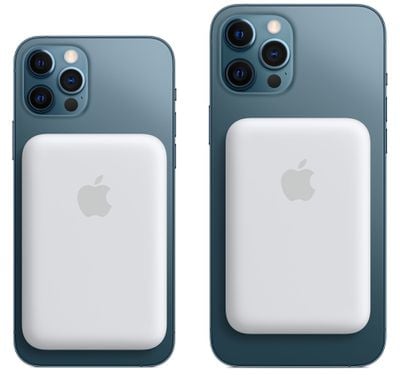
Apple's MagSafe Battery Pack designed for the iPhone 12 models has a unique feature that's long been rumored but never introduced in an Apple product -- reverse wireless charging.
magsafe battery pack 2
When attached to an iPhone that's charging via Lightning, the iPhone can deliver power to the MagSafe Battery Pack, which is the first instance of an iPhone being able to route power to an accessory device.

We've long heard rumors of reverse wireless charging capabilities for the iPhone, a feature that's been talked about as a possibility for both the iPhone 11 and the iPhone 12. Apple hasn't actually implemented reverse wireless charging until now, and the way that it works with the ‌MagSafe Battery Pack‌ is limited in scope.

With the ‌MagSafe Battery Pack‌, the iPhone has to be plugged in for the charging feature to work, but it's certainly a step in the right direction and hints at more expansive reverse wireless charging capabilities in the future. Given the ‌MagSafe Battery Pack‌'s reverse wireless charging feature, it seems technically possible that an iPhone 12 could deliver power to the AirPods or AirPods Pro, but Apple has not yet implemented this feature.

Apple has suggested that ‌MagSafe Battery Pack‌ users might want to use the iPhone passthrough charging feature when the iPhone is connected to a power source like wired CarPlay and is able to charge both accessories.


Popular Stories

8 CarPlay Features in iOS 27 Feature

Which iOS 27 CarPlay Features Actually Work in Your Car?

Thursday September 17, 2026 4:17 am PDT by
In iOS 27, available now, CarPlay gets its biggest update in years, but some features depend on what type of car you have rather than your iPhone model. Some of the biggest additions won't do anything in the vast majority of vehicles on the road today. Here's how the new features pan out. Works in Any CarPlay Vehicle Custom widgets: In iOS 27, CarPlay is no longer limited to Apple's handful ...
Apple Watch New Charging Puck

Here's Why a New Apple Watch Charging Puck Was Just Released

Wednesday September 16, 2026 8:53 am PDT by
The new Apple Watch Series 12 and Apple Watch Ultra 4 have hardware changes that allow for faster charging, but you will need to use the new version of the Apple Watch Magnetic Fast Charger included in the box in order to achieve this boost. If you need extra ones for your own charging stands or travel or so forth, Apple released the new version of the charger on its online store last week, with...
ios272anniversary

iOS 27.2 Could Save Your Marriage

Wednesday September 16, 2026 1:32 pm PDT by
The iOS 27.2 beta that Apple released today adds a feature that reminds you it's your anniversary when you call someone, as long as you've added the date in the Contacts app. On the date of your anniversary, when you go to call the person, you'll see a reminder that it's an important day so you don't forget to say something. The anniversary alert uses Call Context, a feature Apple added in...

Top Rated Comments

szw-mapple fan Avatar
68 months ago
Does this mean I can eventually use the iPhone mini as a MagSafe Battery for a Pro Max? :p
Score: 15 Votes (Like | Disagree)
68 months ago
I’m surprised the rumors were actually true. Hopefully they enable reverse charging for AirPods though I’m not holding my breath.
Score: 11 Votes (Like | Disagree)
arn Avatar
68 months ago

I knew it. This thing has no port.
no, you can plug the battery into the Battery Pack and charge it that way too. And it will also charge the iPhone at the same time. so it goes both ways.

https://support.apple.com/en-us/HT212174

Charge your MagSafe Battery Pack

Before you use your MagSafe Battery Pack for the first time, fully charge it using a Lightning to USB cable with a 20W or higher power adapter.

1. Plug one end of a Lightning to USB cable into the Lightning connector on your MagSafe Battery Pack.
2. Plug the other end of the cable into a 20W or higher USB power adapter, then plug the adapter into a power outlet.
3. You'll see an amber status light while your MagSafe Battery Pack is charging. When the MagSafe Battery Pack is fully charged, you'll briefly see a green status light.
Score: 10 Votes (Like | Disagree)
macsplusmacs Avatar
68 months ago
and the "bulge" is the easiest bulge to put on and take off ever.

if you have plenty of charge in your iphone, don't put it on.

if you are running out of power. put it on.

in this respect much more flexible than the smart case from apple which i loved on my iphone 11.
Score: 9 Votes (Like | Disagree)
68 months ago
$100 for a bulge that has less than half the phone’s capacity.

much less money can buy high quality battery packs with substantially higher capacity, and will charge other things
Score: 9 Votes (Like | Disagree)
Black.Infinity Avatar
68 months ago
As always Apple limits things by its software. Unfortunately I still love iOS.
Score: 7 Votes (Like | Disagree)