iOS 15's Live Text Feature Lets You Digitize Written Notes, Call a Number on a Sign, Translate a Menu, and Much More

In iOS 15, Apple is introducing a new feature called Live Text that can recognize text when it appears in your camera's viewfinder or in a photo you've taken and let you perform several actions with it.

Apple iPadPro iPadOS15 photos LiveText 060721 big
For example, Live Text allows you to capture a phone number from a storefront with the option to place a call, or look up a location name in Maps to get directions. It also incorporates optical character recognition, so you can search for a picture of a handwritten note in your photos and save it as text.

Live Text's content awareness extends to everything from QR codes to emails that appear in pictures, and this on-device intelligence feeds into Siri suggestions, too.

ios15 live text
For instance, if you take a picture that shows an email address and then open the Mail app and start composing a message, ‌Siri‌'s keyboard suggestions will offer up the option to add "Email from Camera" to the To field of your message.

Other Live Text options include the ability to copy text from the camera viewfinder or photos for pasting elsewhere, share it, look it up in the dictionary, and translate it for you into English, Chinese (both simplified and traditional), French, Italian, German, Spanish, or Portuguese.
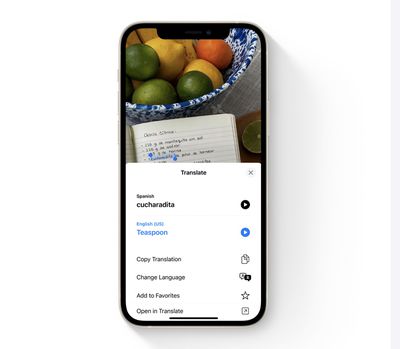
live text translate
It can even sort your photos by location, people, scene, objects, and more, by recognizing the text in pictures. For example, searching for a word or phrase in Spotlight search will bring up pictures from your Camera Roll in which that text occurs.

Live Text works in Photos, Screenshot, Quick Look, and Safari and in live previews with Camera. In the Camera app, it's available whenever you point your iPhone's camera at anything that displays text, and is indicated by a small icon that appears in the bottom right corner whenever textual content is recognized in the viewfinder. Tapping the icon lets you tap recognized text and perform an action with it. A similar icon appears in the ‌Photos‌ app when you're viewing a shot image.

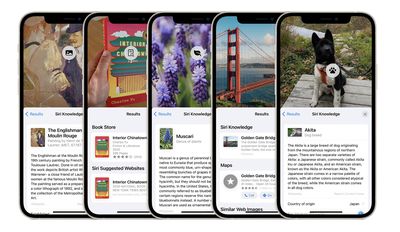
visual look up ios 15
In another neural engine feature, Apple is introducing something called Visual Look Up that lets you take photos of objects and scenes to get more information from them. Point your ‌iPhone‌'s camera at a piece of art, flora, fauna, landmarks, or books, and the Camera will indicate with an icon that it recognizes the content and has relevant ‌Siri‌ Knowledge that can add context.

Since Live Text relies heavily on Apple's neural engine, the feature is only available on iPhones and iPads with at least an A12 Bionic or better chip, which means if you have an ‌iPhone‌ X or earlier model or anything less than an iPad mini (5th generation), iPad Air (2019, 3rd generation), or iPad (2020, 8th generation), then unfortunately you won't have access to it.

The iOS 15 beta is currently in the hands of developers, with a public beta set to be released next month. The official launch of iOS 15 is scheduled for the fall.


Related Forum: iOS 15

Popular Stories

iOS 26

iOS 26.2 Coming Soon With These 8 New Features on Your iPhone

Thursday December 11, 2025 8:49 am PST by
Apple seeded the second iOS 26.2 Release Candidate to developers earlier this week, meaning the update will be released to the general public very soon. Apple confirmed iOS 26.2 would be released in December, but it did not provide a specific date. We expect the update to be released by early next week. iOS 26.2 includes a handful of new features and changes on the iPhone, such as a new...
iOS 26

iOS 26.4 and iOS 27 Features Revealed in New Leak

Friday December 12, 2025 10:56 am PST by
Macworld's Filipe Espósito today revealed a handful of features that Apple is allegedly planning for iOS 26.4, iOS 27, and even iOS 28. The report said the features are referenced within the code for a leaked internal build of iOS 26 that is not meant to be seen by the public. However, it appears that Espósito and/or his sources managed to gain access to it, providing us with a sneak peek...
AirPods Pro Firmware Feature

Apple Releases New Firmware for AirPods Pro 2 and AirPods Pro 3

Thursday December 11, 2025 11:28 am PST by
Apple today released new firmware designed for the AirPods Pro 3 and the prior-generation AirPods Pro 2. The AirPods Pro 3 firmware is 8B30, up from 8B25, while the AirPods Pro 2 firmware is 8B28, up from 8B21. There's no word on what's include in the updated firmware, but the AirPods Pro 2 and AirPods Pro 3 are getting expanded support for Live Translation in the European Union in iOS...
iOS 26

Apple Releases iOS 26.2 With Alarms for Reminders, Lock Screen Changes, Enhanced Safety Alerts and More

Friday December 12, 2025 10:10 am PST by
Apple today released iOS 26.2, the second major update to the iOS 26 operating system that came out in September, iOS 26.2 comes a little over a month after iOS 26.1 launched. ‌iOS 26‌.2 is compatible with the ‌iPhone‌ 11 series and later, as well as the second-generation ‌iPhone‌ SE. The new software can be downloaded on eligible iPhones over-the-air by going to Settings >...
Google maps feaure

Google Maps Quietly Added This Long-Overdue Feature for Drivers

Wednesday December 10, 2025 2:52 am PST by
Google Maps on iOS quietly gained a new feature recently that automatically recognizes where you've parked your vehicle and saves the location for you. Announced on LinkedIn by Rio Akasaka, Google Maps' senior product manager, the new feature auto-detects your parked location even if you don't use the parking pin function, saves it for up to 48 hours, and then automatically removes it once...
AirTag 2 Mock Feature

Apple AirTag 2: Four New Features Found in iOS 26 Code

Thursday December 11, 2025 10:31 am PST by
The AirTag 2 will include a handful of new features that will improve tracking capabilities, according to a new report from Macworld. The site says that it was able to access an internal build of iOS 26, which includes references to multiple unreleased products. Here's what's supposedly coming: An improved pairing process, though no details were provided. AirTag pairing is already...
macOS Tahoe 26 Thumb

Apple Releases macOS Tahoe 26.2 With Edge Light

Friday December 12, 2025 10:08 am PST by
Apple today released macOS Tahoe 26.2, the second major update to the macOS Tahoe operating system that came out in September. macOS Tahoe 26.2 comes five weeks after Apple released macOS Tahoe 26.1. Mac users can download the macOS Tahoe update by using the Software Update section of System Settings. macOS Tahoe 26.2 includes Edge Light, a feature that illuminates your face with soft...
iOS 26

15 New Things Your iPhone Can Do in iOS 26.2

Friday December 5, 2025 9:40 am PST by
Apple is about to release iOS 26.2, the second major point update for iPhones since iOS 26 was rolled out in September, and there are at least 15 notable changes and improvements worth checking out. We've rounded them up below. Apple is expected to roll out iOS 26.2 to compatible devices sometime between December 8 and December 16. When the update drops, you can check Apple's servers for the ...

Top Rated Comments

ruka.snow Avatar
59 months ago
Let's see them digitise doctors notes and prescriptions.
Score: 19 Votes (Like | Disagree)
Unggoy Murderer Avatar
59 months ago

They don’t want to. Hence why they aren’t enabling it for the intel macs. Just a cash grab as they hope everybody will sell their newish intel Mac, which they paid handsomely for, at a huge loss and then go and pay handsomely again for a new Apple silicon Mac.
I'm sure Apple could get it running on the A11, however people apparently forget there will be trade-offs to enable that to happen. What if enabling it on the A11 halved the battery life, would you want that, would that be a trade-off you'd be willing to make? Or perhaps the performance of the phone drops by 25%, how about that?

Apple can't (and shouldn't be expected to) support older hardware with every single new feature that's released. Apple do a good job of supporting older hardware far better than the competitors do (the iPhone 6s, a 2015 phone, gets iOS 15), they'll get the benefit of at least some new features and improvements.

I'm sure some people will want to upgrade their hardware to support the latest software additions, but I (and I'm sure like a lot of other folks like me with newish machines), won't be bothered enough. Nice features, but I won't lose sleep over not having them.


Apple isn’t the company from heaven as most seem to think.
Of course they're not - Apple is a money making enterprise.
Score: 14 Votes (Like | Disagree)
EmotionalSnow Avatar
59 months ago

Forgive me if I'm wrong, but wasn't the A11 the first chip with a Neural Engine? So surely they could make this work on the X (and even the 8 and 8 Plus) if they REALLY wanted to.
The later phones have an improved Neural Engine. I'm guessing that these are required in order to ensure good performance.
Score: 8 Votes (Like | Disagree)
Unggoy Murderer Avatar
59 months ago

The old World Lens app (and subsequent iterations after Google acquired it) were able to both capture and translate text in real-time using substantially slower hardware.

Live text would just be this, without the translation (whether on device or not). I can’t see why the neural engine would be an absolute requirement, even if you try to make a ‘performance’ argument.
Try using Word Lens for any sustained period - it absolutely hammered your battery. And just to be clear, that isn't a criticism of Word Lens - it was an exceptional app for its time, it just couldn't take advantage of optimised silicon.

The performance argument is *the* argument. Apple more than likely could implement it on all hardware, but what it it caused your battery life to be half of usual, or Safari and camera apps to be considerably slower while it runs CPU-bound neural networks on every image downloaded, or every camera frame?

Also worth noting, text recognition isn't a trivial task, especially with handwriting.
Score: 8 Votes (Like | Disagree)
farewelwilliams Avatar
59 months ago
implemented better than android
Score: 5 Votes (Like | Disagree)
LukeHarrison Avatar
59 months ago

Since Live Text relies heavily on Apple's neural engine, so the feature is only available on iPhones and iPads with at least an A12 Bionic or better chip, which means if you have an iPhone X or earlier model or anything less than an iPad mini (5th generation), iPad Air (2019, 3rd generation), or iPad (2020, 8th generation), then unfortunately you won't have access to it.
Forgive me if I'm wrong, but wasn't the A11 the first chip with a Neural Engine? So surely they could make this work on the X (and even the 8 and 8 Plus) if they REALLY wanted to.
Score: 5 Votes (Like | Disagree)