Bartender 4 Now Supports macOS Big Sur, Gains Menu Bar Spacing Options, Quick Reveal, and More

Surtees Studios has released Bartender 4 for macOS Big Sur, following extended testing in public beta. As well as macOS 11 support, the popular tool for rearranging or hiding Mac menu bar items now runs native on M1 Macs and comes with several new features and core abilities.
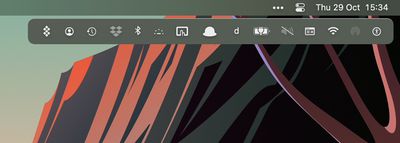
BartenderBar%402x
With Big Sur, Apple increased the space between menu bar items, which reduces the space available for icons. To alleviate this problem, Bartender 4 now allows users to revert to pre-Big Sur spacing or even use no spacing so to fit in more menu bar apps.

Bartender 4 also introduces menu bar spacers, which allow users to add spacers between groups of menu bar items that can either be just a configurable space, text, or even emoji, for grouping menu bar items into similar groups.
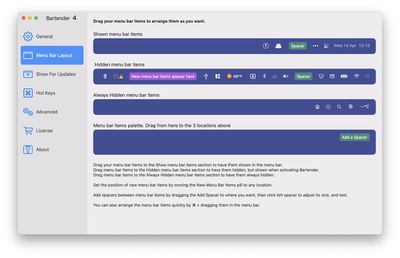
bartender 4 spacing
Meanwhile, there are new triggers for showing menu bar items, including image comparisons that show a menu bar item when it matches a particular state, and the ability to use scripts to show items, such as when VPNs or AirPods connect, for example. Other built-in triggers include showing the battery icon when on battery power and showing Time Machine during a backup.

With the new Quick Reveal feature, users can now also get instant access to hidden menu bar items by moving their mouse to the menu bar, or alternately by clicking the menu bar.

bartender 4 quick reveal
Elsewhere, there are improvements to Bartender's search function, which now sports a Spotlight-like interface with fuzzy search to very quickly find, show and activate menu bar items from your keyboard. It's also now possible to assign hotkeys to menu bar items to display them.

In addition, Bartender 4 introduces a new preferences screen to organize and order menu bar items, and choose where new menu bar items are placed.

Bartender 4 costs $15 after a free four-week trial, while upgrading users get a 50% discount. Bartender 4 is also featured in MacPaw's Setapp app store.


Popular Stories

iOS 26

iOS 26.4 and iOS 27 Features Revealed in New Leak

Friday December 12, 2025 10:56 am PST by
Macworld's Filipe Espósito today revealed a handful of features that Apple is allegedly planning for iOS 26.4, iOS 27, and even iOS 28. The report said the features are referenced within the code for a leaked internal build of iOS 26 that is not meant to be seen by the public. However, it appears that Espósito and/or his sources managed to gain access to it, providing us with a sneak peek...
iOS 26

iOS 26.2 Coming Soon With These 8 New Features on Your iPhone

Thursday December 11, 2025 8:49 am PST by
Apple seeded the second iOS 26.2 Release Candidate to developers earlier this week, meaning the update will be released to the general public very soon. Apple confirmed iOS 26.2 would be released in December, but it did not provide a specific date. We expect the update to be released by early next week. iOS 26.2 includes a handful of new features and changes on the iPhone, such as a new...
iOS 26

Apple Releases iOS 26.2 With Alarms for Reminders, Lock Screen Changes, Enhanced Safety Alerts and More

Friday December 12, 2025 10:10 am PST by
Apple today released iOS 26.2, the second major update to the iOS 26 operating system that came out in September, iOS 26.2 comes a little over a month after iOS 26.1 launched. ‌iOS 26‌.2 is compatible with the ‌iPhone‌ 11 series and later, as well as the second-generation ‌iPhone‌ SE. The new software can be downloaded on eligible iPhones over-the-air by going to Settings >...
AirPods Pro Firmware Feature

Apple Releases New Firmware for AirPods Pro 2 and AirPods Pro 3

Thursday December 11, 2025 11:28 am PST by
Apple today released new firmware designed for the AirPods Pro 3 and the prior-generation AirPods Pro 2. The AirPods Pro 3 firmware is 8B30, up from 8B25, while the AirPods Pro 2 firmware is 8B28, up from 8B21. There's no word on what's include in the updated firmware, but the AirPods Pro 2 and AirPods Pro 3 are getting expanded support for Live Translation in the European Union in iOS...
macOS Tahoe 26 Thumb

Apple Releases macOS Tahoe 26.2 With Edge Light

Friday December 12, 2025 10:08 am PST by
Apple today released macOS Tahoe 26.2, the second major update to the macOS Tahoe operating system that came out in September. macOS Tahoe 26.2 comes five weeks after Apple released macOS Tahoe 26.1. Mac users can download the macOS Tahoe update by using the Software Update section of System Settings. macOS Tahoe 26.2 includes Edge Light, a feature that illuminates your face with soft...
AirTag 2 Mock Feature

Apple AirTag 2: Four New Features Found in iOS 26 Code

Thursday December 11, 2025 10:31 am PST by
The AirTag 2 will include a handful of new features that will improve tracking capabilities, according to a new report from Macworld. The site says that it was able to access an internal build of iOS 26, which includes references to multiple unreleased products. Here's what's supposedly coming: An improved pairing process, though no details were provided. AirTag pairing is already...
ipados 26 1 slide over

Apple Releases iPadOS 26.2 With Multitasking Improvements

Friday December 12, 2025 10:09 am PST by
Apple today released iPadOS 26.2, the second major update to the iPadOS 26 operating system released in September. iPadOS 26.2 comes a month after iPadOS 26.1. The new software can be downloaded on eligible iPads over-the-air by going to Settings > General > Software Update. iPadOS 26.2 continues with the multitasking improvements that were added with iPadOS 26.1. You can now drag and...
bug security vulnerability issue fix larry

Update Now: iOS 26.2 Fixes 20+ Security Vulnerabilities

Friday December 12, 2025 11:11 am PST by
Apple today released iOS 26.2, iPadOS 26.2, and macOS 26.2, all of which introduce new features, bug fixes, and security improvements. Apple says that the updates address over 20 vulnerabilities, including two bugs that are known to have been actively exploited. There are a pair of WebKit vulnerabilities that could allow maliciously crafted web content to execute code or cause memory...

Top Rated Comments

Allards Avatar
61 months ago
i prefer hidden bar free and open source
https://apps.apple.com/us/app/hidden-bar/id1452453066?mt=12
Score: 15 Votes (Like | Disagree)
MrGimper Avatar
61 months ago
BT is in my bag of essential apps.
Score: 10 Votes (Like | Disagree)
EmotionalSnow Avatar
61 months ago
I have tried other apps but none work as well as Bartender. And honestly, $15 is really affordable too. It's very disappointing though that Apple thinks users have no need for menubar management.
Score: 6 Votes (Like | Disagree)
uploaded Avatar
61 months ago
I use Vanilla which is compatible with macOS Big Sur!

https://matthewpalmer.net/vanilla/
Score: 5 Votes (Like | Disagree)
Aetles Avatar
61 months ago
Such a nice app, a must have for me. Been running the beta of Bartender 4 since I bought an MBA M1 and it has has worked well, the menu bar was horrible otherwise. Filled with useful details like showing a menu icon if it differs from how it usually looks.
Score: 3 Votes (Like | Disagree)
macsplusmacs Avatar
61 months ago
Worth every penny. No other options offer as much flexibilty.
Score: 3 Votes (Like | Disagree)