tvOS 14.5 Beta 6 References Apple TV Remote With 'Center Button' [Updated] - MacRumors
Skip to Content

tvOS 14.5 Beta 6 References Apple TV Remote With 'Center Button' [Updated]

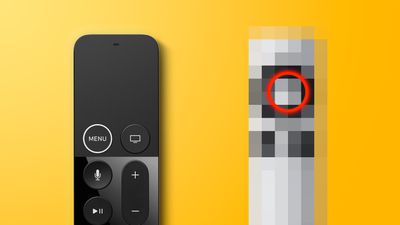
The tvOS 14.5 beta that was released this morning includes a code change that references an Apple TV remote control that features a "Center Button," which is a description that does not fit the current ‌Apple TV‌ remote.

mystery remote feature 2
"Press the center button or the touch surface to continue," reads the tvOS 14.5 code, which was discovered by MacRumors contributor Steve Moser.

The remote for the fourth and fifth-generation ‌Apple TV‌ models features a series of buttons that are arranged in two rows, with no button in the center.

There is an older "Apple Remote" with a center button that's designed for the second and third-generation ‌Apple TV‌ models and is compatible with the current ‌Apple TV‌ models, so it's possible that's what the code change is referencing, but it could also be referring to a new unreleased ‌Apple TV‌ remote.


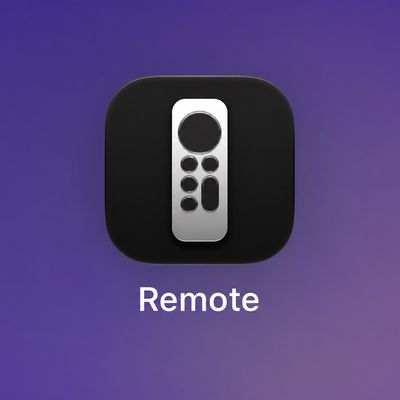
The specific code that was found is in a "setup" app, which would make more sense for a new remote rather than an older remote, but we don't know for sure that this is a reference to a new ‌Apple TV‌ remote option. If it is indeed something new, the upcoming ‌Apple TV‌ remote could perhaps feature a design similar to the remote app on the iPhone, which features a large touch area, a main center Menu button, and side buttons for accessing Siri, play/pause, the Home screen, and search.

Apple is rumored to be working on a sixth-generation ‌Apple TV‌ that will feature an upgraded A-series chip and a revamped remote control. We haven't heard details on what the remote control might look like, but it could have a "Find My" feature for location purposes when lost.

In an earlier beta, Apple renamed the "‌Siri‌ Remote" to the "‌Apple TV‌ Remote," which is another possible reference to an unreleased ‌Apple TV‌ remote option.

Update: The code could be referring to a third-party ‌Apple TV‌ remote that's in development and which could be offered by Universal Electronics to cable, satellite, and MVPD companies. This remote also has a circular button, and an image of it was found in the beta by 9to5Mac.

It's possible the Universal Electronics remote will soon be available from various cable providers who will offer it alongside the ‌Apple TV‌, much like the Salt Remote sold by a Swiss telecommunications company.

Related Roundup: Apple TV
Buyer's Guide: Apple TV (Don't Buy)

Popular Stories

General visionOS watchOS and tvOS Betas Feature Redux

Apple Seeds watchOS 26.5, tvOS 26.5 and visionOS 26.5 Release Candidates

Monday May 4, 2026 10:11 am PDT by
Apple today provided developers with the release candidate versions of upcoming watchOS 26.5, tvOS 26.5, and visionOS 26.5 betas for testing purposes. The software comes a week after Apple released the fourth betas for each platform. The software updates are available through the Settings app on each device, and because these are developer betas, a free developer account is required....
tvOS 26 Feature

Apple Releases tvOS 26.5

Monday May 11, 2026 10:02 am PDT by
Apple today released tvOS 26.5, the fifth update to the tvOS operating system that came out last fall. tvOS 26.5 is available for the Apple TV 4K, and it comes over a month after Apple released tvOS 26.4. tvOS 26.5 can be downloaded using the Settings app on the ‌‌Apple TV‌‌. Open up Settings and go to System > Software Update to get the new software. ‌‌Apple TV‌‌ owners who...
General visionOS watchOS and tvOS Betas Feature Redux

Apple Releases First watchOS 26.6, tvOS 26.6 and visionOS 26.6 Betas

Tuesday May 26, 2026 10:03 am PDT by
Apple today provided developers with the first betas of upcoming watchOS 26.6, tvOS 26.6, and visionOS 26.6 betas for testing purposes. The software two weeks after Apple launched the 26.5 versions of each platform. The software updates are available through the Settings app on each device, and because these are developer betas, a free developer account is required. There's no word on...

Top Rated Comments

LeadingHeat Avatar
68 months ago

Press the center button or the touch surface to continue
Please keep the touch surface. It would be a huge step backwards to have to spam click the down arrow to get down the page, instead of swiping with slow or fast gestures to immediately get to the right place.

Never really understood the hate. Unless maybe it’s the “picking it up upside down”... but how long does that really take to correct? .04 seconds to quickly spin around? Plus isn’t that what the raised “menu” button was for? If anything, make it look like the iPhone’s Apple TV remote interface like the article described. That way you wouldn’t pick it up the wrong way. Just please keep the touch pad, and volume buttons.

the upcoming Apple TV remote could perhaps feature a design similar to the remote app on the iPhone, which features a large touch area, a main center Menu button, and side buttons for accessing Siri, play/pause, the Home screen, and search.
Score: 19 Votes (Like | Disagree)
ouimetnick Avatar
68 months ago
Considering the aluminum remote (2009) works with ALL Apple TV models they are most likely referring to this one. I actually used that remote to configure my used 4th gen Apple TV HD that didn’t have a a remote.

Attachment Image
Score: 13 Votes (Like | Disagree)
brijazz Avatar
68 months ago

10 sec skip is so painful to use on some apps, especially YouTube.
The YouTube app for Apple TV is garbage all around. The 10-second skip. Scrolling through lists. "Watch Later" and "Subscriptions" don't update in-place (you need to back out of them and then navigate into them to see changes). And it's kinda ugly.
Score: 12 Votes (Like | Disagree)
Michael Scrip Avatar
68 months ago
Hmmm... a center button... and maybe a D-pad for up-down-left-right?

You know... like almost every media remote control ever made?

🤣


Attachment Image
Score: 12 Votes (Like | Disagree)
68 months ago

Looks better than the current version, looks like the stupid swipe pad is gone !


🤔 guess anything is better than the current remote.


Uhhhh....


Attachment Image
Score: 11 Votes (Like | Disagree)
Unity451 Avatar
68 months ago

Hmmm... a center button... and maybe a D-pad for up-down-left-right?

You know... like almost every media remote control ever made?

🤣


Or like the ones they created first. Roku and the like just copied their simple design and added buttons.


Attachment Image
Score: 10 Votes (Like | Disagree)