Spotify for Mac Can Now Initiate Streams to Chromecast Devices
Spotify for desktop can now directly initiate Chromecast streams, reports 9to5Google.
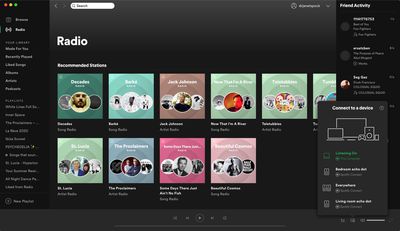
Previously, the only way to control Chromecast streams on the desktop app was by initiating the stream on the Spotify mobile app first, but now you can do this directly from your Mac via Spotify Connect.
Starting a Chromecast stream on the desktop app can be done by clicking the Devices Available button on the bottom-right corner of the interface, where Google Cast as well as Spotify Connect-enabled speakers will now appear alongside any Bluetooth or AirPlay devices.
The functionality is available in version 1.1.38 of the Spotify app for Mac, and should delight users who have been asking for it in the Spotify Community forums for years.
Popular Stories
Some Apple retail employees have been told to warn customers against visiting to purchase an iPhone Duo without a pre-order on Friday, October 23.
Apple Store employees told MacRumors that they have been advised that there will likely be no iPhone Duo stock available for walk-in purchases on launch day. Staff have been instructed to discourage customers without pre-orders from coming in...
Apple today sent out invites for an experience in Los Angeles on Wednesday, October 28, and the "Pro and tell" tagline on the invitation likely means that the rumored MacBook models with touch-enabled OLED displays will stick with MacBook Pro branding instead of the once-rumored "MacBook Ultra" name.
The long-rumored "iPhone Ultra" ended up being named iPhone Duo, so speculation that Apple...
Despite knowing that the iPhone Duo would face "severe supply constraints" due to manufacturing challenges, Apple chose to begin iPhone Duo pre-orders on Friday instead of waiting until it had more inventory ready, according to Bloomberg's Mark Gurman. In his Power On newsletter today, he called this decision a "major mistake."
"Let me cut to the chase: Apple made a major mistake here," he...







/https://forums.macrumors.com/attachments/938202/)












































