Darkroom Photo Editing App Gets New Album Manager - MacRumors
Skip to Content

Darkroom Photo Editing App Gets New Album Manager

by

Darkroom, a popular camera app designed for iOS devices, has been updated with new features that enable users to manage albums within the app, rather than in the Photos app.
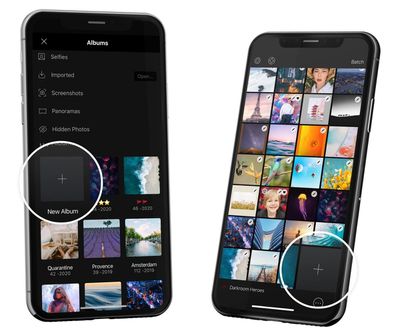
darkroom up date new album button
Once the update is installed, users no longer have to exit the app to manage their photo collection – they can create and edit albums from within the Darkroom interface, and the changes they make will be reflected in their device's native photo library.

Today's update adds complete Album Management workflows to Darkroom. From the library, you can now create, rename, and delete albums. You can also select photos and add them to an album. All changes are reflected in your photo library and vice versa.

When browsing albums, the Batch tool can be used to select multiple photos. Doing so reveals a row of actions at the bottom of the screen, and new to that list is "Add To." Users can tap this option to move the selected photos to any existing album or create a new one.

For more information on the update and suggested album workflows, check out this Medium post by the Darkroom development team. Darkroom is available to download from the App Store for iPhone and iPad. [Direct Link]

The app swapped to a subscription-based business model for new users back in February and recently renamed that subscription service to Darkroom+. Darkroom+ provides access to video editing and all of Darkroom's filters and editing tools, and costs $3.99 per month, $19.99 per year, or a one-time fee of $49.99.


Top Rated Comments

76 months ago
Gee. Pretty soon the transition of every app having it's own way of storing everything will be complete and we'll be right back in the 1970's.
Score: 3 Votes (Like | Disagree)
76 months ago

Cool, I’m really looking forward to being able to save pictures as a uuencoded ASCII text stream on decks of punched cards.
There's a guy that keeps connecting things like floppy drives to iPhones just to see if it can be done. He did something, maybe just a reader?, with punched cards. It would be interesting to see how many cards a "modern" program would take. Probably a small forest-worth. :)
Score: 1 Votes (Like | Disagree)

Popular Stories

iOS 26

iOS 26.4 Adds Two New Features to CarPlay

Tuesday March 24, 2026 1:55 pm PDT by
iOS 26.4 was released today, and it includes a couple of new features for CarPlay: an Ambient Music widget and support for voice-based chatbot apps. To update your iPhone 11 or newer to iOS 26.4, open the Settings app and tap on General → Software Update. CarPlay will automatically offer the new features so long as the iPhone connected to your vehicle is running iOS 26.4 or later....
Apple Business hero

Apple Unveils 'Apple Business' All-in-One Platform

Tuesday March 24, 2026 8:53 am PDT by
Apple today announced Apple Business, a new all-in-one platform that unifies device management, productivity tools, and customer outreach features. The service is designed to be a consolidated replacement for several of Apple's existing business-focused offerings, including Apple Business Essentials, Apple Business Manager, and Apple Business Connect. It provides organizations with a single...
AirPods Pro Firmware Feature

Apple Releases New Firmware for AirPods Pro 3, AirPods Pro 2 and AirPods 4

Tuesday March 24, 2026 12:31 pm PDT by
Apple today released new firmware for the AirPods Pro 2, AirPods Pro 3, and the AirPods 4. The firmware has a version number of 8B39, up from 8B34 on the AirPods Pro 3, 8B28 on the AirPods Pro 2, and 8B21 on the AirPods 4. There is no word on what's included in the firmware, but Apple has a support document with limited notes. Most updates are limited to bug fixes and performance...