Apple Releases iOS and iPadOS 13.3 With Communication Limits for Screen Time, Safari Physical Security Key Support, and More - MacRumors
Skip to Content

Apple Releases iOS and iPadOS 13.3 With Communication Limits for Screen Time, Safari Physical Security Key Support, and More

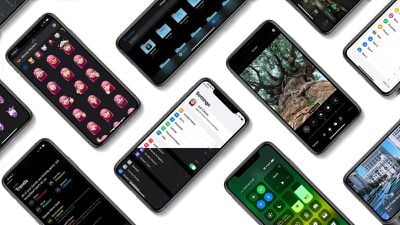
Apple today released iOS 13.3, the third major update to the iOS and iPadOS 13 operating systems. The new software updates come two weeks after the release of iOS/iPadOS 13.2.3 and more than a month after the launch of iOS 13.2, which brought new emoji.

The iOS and ‌‌iPadOS‌‌ 13.3 updates are available on all eligible devices over-the-air in the Settings app. To access the updates, go to Settings > General > Software Update. Apple has also released an iOS 12.4.4 update for older devices that aren't able to run iOS 13.
ryanscoolios13thumbnail
iOS 13.3 continues to add features that were originally promised for iOS 13 but were ultimately eliminated during the beta testing process, with the update introducing Communication Limits for Screen Time.

Communication Limits let parents control who their children are able to contact, with the feature covering FaceTime, Phone, Messages, and iCloud Contacts.

Calls to emergency numbers are always allowed and when placed, will turn off communication limits for 24 hours to make sure children are safe and not restricted from communicating with people in the event of an emergency.

The iOS 13.3 and iPadOS 13.3 updates bring support for NFC, USB, and Lightning FIDO2-compliant security keys in Safari. That means physical security keys like the Lightning-equipped YubiKey can be used for more secure two-factor authentication in place of a software-based two-factor authentication option.

In the Keyboards section of the Settings app (under General), there's a new toggle that prevents Animoji and Memoji stickers from being displayed as an option on the Emoji Keyboard for those who prefer not to see Animoji and Memoji sticker options.

When editing a video, there's a new feature that lets you save the edited version as a new clip rather than replacing the original, and Apple has also tweaked the Apple Watch app icon, changing the color of the Digital Crown from black to gray.

Apple's full release notes for the iOS 13.3 update are below:

iOS 13.3 includes improvements, bug fixes and additional parental controls for Screen Time.

Screen Time
- New parental controls provide more communication limits over who their children can call, FaceTime, or Message
- Contact list for children lets parents manage the contacts that appear on their children’s devices

Apple News
- New layout for Apple News+ stories from The Wall Street Journal and other leading newspapers
- Easily like or dislike stories with a tap

Stocks
- Stories from Apple News are now available in Canada in English and French
- Continue reading with links to related stories or more stories from the same publication
- “Breaking” and “Developing” labels for Top Stories

This update also includes bug fixes and other improvements. This update:
- Enables the creation of a new video clip when trimming a video in Photos
- Adds support for NFC, USB, and Lightning FIDO2-compliant security keys in Safari
- Fixes issues in Mail that may prevent downloading new messages
- Addresses an issue that prevented deleting messages in Gmail accounts
- Resolves issues that could cause incorrect characters to display in messages and duplication of sent messages in Exchange accounts
- Fixes an issue where the cursor may not move after long pressing on the space bar
- Addresses an issue that may cause screenshots to appear blurry when sent via Messages
- Resolves an issue where cropping or using Markup on screenshots may not save to Photos
- Fixes an issue where Voice Memos recordings may not be able to be shared with other audio apps
- Addresses an issue where the missed call badge on the Phone app may not clear
- Resolves an issue where the Cellular Data setting may incorrectly show as off
- Fixes an issue that prevented turning off Dark Mode when Smart Invert was enabled
- Addresses an issue where some wireless chargers may charge more slowly than expected

For more on the new features that Apple added to iOS with the launch of iOS 13, make sure to check out our iOS 13 roundup.


Related Forum: iOS 13

Popular Stories

iOS 28 AI

Apple Taking New Approach to Developing iOS 28 and macOS 28

Sunday November 8, 2026 7:42 am PST by
Apple has made a change to its development process for iOS 28, macOS 28, and corresponding software updates, according to Bloomberg's Mark Gurman. In his Power On newsletter today, he said Apple separates development of each year's new operating systems into three major stages. Typically, he said each stage consists of four weeks of coding followed by a four-week "convergence" period where...
apple pro tell logo

Apple Launching Two More New Products This Friday

Monday November 9, 2026 4:22 am PST by
The Apple launches keep coming! The company is set to release two new products on Friday, November 13: the all-new Apple HomeView and the fourth-generation Apple TV 4K, both of which have been available to pre-order since mid-October. Apple HomeView: Apple's new smart home display, powered by Apple Intelligence with Siri AI, for entertainment and managing the home. Available in tabletop and...
Apple Store Downtown Detroit

Apple Store Subscription Sign-Up Controversy Exposed

Sunday November 8, 2026 7:28 pm PST by
In a series of YouTube videos shared over the past two weeks, electronics technician and consumer rights advocate Louis Rossmann has exposed a controversy in which some Apple Store employees have allegedly signed up customers for auto-renewing subscription trials for Apple One and other services without their informed consent. Here is how the process works at Apple Stores in the United...

Top Rated Comments

zorinlynx Avatar
90 months ago

Ive never had a device brick ever.
iOS devices can't really be bricked because you can always DFU them.

Even with over the air updates, bricking is practically impossible now with APFS.

The way the updates work is:

- The OS partition is cloned. (copy on write, this doesn't take extra space)
- The update is applied to the cloned partition. (Preparing update)
- The partition is verified; every file in it gets an md5 check to make sure the update has no errors. This is why that damn progress bar takes so long.
- The system is rebooted from the clone.
- Only after the system comes up correctly and various checks pass (the second progress bar) is the previous OS partition deleted.

This sequence of events makes it practically impossible for an over the air update to brick the device anymore. If something interrupts the update, the device will just boot from the unmodified original OS version and you can try again.
Score: 21 Votes (Like | Disagree)
90 months ago
Let's see how buggy this version is...
Score: 11 Votes (Like | Disagree)
Elitegate Avatar
90 months ago

Also 12.4.4 for older devices
I love Apple for this. One big reason to favor Apple / iOS devices over Android.
Score: 7 Votes (Like | Disagree)
90 months ago
I'm getting kinda tired of hitting the 'download & install' button and having to go in again and tell it to install. Why don't they split up the two functions into 'download' and 'download & install' or just do what they asked to do? How many people have they hired from Microsoft?
Score: 6 Votes (Like | Disagree)
90 months ago

Very, real lag on everything. Watching a video in News and press up/down on the volume keys has 2-3 second lag

OK update, originally it was but had to close the apps and now it seems to be OK. Not sure what just happened but after the restart the phone was very unresponsive for 5 minutes
Always need to give it 24 hours or so to bake. iOS likes to reindex the filesystem after an update depending on how much you have installed....
Score: 5 Votes (Like | Disagree)
90 months ago

I haven't had a device brick in years. Is it really such a concern still?
Ive never had a device brick ever.
Score: 5 Votes (Like | Disagree)
Latest Stories
'Apple Support Community' Permanently Closing on November 20
4 hours ago
Apple's Holiday Gift Guide Highlights iPhone Duo and More
7 hours ago
Three Workers Die at Tata iPhone Parts Plant in India
8 hours ago
iCloud Mail, Calendar, Contacts and More Experiencing Outage [Updated]
8 hours ago
Apple's Claris Testing 'Harbor' App for Local AI on Macs
9 hours ago
iFixit's PROLED MacBook Pro Teardown Reveals Logo LEDs
10 hours ago
10 Free iPhone Duo Apps Worth Downloading
12 hours ago
Apple Releases New AirPods Firmware
12 hours ago
Amazon Begins Early Black Friday Sale, Featuring Sitewide Discounts on Tech and Decor
14 hours ago
Apple Announces Swift Student Challenge Ahead of WWDC 2027
15 hours ago
Next iPad Air Likely to Have These 10 New Features
15 hours ago
iPad Mini 2021 vs. 2026 Buyer's Guide: Is It Worth Upgrading?
15 hours ago
New Apple TV Sign Language Feature Announced
15 hours ago
Disable Touch on MacBook Pro PROLED XDR and When Using Sidecar
16 hours ago
Anker's Early Black Friday Sale Surprises With Mystery Boxes and Big Discounts
16 hours ago
Apple Arcade Adding These Four Games in December
17 hours ago
OLED iPad Air Rumored to Launch in Two Sizes in Early 2027
19 hours ago
The Original iPod Went on Sale 25 Years Ago Today
19 hours ago
Apple Maps Could Factor Parking Into Your Arrival Time
20 hours ago
Waze Now Alerts Drivers to Nearby Cyclists Using Garmin LiveTrack
20 hours ago
iPhone 20 Pro: Ten Big Changes That Could Redefine Apple's Flagship
21 hours ago
Here's What Apple Fixed in iOS 27.2.1 and macOS 27.2.1
1 day ago
Webex Gets iPhone Duo Support
1 day ago
Meta's Muse AI Agent Comes to Apple Watch
1 day ago
Anker Launches Eufy Security Cam With Auto-Tracking Light
1 day ago
macOS 27.2.1 Fixes eMudhra Certificate Flaw in Command-Line Tools
2 days ago
Anthropic Launches Claude Fable 5.2 and Mythos 5.2
2 days ago
Apple Releases macOS Golden Gate 27.2.1
2 days ago
Apple Releases iOS 27.2.1 With Bug Fixes
2 days ago
Apple Releases watchOS 27.2.1 and visionOS 27.2.1 With Security Fixes
2 days ago