16-Inch MacBook Pro Features New 'Lid Angle Sensor' - MacRumors
Skip to Content

16-Inch MacBook Pro Features New 'Lid Angle Sensor'

Earlier this week, do-it-yourself repair website iFixit shared its full teardown of the new 16-inch MacBook Pro, providing a closer look at its scissor switch keyboard, new thermal architecture, and other design tweaks.

As it turns out, there is one more change. In an internal document to Apple Authorized Service Providers, obtained by MacRumors, Apple indicates the 16-inch MacBook Pro includes a new "lid angle sensor" that presumably monitors the opening and closing of the notebook and the precise position of the lid.

MacRumors reached out to iFixit to investigate, leading them to uncover a small sensor facing the left-side hinge of the notebook. There is also a magnet embedded in the hinge itself, with an arrow indicating polarity. iFixit has updated its teardown with photos of the sensor, which we've shared below.
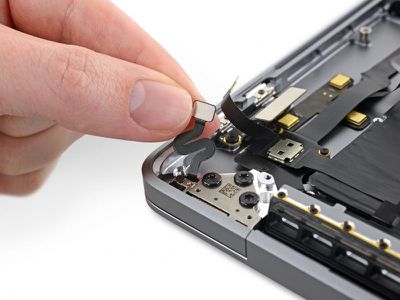
ifixit 16 inch macbook pro lid angle sensor

Photo: iFixit

While previous-generation MacBook Pro models have a Hall effect sensor that determines when the lid is closed for sleep/wake purposes, the lid angle sensor in the 16-inch MacBook Pro appears to be more sophisticated.

Apple's service document does not provide any clues as to why the sensor was redesigned, but iFixit speculates that it could provide a clever way for Apple to track how often the lid was opened, closed, or adjusted in cases where the display or frayed flex cables need to be repaired — think "Flexgate."
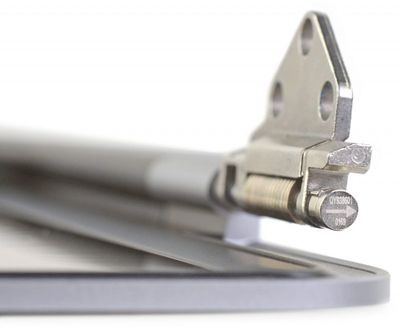
ifixit 16 inch macbook pro lid angle sensor magnet

Photo: iFixit

The lid angle sensor could also be for an unannounced macOS feature, although again, this is merely speculation.

Of note, in the event of a display repair, Apple's service document indicates that technicians must calibrate both the display and the lid angle sensor in order for the repair to be considered complete. If we learn any additional information about the sensor, we will be sure to provide an update.

Related Roundup: MacBook Pro
Tag: iFixit
Buyer's Guide: MacBook Pro (Buy Now)
Related Forum: MacBook Pro

Popular Stories

iOS 26

iOS 26.4 Adds Two New Features to CarPlay

Tuesday March 24, 2026 1:55 pm PDT by
iOS 26.4 was released today, and it includes a couple of new features for CarPlay: an Ambient Music widget and support for voice-based chatbot apps. To update your iPhone 11 or newer to iOS 26.4, open the Settings app and tap on General → Software Update. CarPlay will automatically offer the new features so long as the iPhone connected to your vehicle is running iOS 26.4 or later....
AirPods Pro Firmware Feature

Apple Releases New Firmware for AirPods Pro 3, AirPods Pro 2 and AirPods 4

Tuesday March 24, 2026 12:31 pm PDT by
Apple today released new firmware for the AirPods Pro 2, AirPods Pro 3, and the AirPods 4. The firmware has a version number of 8B39, up from 8B34 on the AirPods Pro 3, 8B28 on the AirPods Pro 2, and 8B21 on the AirPods 4. There is no word on what's included in the firmware, but Apple has a support document with limited notes. Most updates are limited to bug fixes and performance...
apple tv 4k new orange

tvOS 26.4 Adds These New Features to Your Apple TV

Wednesday March 25, 2026 3:33 pm PDT by
Apple this week released tvOS 26.4, and the software update includes a handful of new features and changes for the Apple TV. tvOS 26.4 is compatible with all Apple TV 4K and Apple TV HD models released since 2015. To update your Apple TV, open the Settings app on the device, navigate to System → Software Updates, and select Update Software. Below, we have recapped what is new in tvOS...

Top Rated Comments

T'hain Esh Kelch Avatar
83 months ago
It may also, for future models, be used to help FaceID to determine the angle at which the face is likely at for quicker login.
Score: 28 Votes (Like | Disagree)
83 months ago
This is probably the "pervert privacy protection" feature. If it senses the lid closing super rapidly, it closes all browser windows and scrubs the hard drive of all your porn.
Score: 19 Votes (Like | Disagree)
83 months ago
My 2015 MBP has a magnetic sensor on the left side. My TI2 pen has magnets to hold the cap on. One day I placed my pen next to my laptop and the screen shut off because the magnet caused it to think the lid was closed.

My coworker has a 2018 MBP that does not respond to the pen. However, when he disconnects from his external monitors with his laptop screen up, his computer will completely lockup, as if it thinks the lid is closed. Opening it and closing it has no effect, and the trackpad goes completely dead (no haptic - just like my laptop when the pen is placed beside it).

My theory: I know other people with the same issue when disconnecting from hubs/docks. I guarantee more than a few have gone to the Genius Bar about this issue. This sensor is so the machine knows if the display is actually closed or not so it does not lock up for those and similarly-affected users.
Score: 9 Votes (Like | Disagree)
83 months ago
Might simply because they couldn't fit large enough magnets with the new smaller bezels.
Score: 5 Votes (Like | Disagree)
83 months ago
Interesting. Maybe a feature this sensor could be used for could be a setting where a user can set exactly how far closed they want the lid to be when the display turns off.
Score: 5 Votes (Like | Disagree)
83 months ago
I'm an Apple technician an AASP and we have been speculating about this since the internal documents were released.

The leading theory at this point is that it gathers info about whether the screen has been over extended at any point leading to hinge damage.
Score: 4 Votes (Like | Disagree)