MacStories today released a set of 300 custom icons for use when adding Shortcuts to the home screen on iPhone and iPad.
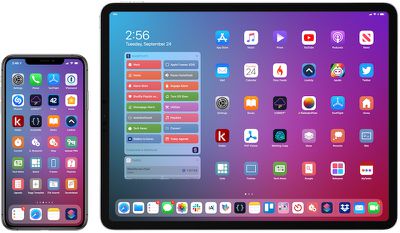
iphone ipad macstories shortcuts icons
Apple already provides many default glyphs for Shortcuts icons, but the MacStories set provides users with hundreds of extra options across dozens of categories, ranging from documents and clipboard to media and task management.

MacStories editor-in-chief and Shortcuts power user Federico Viticci:

MacStories Shortcuts Icons were designed by our longtime designer Silvia Gatta in collaboration with me. After years of covering Workflow, then Shortcuts, and following the launch of the MacStories Shortcuts Archive, I decided it was time to provide a custom icon set for Shortcuts as well.

MacStories Shortcuts Icons were designed with the needs of Shortcuts users in mind. They're not just a random icon set: each icon was specifically created for a potential use case in the Shortcuts app.

Viticci adds:

We created the set to complement Apple's default glyphs and offer more options for Shortcuts power users. I personally went through my list in the MacStories Shortcuts Archive, as well as popular shortcuts from Reddit and the community, and tried to come up with icons that would better represent each shortcut. The icons were designed with a modern, rounded look and subtle drop shadows.

For the icons to work properly, iOS 13.1 or iPadOS 13.1 is required. In those latest software versions, you can now use custom glyphs such as the MacStories icons and still keep the original colors of your shortcut icons.
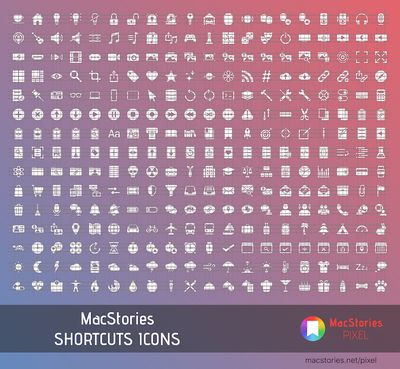
macstories shortcuts icons preview
How to use the custom icons:

  • Download the MacStories icon set directly on an iPhone or iPad and unzip the folder in the Files app

  • Open the Shortcuts app

  • Tap on the circle with three dots on a Shortcut

  • Tap on the circle with three dots in the top-right corner

  • Tap on "Add to Home Screen"

  • Tap on the icon outlined in blue and select "Choose File"

  • Choose a MacStories icon and save to the Home screen

The icon set is available today for $14.99 on the MacStories website. For a limited time, MacStories is offering MacRumors readers a 15 percent discount with promo code MACRUMORS15 at checkout.


Top Rated Comments

Joe Rossignol Avatar
81 months ago

$15 for icons? Paid post?
This isn't a paid or sponsored post and MacRumors is not receiving any sort of commission on purchases.

Just a typical press release emailed to us by MacStories in which they offered MacRumors readers a discount code.
Score: 5 Votes (Like | Disagree)
Jeremy1026 Avatar
81 months ago
$15 for an icon set, that seems a bit steep. Especially when free icon sets are readily available on the web.
Score: 3 Votes (Like | Disagree)
JosephAW Avatar
81 months ago
$15? Why not just have a subscription?
Score: 2 Votes (Like | Disagree)
Macropanda Avatar
81 months ago

Awesome! Now if someone could tell me how to download and install one of their custom shortcuts - I always get the message that my settings only allow shortcuts from trustworthy sources - but when I go to the shortcuts settings, there's no switch to change those settings...
I had the same issue. I created 1 random shortcut with 1 action and downloaded 1 official shortcut from in the app. Then went to settings and it was there.
Score: 2 Votes (Like | Disagree)
chfilm Avatar
81 months ago
Awesome! Now if someone could tell me how to download and install one of their custom shortcuts - I always get the message that my settings only allow shortcuts from trustworthy sources - but when I go to the shortcuts settings, there's no switch to change those settings...
Score: 1 Votes (Like | Disagree)
darkslide29 Avatar
81 months ago

$15 for an icon set, that seems a bit steep. Especially when free icon sets are readily available on the web.

$15 for icons? Paid post?
To be honest, I don't even know what the normal icons look like to compare to this, lol. But artists and designers should get paid for their work to make a living.

Then again, the App Store has conditioned us that iOS and iPadOS apps and games should be as cheap as possible. ;)
Score: 1 Votes (Like | Disagree)

Popular Stories

iOS 26

iOS 26.2 Coming Soon With These 8 New Features on Your iPhone

Thursday December 11, 2025 8:49 am PST by
Apple seeded the second iOS 26.2 Release Candidate to developers earlier this week, meaning the update will be released to the general public very soon. Apple confirmed iOS 26.2 would be released in December, but it did not provide a specific date. We expect the update to be released by early next week. iOS 26.2 includes a handful of new features and changes on the iPhone, such as a new...
AirPods Pro Firmware Feature

Apple Releases New Firmware for AirPods Pro 2 and AirPods Pro 3

Thursday December 11, 2025 11:28 am PST by
Apple today released new firmware designed for the AirPods Pro 3 and the prior-generation AirPods Pro 2. The AirPods Pro 3 firmware is 8B30, up from 8B25, while the AirPods Pro 2 firmware is 8B28, up from 8B21. There's no word on what's include in the updated firmware, but the AirPods Pro 2 and AirPods Pro 3 are getting expanded support for Live Translation in the European Union in iOS...
Google maps feaure

Google Maps Quietly Added This Long-Overdue Feature for Drivers

Wednesday December 10, 2025 2:52 am PST by
Google Maps on iOS quietly gained a new feature recently that automatically recognizes where you've parked your vehicle and saves the location for you. Announced on LinkedIn by Rio Akasaka, Google Maps' senior product manager, the new feature auto-detects your parked location even if you don't use the parking pin function, saves it for up to 48 hours, and then automatically removes it once...
iOS 26

iOS 26.4 and iOS 27 Features Revealed in New Leak

Friday December 12, 2025 10:56 am PST by
Macworld's Filipe Espósito today revealed a handful of features that Apple is allegedly planning for iOS 26.4, iOS 27, and even iOS 28. The report said the features are referenced within the code for a leaked internal build of iOS 26 that is not meant to be seen by the public. However, it appears that Espósito and/or his sources managed to gain access to it, providing us with a sneak peek...
iOS 26

Apple Releases iOS 26.2 With Alarms for Reminders, Lock Screen Changes, Enhanced Safety Alerts and More

Friday December 12, 2025 10:10 am PST by
Apple today released iOS 26.2, the second major update to the iOS 26 operating system that came out in September, iOS 26.2 comes a little over a month after iOS 26.1 launched. ‌iOS 26‌.2 is compatible with the ‌iPhone‌ 11 series and later, as well as the second-generation ‌iPhone‌ SE. The new software can be downloaded on eligible iPhones over-the-air by going to Settings >...
Foldable iPhone 2023 Feature 1

Apple to Make More Foldable iPhones Than Expected [Updated]

Tuesday December 9, 2025 9:59 am PST by
Apple has ordered 22 million OLED panels from Samsung Display for the first foldable iPhone, signaling a significantly larger production target than the display industry had previously anticipated, ET News reports. In the now-seemingly deleted report, ET News claimed that Samsung plans to mass-produce 11 million inward-folding OLED displays for Apple next year, as well as 11 million...
AirTag 2 Mock Feature

Apple AirTag 2: Four New Features Found in iOS 26 Code

Thursday December 11, 2025 10:31 am PST by
The AirTag 2 will include a handful of new features that will improve tracking capabilities, according to a new report from Macworld. The site says that it was able to access an internal build of iOS 26, which includes references to multiple unreleased products. Here's what's supposedly coming: An improved pairing process, though no details were provided. AirTag pairing is already...
iOS 26

15 New Things Your iPhone Can Do in iOS 26.2

Friday December 5, 2025 9:40 am PST by
Apple is about to release iOS 26.2, the second major point update for iPhones since iOS 26 was rolled out in September, and there are at least 15 notable changes and improvements worth checking out. We've rounded them up below. Apple is expected to roll out iOS 26.2 to compatible devices sometime between December 8 and December 16. When the update drops, you can check Apple's servers for the ...
macOS Tahoe 26 Thumb

Apple Releases macOS Tahoe 26.2 With Edge Light

Friday December 12, 2025 10:08 am PST by
Apple today released macOS Tahoe 26.2, the second major update to the macOS Tahoe operating system that came out in September. macOS Tahoe 26.2 comes five weeks after Apple released macOS Tahoe 26.1. Mac users can download the macOS Tahoe update by using the Software Update section of System Settings. macOS Tahoe 26.2 includes Edge Light, a feature that illuminates your face with soft...