Microsoft has unveiled its new-look To Do app. First launched in 2017, the productivity app came along two years after the company acquired Wunderlist, but only now does it resemble a like-for-like replacement offering feature parity with the long-running cloud-based task management service. Announcing To Do v2.0, Microsoft had this to say:
to do

When Wunderlist became part of the Microsoft family, our mission was to bring the delightful, simple, and elegant daily task experience and build it into Microsoft's intelligent, interconnected, and security-centric ecosystem to create a new app—Microsoft To Do. Today, we're unveiling the new version of To Do, which includes a fresh new design, access from wherever you are, and more integration with Microsoft apps and services.

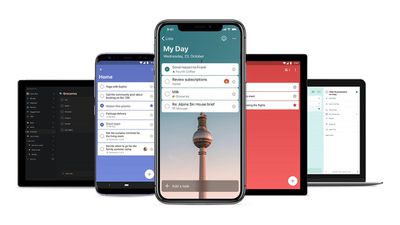
The most obvious visual similarity is that To Do now supports background images – and even includes the Berlin TV tower image that longtime Wunderlist users will be familiar with. Every list can be given its own background image, and Microsoft says it has reduced the list header size and added new color theme customization options, with a dark mode for iOS and Mac coming soon.

Otherwise, it looks like business as usual for Wunderlist fans. The app features subtasks, recurring tasks, prioritized tasks, reminders and due dates, file attachments, and notes. Lists can also be grouped, shared with other people, and assigned.

There's a personalized daily planner feature called My Day that refreshes daily and features smart suggestions for tasks. And of course, all lists sync across devices, allowing users to stay organized at work, home, or on the go. Finally, there's deeper integration with Microsoft 365 apps and services like Microsoft Planner, linking to Microsoft-hosted email accounts like Outlook, Hotmail, and Live, and Cortana and Amazon Echo support.


Users without a Microsoft account can register with their existing email address. Once they sign in, the option to import tasks from Wunderlist is displayed, and it can also be found in Settings. Microsoft To Do is a free download for iPhone and iPad available from the App Store. [Direct Link]

Top Rated Comments

NeXTCube Avatar
83 months ago
And having a background image helps with this??
I think the poster wasn't directly answering the question, but...I think that you could use different background images as a quick visual cue as to which to-do list you were viewing, without having to actually read (or even see) the title at the top of the screen. Other than that, the feature is really just cosmetic, but it is an improvement over the plain backgrounds in the previous revision of Microsoft To-Do.

My big gripe is that it's taken MS more than two years - with the Wunderlist team in-house - to basically re-create Wunderlist, while Wunderlist itself stagnated. It's completely unclear to me what value Microsoft has added (since Wunderlist already integrated with Microsoft online accounts, etc.).
Score: 2 Votes (Like | Disagree)
maflynn Avatar
83 months ago
Is this something important that people require in a to-do app? :confused:
Yes, my work requires managing 30+ servers, various enterprise applications and security for the servers and also applications. I have frequently have a complex set of multilayered tasks. While I don't have this app, this seems right up my ally.
Score: 2 Votes (Like | Disagree)
Palliser Avatar
83 months ago
I still prefer ToDoist over either of these
Score: 1 Votes (Like | Disagree)
BrettArchibald Avatar
83 months ago
Yes, my work requires managing 30+ servers, various enterprise applications and security for the servers and also applications. I have frequently have a complex set of multilayered tasks. While I don't have this app, this seems right up my ally.
And having a background image helps with this??
Score: 1 Votes (Like | Disagree)
kafka27 Avatar
83 months ago
I'll never use a cloud based app. They use/sale all info about you.
Score: 1 Votes (Like | Disagree)
69Mustang Avatar
83 months ago
Is this something important that people require in a to-do app? :confused:
Pretty sure it's just one of those extra things that's used to differentiate their app from the other to-do apps. Some users will like and use it. Others won't and won't. Not really sure why you emphasized important and require.:confused: They sure didn't. ;)
Score: 1 Votes (Like | Disagree)

Popular Stories

iphone 17 models

No iPhone 18 Launch This Year, Reports Suggest

Thursday January 1, 2026 8:43 am PST by
Apple is not expected to release a standard iPhone 18 model this year, according to a growing number of reports that suggest the company is planning a significant change to its long-standing annual iPhone launch cycle. Despite the immense success of the iPhone 17 in 2025, the iPhone 18 is not expected to arrive until the spring of 2027, leaving the iPhone 17 in the lineup as the latest...
duolingo ad live activity

Duolingo Used iPhone's Dynamic Island to Display Ads, Violating Apple Design Guidelines

Friday January 2, 2026 1:36 pm PST by
Language learning app Duolingo has apparently been using the iPhone's Live Activity feature to display ads on the Lock Screen and the Dynamic Island, which violates Apple's design guidelines. According to multiple reports on Reddit, the Duolingo app has been displaying an ad for a "Super offer," which is Duolingo's paid subscription option. Apple's guidelines for Live Activity state that...
Clicks Communicator Feature

'Clicks Communicator' Unveiled — Will You Carry This With Your iPhone?

Friday January 2, 2026 6:35 am PST by
The company behind the BlackBerry-like Clicks Keyboard accessory for the iPhone today unveiled a new Android 16 smartphone called the Clicks Communicator. The purpose-built device is designed to be used as a second phone alongside your iPhone, with the intended focus being communication over content consumption. It runs a custom Android launcher that offers a curated selection of messaging...
apple intelligence black

Report: Apple's AI Strategy Could Finally Pay Off in 2026

Tuesday December 30, 2025 9:01 am PST by
Apple's restrained artificial intelligence strategy may pay off in 2026 amid the arrival of a revamped Siri and concerns around the AI market "bubble" bursting, The Information argues. The speculative report notes that Apple has taken a restrained approach with AI innovations compared with peers such as OpenAI, Google, and Meta, which are investing hundreds of billions of dollars in data...
apple fitness 2026 1

Apple Teases 'Something Big' Coming Soon to Apple Fitness+

Tuesday December 30, 2025 2:11 pm PST by
The Apple Fitness+ Instagram account today teased that the service has "big plans" for 2026. In a video, several Apple Fitness+ trainers are shown holding up newspapers with headlines related to Apple Fitness+. What's Apple Fitness+ Planning for the New Year? Something Big is Coming to Apple Fitness+ The Countdown Begins. Apple Fitness+ 2026 is Almost Here 2026 Plans Still Under ...
Mac Pro Feature Blue

What's Happening With the Mac Pro?

Wednesday December 31, 2025 9:59 am PST by
Apple hasn't updated the Mac Pro since 2023, and according to recent rumors, there's no update coming in the near future. In fact, Apple might be finished with the Mac Pro. Bloomberg recently said that the Mac Pro is "on the back burner" and has been "largely written off" by Apple. Apple apparently views the more compact Mac Studio as the ideal high-end pro-level desktop, and it has almost...
macbook air march 2020

Apple Says Final Intel MacBook Air and Apple Watch Series 5 Now 'Vintage'

Wednesday December 31, 2025 8:39 am PST by
Apple today added the final 13-inch MacBook Air powered by Intel processors, the Apple Watch Series 5, and additional products to its vintage products list. The iPhone 11 Pro was also added to the list after the iPhone 11 Pro Max was added back in September. The full list of products added to Apple's vintage and obsolete list today: MacBook Air (Retina, 13-inch, 2020) iPhone 8 Plus 128GB ...
Apple Fitness Plus hero

Apple Announces New Fitness+ Workout Programs, Strava Challenge, and More

Friday January 2, 2026 6:43 am PST by
Apple today announced a number of updates to Apple Fitness+ and activity with the Apple Watch. The key announcements include: New Year limited-edition award: Users can win the award by closing all three Activity Rings for seven days in a row in January. "Quit Quitting" Strava challenge: Available in Strava throughout January, users who log 12 workouts anytime in the month will win an ...