Ulysses 17 Gains Keyword Management for iOS, New iPad Fullscreen Mode, and More - MacRumors
Skip to Content

Ulysses 17 Gains Keyword Management for iOS, New iPad Fullscreen Mode, and More

by

Version 17 of Ulysses was released today, bringing some much-requested features to the popular Mac and iOS app for writers.

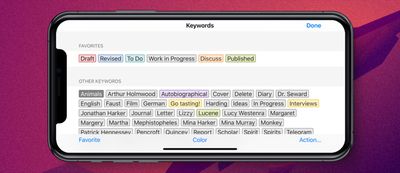
First up, the developers have brought keyword management to the iOS app, following the introduction of the feature on Mac in spring.
ulysses 17 ios
You can now edit or delete keywords, customize colors, and merge several keywords into one, whichever device you're working on.

You can also mark your most-used keywords as favorites for easy access within the app, with full keyword sync across Mac and iOS.

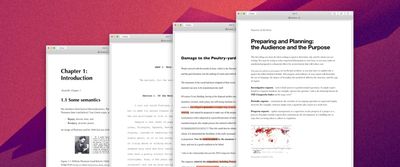
Regular Ulysses users will be familiar with the app's ability to export their texts as a formatted PDF or DOCX document. In this latest release, four new export styles are included.

Business is for laying out reports and strategy papers. Academica is for lecture notes. Review is suited for on-paper editing (the style reproduces comments and text deletions and comes with a large margin for hand-written notes).
ulysses 17 export
Finally, Manuscript is geared to the U.S. layout standards used for submitting literary works to publishers.

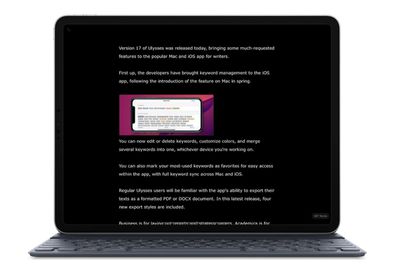
In addition to the above, this version shows image captions in image previews, and for iPad users, there's a completely overhauled fullscreen mode that puts your text front and center.

There are no onscreen toolbars, and sidebars slide into view for quick interactions before sliding out again to keep you focused. With an external keyboard attached, the same Mac shortcut Command-Control-F opens and closes fullscreen mode, and the shortcut bar is hidden.
ulysses 17 ipad
Elsewhere in this update, there's added support for previewing image captions in the editor and exporting them to PDF and DOCX documents, and a handful of bug fixes have been implemented.

Ulysses can be downloaded for free on the App Store and the Mac App Store, with version 17 rolling out to existing users today.

After a 14-day trial period, a subscription is required to unlock the app on all devices. A monthly subscription costs $4.99, while a yearly subscription is $39.99. Students can use Ulysses at a discounted price of $11.99 per six months. The discount is granted from within the app.


Tag: Ulysses

Top Rated Comments

86 months ago
Agreed. Paid for premium price, then they went to subscription. Horrible company.

Moved everything over to iA Writer, Scrivener and Devonthink. Much happier.

Incidentally, a similar thing happened with 1Password. Moved everything over to Enpass and Myki, and couldn’t be happier.

Will not pay subscription prices for these apps. Happy to pay premium for a good app.
IMO, 1Password at least has a foot to stand on since security integrity is more paramount for a password manager. That’s something worth paying into.
Score: 5 Votes (Like | Disagree)
86 months ago
Another example where subscription-based app doesn’t make too much sense. Sigh. People don’t mind paying a bit more for quality software (like with Affinity) but they don’t want to be exploited through monthly payments and constant reminder that they lose access to their data if they stop paying.
Score: 5 Votes (Like | Disagree)
86 months ago
Why would you wish that? I purchased it, used it, loved it, advocated for it, put all my writing into it to the point where it became my full workflow, all on their explicit promise that they'd never go SaaS, and then they held me hostage for it. A case where it was better to never have loved at all than to have loved and lost.
Agreed. Paid for premium price, then they went to subscription. Horrible company.

Moved everything over to iA Writer, Scrivener and Devonthink. Much happier.

Incidentally, a similar thing happened with 1Password. Moved everything over to Enpass and Myki, and couldn’t be happier.

Will not pay subscription prices for these apps. Happy to pay premium for a good app.
Score: 4 Votes (Like | Disagree)
Heineken Avatar
86 months ago
Subscriptions? Yeah, but no.
Score: 4 Votes (Like | Disagree)
Apple_Robert Avatar
86 months ago
Ulysses is 50% off right now.
Score: 3 Votes (Like | Disagree)
86 months ago
I want an app like with no markdown. I want a wiki, I guess Ulysses is made for writers who will export their work in different formats.
Wiki? Did you mean a WYSIWYG editor? Try Scrivener 3.0 for macOS.
Score: 2 Votes (Like | Disagree)

Popular Stories

Apple Event Logo

Apple to Launch These 15+ New Products Later This Year

Friday March 27, 2026 2:03 pm PDT by
March has been an incredibly busy month for Apple, with the company unveiling more than 10 new products and accessories. We said hello to the MacBook Neo at the start of the month, and we bid farewell to the Mac Pro at the end of it. Nevertheless, there is still a lot more to come this year. Beyond the usual annual updates to iPhones and Apple Watches, Apple's all-new smart home hub is...
iOS 26

iOS 26.4 Adds Two New Features to CarPlay

Tuesday March 24, 2026 1:55 pm PDT by
iOS 26.4 was released today, and it includes a couple of new features for CarPlay: an Ambient Music widget and support for voice-based chatbot apps. To update your iPhone 11 or newer to iOS 26.4, open the Settings app and tap on General → Software Update. CarPlay will automatically offer the new features so long as the iPhone connected to your vehicle is running iOS 26.4 or later....
Mac Pro Feature Teal

Apple Confirms Mac Pro Is Dead, No Future Models Planned

Thursday March 26, 2026 2:04 pm PDT by
Apple has discontinued the Mac Pro and has removed the machine from its website, reports 9to5Mac. Apple said it does not plan to design a new version of the Mac Pro, and no new model will be coming in the future. The Mac Pro was last updated in 2023, which was when Apple added an M2 Ultra Apple silicon chip, but the chassis has not been refreshed since 2019. Apple redesigned the Mac Pro to...