Skip to Content

Fun iOS Safari Bug Lets You Trick Your Friends With Fake Website Headlines

You may or may not know this, but there's a feature in Safari that's designed to let you select a portion of text and send it to a friend over Messages using the Share feature in Safari.

When researching one of our tips videos, we came across this handy trick, but soon discovered that there's another aspect to it -- one that you can use to create fake website headlines that can be sent to your friends and family.


As it turns out, there's a bug in the select text and share feature, and it involves the search function on websites. If you type text into the search bar on a website, highlight it, and then share it with the Safari Share Sheet, it will send your written text along with a website link that looks rather official. See the screenshot below:
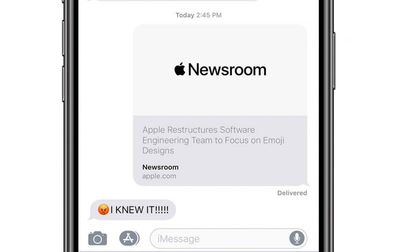
fakeheadlinesafari crop
Here are the specific steps to follow to create a fake website title:

1. Go to a website with a search function, such as MacRumors.com.
2. Make sure your iPhone is in landscape mode.
3. Tap on the search bar.
4. Enter your text and then select it.
5. Tap on the Share icon next to the address bar.
6. Select Messages and then type in the name of the person who you want to prank.

From there, the person will see the fake website header that you created, but it will look like text from the website itself because the text isn't sent separately due to the rich text feature in Messages.

This pretty much only works ‌iPhone‌ to ‌iPhone‌ and won't work if you're sending messages to your friends on Android devices. You can use this trick on the iPad too, but it doesn't work on the Mac.

If you want to use the feature as Apple intended you to do, you can select a bit of text on a website and then send it to a friend to highlight something specific that's worth pointing out. Like in our AirPods roundup, if you wanted to highlight the bit about a new color, you could select it and share the page with this text visible in the link.

It's actually a useful feature that's great for pointing out specific passages in blogs, news articles, and more.

We're pretty sure selecting search text through this feature and sending it over Messages is a bug that Apple will fix at some point, but in the meantime you can have a bit of fun with it and send unique website headlines to friends and family.


Tag: Safari

Popular Stories

imac video apple feature

Apple Unveils Seven New Products

Friday March 6, 2026 11:48 am PST by
Apple this week unveiled seven products, including an iPhone 17e, an iPad Air with the M4 chip, updated MacBook Air and MacBook Pro models, a new Studio Display, a higher-end Studio Display XDR, and an all-new MacBook Neo that starts at just $599. iPhone 17e features the same overall design as the iPhone 16e, but it gains Apple's A19 chip, MagSafe for magnetic wireless charging and magnetic...
Apple MacBook Pro M4 hero

Apple Planning 'MacBook Ultra' With Touchscreen and Higher Price

Sunday March 8, 2026 8:05 am PDT by
Apple is planning to launch an all-new "MacBook Ultra" model this year, featuring an OLED display, touchscreen, and a higher price point, Bloomberg's Mark Gurman reports. Gurman revealed the information in his latest "Power On" newsletter. While Apple has been widely expected to launch new M6-series MacBook Pro models with OLED displays, touchscreen functionality, and a new, thinner design...
MacBook Neo Feature Pastel 1

First MacBook Neo Benchmarks Are In: Here's How It Compares to the M1 MacBook Air

Thursday March 5, 2026 4:07 pm PST by
Benchmarks for the new MacBook Neo surfaced today, and unsurprisingly, CPU performance is almost identical to the iPhone 16 Pro. The MacBook Neo uses the same 6-core A18 Pro chip that was first introduced in the iPhone 16 Pro, but it has one fewer GPU core. The MacBook Neo earned a single-core score of 3461 and a multi-core score of 8668, along with a Metal score of 31286. Here's how the...

Top Rated Comments

keysofanxiety Avatar
92 months ago
Woah, it really works!


Attachment Image
Score: 51 Votes (Like | Disagree)
keysofanxiety Avatar
92 months ago
Really, MacRumors?!? Since when is propagating fake headlines "fun" or positive in any way...this story is ridiculous and is a disservice to anyone who actually values the truth.
It’s a foolproof plan! Unless the user does something stupid, like, say, follow the link and realise it’s a joke.

But if people who “value the truth” take a clickbait headline at face value without investigating further, I think that reflects worse on their values than it does an innocent prank.
Score: 14 Votes (Like | Disagree)
AngerDanger Avatar
92 months ago
Oh my god, you actually took my advice* with the bug exploit video thumbnail! That's awesome! :D It's got a red arrow, emoji, and it's perfect!

[SPOILER="*"]
Always great to see that FaceTime bug demo video again! However, I'm not sure if it's optimally attention-grabbing. Sure the all-caps "MAJOR" is a nice start, but it could still use more work. Maybe something like…

[/SPOILER]
Score: 10 Votes (Like | Disagree)
AngerDanger Avatar
92 months ago
Woah, it really works!


Attachment Image
Score: 9 Votes (Like | Disagree)
nattK Avatar
92 months ago
Oh no

Attachment Image
Score: 7 Votes (Like | Disagree)
ipedro Avatar
92 months ago
Woah, it really works!

Update: he later edited the post to add a GIF he spent an hour working on after originally posting to save his spot early in the thread.
Score: 6 Votes (Like | Disagree)