Apple Now Has 1.4 Billion Active Devices Worldwide - MacRumors
Skip to Content

Apple Now Has 1.4 Billion Active Devices Worldwide

by

Apple CEO Tim Cook today announced that its active installed base of devices has hit 1.4 billion, a milestone the company hit at the end of December.

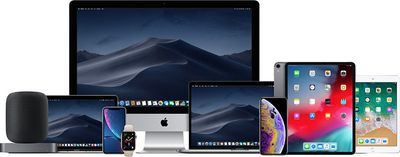
Apple's active installed base includes the iPhone, iPod touch, iPad, Mac, Apple TV, and Apple Watch models in use around the world. Of the 1.4 billion active devices, 900 million of those are iPhones.
appleproductlineup
The new 1.4 billion milestone comes nearly a year after Apple announced that it had 1.3 billion active devices back in December 2018, and the growth comes despite a Q1 2019 decline in iPhone sales.

On the strength of that active installed base, Apple's services category set new all-time records, seeing a 19 percent growth in revenue year-over-year.

Top Rated Comments

macduke Avatar
97 months ago
I would add to their numbers right now if they would release new desktop Macs!
[doublepost=1548800879][/doublepost]
That’s a lot of devices. Don’t be misled into thinking 1 in 6 people on earth have an Apple device though. More like 1 in 20 have multiple devices.
Yep. Multiple Apple TVs in my house, both my wife and I have Apple Watch, iPhone and iPad, and I have a Mac.
Score: 6 Votes (Like | Disagree)
Abazigal Avatar
97 months ago
Here’s the device breakdown according to AboveAvalon. I can’t vouch for its accuracy, but I do trust the writer to have done his homework.

Score: 2 Votes (Like | Disagree)
97 months ago
That’s a lot of devices. Don’t be misled into thinking 1 in 6 people on earth have an Apple device though. More like 1 in 20 have multiple devices.
Myself, I have 5 Android devices I regularly use. Same will be true of many Apple users.
Score: 2 Votes (Like | Disagree)
97 months ago
A lot of people have multiple Apple devices.

How many people do those 1.4 billion devices have as owners?
And how do we define active? Physically working? iPhone 4 still works, my original classic iPod wheel still works.
Score: 2 Votes (Like | Disagree)
97 months ago
Here’s the device breakdown according to AboveAvalon. I can’t vouch for its accuracy, but I do trust the writer to have done his homework.

Neil Cybart is one of the most thorough and interesting commentators about Apple, but many of his are just guesstimates, educated yes, but guesstimates nonetheless, and as such, may be wildly off.
Score: 1 Votes (Like | Disagree)
Glockworkorange Avatar
97 months ago
The Apple product shot is missing an iPad Mini, an iPod Touch and a Mac Pro.

No step children for this family photo shoot!
Score: 1 Votes (Like | Disagree)

Popular Stories

iphone 16 teal

'Siri AI' Lawsuit Update: Apple to Pay Owners of These iPhone Models

Thursday July 9, 2026 7:08 am PDT by
In May, Apple agreed to pay $250 million to settle a U.S. class action lawsuit over Siri AI's delayed launch, and eligible iPhone users could receive up to a $95 payout. This week, the California court overseeing the case held a hearing regarding preliminary approval of the settlement, but the judge has not yet issued a ruling. It will likely be at least a few more months before eligible...
Apple TV Thumb 3

Everything Coming in the 2026 Apple TV 4K

Wednesday July 8, 2026 4:51 pm PDT by
The Apple TV 4K hasn't been updated since 2022, and it's due for a refresh. An update is planned for 2026, but Apple is likely going to wait to launch it after Siri AI launches in iOS 27. Design Apple TV design updates don't happen often, and that's not changing. The next Apple TV is going to have the same squircle shape as the current model, and it'll continue to be made from a black...
apple wallet drivers license feature iPhone 15 pro

Apple Says iPhone Driver's Licenses Will Expand to These 6 U.S. States

Thursday July 9, 2026 7:29 am PDT by
In select U.S. states, residents can add their driver's license or state ID to the Apple Wallet app on the iPhone and Apple Watch, and then use it to display proof of identity or age at select airports and businesses, and in select apps. To set up the feature, open the Wallet app on the iPhone and tap on the plus sign in the top-right corner. Next, tap on Driver's License and ID Cards,...