

Apple Seeds Ninth Beta of macOS Mojave to Developers

Apple today seeded the ninth beta of an upcoming macOS Mojave update to developers for testing purposes, one week after releasing the eighth beta and more than two months after introducing the software at the Worldwide Developers Conference.

macOS Mojave introduces a new method of installing software updates, so after you've installed the initial beta using the appropriate profile from the Developer Center, additional betas can be downloaded through opening up System Preferences and choosing the "Software Update" icon.


Apple's macOS Mojave update introduces a systemwide Dark Mode, with Mojave users able to choose between a light theme or the new dark theme, which changes the color of the dock, menu bar, apps, and other elements. Dark Mode is accompanied by Dynamic Desktops, aka wallpapers that subtly change throughout the day. Additional wallpapers were introduced in the fourth and fifth betas.

Stacks, a new desktop organization system, keeps all of your desktop files neat and organized, while Finder has been enhanced with a Gallery View, a Sidebar, a revamped Quick Look option and Quick Actions, so you can do more in the Finder window than ever before.

Screenshots can now be edited using Markup tools and a new management options that also allow for easy screen recording, while Continuity camera, a new feature, allows you to import photos and document scans directly from an iPhone or iPad to the Mac.
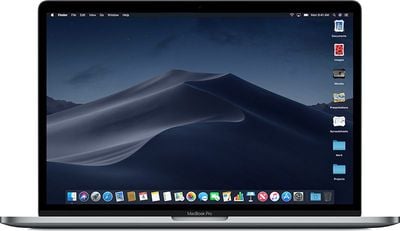
macosmojavestacks
The Apple News, Stocks, Home, and Voice Memos apps have been ported from iOS to macOS as part of a multiyear project Apple is working on to make it easier to bring iOS apps to Macs, and Apple has introduced several new privacy protections to keep your data safer than ever.

Apple is also making it harder for websites to track you with a range of new Safari tools, and it's also easier to make and store secure, hard-to-guess passwords for each and every website.

Apple has added an entirely revamped Mac App Store to macOS Mojave that makes it easier to discover apps with a featured section and specific categories for games, creative apps, productivity apps, apps for developers, and more.
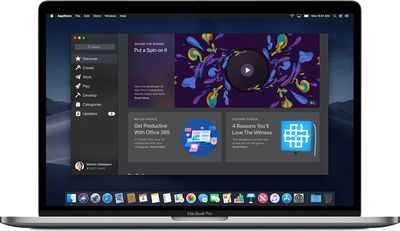
macosmojavemacappstore
macOS Mojave was initially supposed to include a Group FaceTime feature that includes support for chatting with up to 32 people at one time, but it was removed in macOS Mojave beta 7 and the feature won't be available until later in the year.

macOS Mojave is available to developers and public beta testers to work out bugs and other issues ahead of an upcoming fall public release.


Related Forum: macOS Mojave

Popular Stories

imac video apple feature

Apple Unveils First New Products of 2026

Monday January 26, 2026 1:55 pm PST by
Apple today introduced its first two physical products of 2026: a second-generation AirTag and the Black Unity Connection Braided Solo Loop for the Apple Watch. Read our coverage of each announcement to learn more:Apple Unveils New AirTag With Longer Range, Louder Speaker, and More Apple Introduces New Black Unity Apple Watch BandBoth the new AirTag and the Black Unity Connection Braided...
iPhone 5s

iPhone 5s Gets New Software Update 13 Years After Launch

Monday January 26, 2026 3:56 pm PST by
Alongside iOS 26.2.1, Apple today released an updated version of iOS 12 for devices that are still running that operating system update, eight years after the software was first released. iOS 12.5.8 is available for the iPhone 5s and the iPhone 6, meaning Apple is continuing to support these devices for 13 and 12 years after launch, respectively. The iPhone 5s came out in September 2013,...
Apple Creator Studio

Apple's Next Launch is Today

Tuesday January 27, 2026 2:39 pm PST by
Update: Apple Creator Studio is now available. Apple Creator Studio launches this Wednesday, January 28. The all-in-one subscription provides access to the Final Cut Pro, Logic Pro, Pixelmator Pro, Motion, Compressor, and MainStage apps, with U.S. pricing set at $12.99 per month or $129 per year. A subscription to Apple Creator Studio also unlocks "intelligent features" and "premium...
Apple Logo Black

Apple Just Made Its Second-Biggest Acquisition Ever After Beats

Thursday January 29, 2026 10:07 am PST by
Apple today confirmed to Reuters that it has acquired Q.ai, an Israeli startup that is working on artificial intelligence technology for audio. Apple paid close to $2 billion for Q.ai, according to sources cited by the Financial Times. That would make this Apple's second-biggest acquisition ever, after it paid $3 billion for the popular headphone and audio brand Beats in 2014. Q.ai has...
Second Generation AirTag Feature

Apple Unveils New AirTag With Longer Range, Louder Speaker, and More

Monday January 26, 2026 6:07 am PST by
Apple today introduced the second-generation AirTag, with key features including longer range for tracking items and a louder speaker. For those who are not familiar, the AirTag is a small accessory that you can attach to your backpack, keys, or other items. Then, you can track the location of those items in the Find My app on the iPhone, iPad, Mac, Apple Watch, and iCloud.com. The new...

Top Rated Comments

Chris The Bipolarbear Avatar
97 months ago
Dark mode is awesome
Dark mode is a personal matter of preference like any other background, wallpaper.
Score: 12 Votes (Like | Disagree)
uneeko1ne Avatar
97 months ago
Dark mode is awesome
Score: 11 Votes (Like | Disagree)
dan9700 Avatar
97 months ago
Anyone using Mojave on a space grey 12” MacBook? I just wondered how the dark mode mixed with the space grey looks:)

Also those that have downloaded it, how are you finding dark mode? It’s something I’m looking forward to.
dark mode is over rated its to dark it just looks odd trust me
Score: 8 Votes (Like | Disagree)
albebaubles Avatar
97 months ago
Anyone using Mojave on a space grey 12” MacBook? I just wondered how the dark mode mixed with the space grey looks:)

Also those that have downloaded it, how are you finding dark mode? It’s something I’m looking forward to.
DM is so much better on my old eyes...
Score: 8 Votes (Like | Disagree)
nortonandreev Avatar
97 months ago
Anyone using Mojave on a space grey 12” MacBook? I just wondered how the dark mode mixed with the space grey looks:)

Also those that have downloaded it, how are you finding dark mode? It’s something I’m looking forward to.
Dark mode is fine, I've been using it all of the time since the latest several beta versions.
Score: 7 Votes (Like | Disagree)
nortonandreev Avatar
97 months ago
Even if the Dark Mode is the major new feature, the performance gain is something which shouldn't be neglected as well.
Score: 6 Votes (Like | Disagree)










