Skip to Content

Parallels Desktop 14 for Mac Offers Speed and Storage Gains, macOS Mojave Support

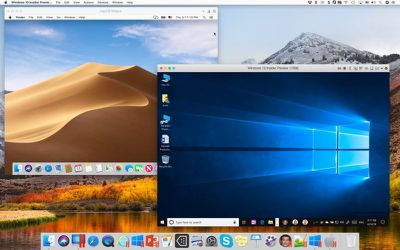
Parallels today announced version 14 of its desktop virtualization software for Mac, offering macOS Mojave support out of the box and significantly improved application launch speeds over the previous version.

This update puts a heavy focus on enhanced storage optimization, with Parallels Desktop being around 20-30 percent smaller than earlier releases. The company says virtual machines can also save as much as 20GB of additional disk space depending on how they're configured.
parallels 14 for mac
Elsewhere, the developers have optimized the compression of memory states saved with the Snapshots tool, which takes on average 15 percent less storage space, while a new disk space wizard provides users with suggestions on how to economize storage, with advice on managing multiple virtual machines and VM snapshots.

In addition, Parallels 14 introduces several Windows features for use in macOS. For example, Microsoft Ink is now available for editing Office documents, and stylus support has been added to CorelDRAW, Fresh Paint, PowerPoint, Adobe Illustrator and Photoshop.

Parallels Desktop also now includes Touch Bar features on compatible MacBook Pros for OneNote, AutoCAD, SketchUp, Microsoft Visio, and other apps, while a Touch Bar wizard offers users the ability to customize Windows app shortcuts from Apple's OLED function strip.


Lastly, Parallels Toolbox has received some additional Mac features including new options to screenshot entire web pages, resize images and perform memory consolidation functions.

Parallels Desktop 14 for Mac is available from August 23. Existing Parallels 12 and 13 users can upgrade to the new version for $50. New users can sign up for an $80 a year subscription or make a one-time purchase of Parallels 14 for $100. Parallels Desktop 14 Pro Edition and Business Edition both cost $100 per year. Note that a Windows license is not included in the software and must be bought separately.


Popular Stories

MacBook Neo Feature Pastel 1

Apple Announces $599 'MacBook Neo' With A18 Pro Chip

Wednesday March 4, 2026 6:15 am PST by
Apple today announced the "MacBook Neo," an all-new kind of low-cost Mac featuring the A18 Pro chip for $599. The MacBook Neo is the first Mac to be powered by an iPhone chip; the A18 Pro debuted in 2024's iPhone 16 Pro models. Apple says it is up to 50% faster for everyday tasks than the bestselling PC with the latest shipping Intel Core Ultra 5, up to 3x faster for on-device AI workloads,...
MacBook Neo Feature Pastel 1

First MacBook Neo Benchmarks Are In: Here's How It Compares to the M1 MacBook Air

Thursday March 5, 2026 4:07 pm PST by
Benchmarks for the new MacBook Neo surfaced today, and unsurprisingly, CPU performance is almost identical to the iPhone 16 Pro. The MacBook Neo uses the same 6-core A18 Pro chip that was first introduced in the iPhone 16 Pro, but it has one fewer GPU core. The MacBook Neo earned a single-core score of 3461 and a multi-core score of 8668, along with a Metal score of 31286. Here's how the...
Multicolored Low Cost A18 Pro MacBook Feature

Apple Accidentally Leaks 'MacBook Neo'

Tuesday March 3, 2026 7:00 am PST by
Apple appears to have prematurely revealed the name of its rumored lower-cost MacBook model, which is expected to be announced this Wednesday. A regulatory document for a "MacBook Neo" (Model A3404) has appeared on Apple's website. Unfortunately, there are no further details or images available yet. While the PDF file does not contain the "MacBook Neo" name, it briefly appeared in a link...

Top Rated Comments

Serif Avatar
99 months ago
[doublepost=1534846437][/doublepost]I've bought and used every release of Parallels since version 3 up to and including version 13. I've had problems over the years but on the whole it's been good enough and did what I needed, so a reasonably happy customer who then went off and deployed their Parallels Cloud Server software at my company on the basis of that.

I won't be upgrading to version 14 though. One area that Parallels desktop has fallen behind other similar products is on the licensing front. These days I don't do all my work on a single desktop computer, I want to be able to continue working on my MacBook when I'm not sat at my desk. To do this with Parallels desktop you need to buy multiple licenses or move the single license between computers which is both clunky and limited in that it will stop working if you make too many transfers.

Parallel's main competitor for this product is VMware Fusion, which is now more than good enough feature wise, but in addition VMware has worked out that the license should be associated with the person, not with a specific computer, presumably on the principle that I'm only working on one computer at once. So far Fusion is doing what I need and since it offers easy deployment of virtual images to their server software, guess what I'll be looking to deploy as new server software?
Score: 17 Votes (Like | Disagree)
Markoth Avatar
99 months ago
Does it work to move from VM Ware Fusion to Parallels? I mean without setting up the VM again.
VMWare Fusion is better in my opinion.
Score: 15 Votes (Like | Disagree)
dan9700 Avatar
99 months ago
Every year they make a new verision when macos comes out its like they make people buy a new one all the time
Score: 13 Votes (Like | Disagree)
99 months ago
And still no DirectX 12, or even DirectX 11, support :-(
Score: 12 Votes (Like | Disagree)
98 months ago

Why? Who else apart from Apple gives everyone a major software revision update for free? If you subscribe, you do get it for free.

It's not without its faults, but lets not make stuff up.
Since subscribing is not free, you are not getting anything free, so "lets not make stuff up".
Score: 11 Votes (Like | Disagree)
maflynn Avatar
98 months ago
I'm waiting for Fusion to be updated. I never really cared for Parallels, from my experience it was too buggy. I prefer stability over performance. I'm not going to be playing any games in a virtual environment anyways
Score: 10 Votes (Like | Disagree)